You can print any wordlist with the Glossary Maker activity.
Select the list you want to print
You can click the list from the Recent Wordlists sidebar. If you don’t see your desired list there, go to “My wordlist” under “My Wordsmyth.”
Find the list you want to print and go back to the Activities page
On the “My Wordlists” page, select the list you are looking for and then click the “more” option icon. From the options shown there, click on “Activities” to go back to Activities page with your target list selected.
Choose Glossary on the Activities page
The Glossary will be opened in a separate tab. Make sure the list is the one you want and click “GO”. Note here you can also decide how simple or detailed you want to make your glossary and what fields in the entries you would like to print out. If you would like a detailed glossary with example sentences and synonyms, for example, click “Custom Glossary” and then mark those items you’d like to see shown.
Click the “Print” button inside the Glossary activity
Your list will be downloaded as a PDF file. Now you can save it as a PDF and print it out with a printer anytime.
Word lovers, vocabulary learners, teachers and students: it is time to start thinking about the Word of the Year 2022! Write a short essay reflecting on the Year of 2022. After writing, choose the word that you feel is most key to your essay. It will be your word of the year!
Wordsmyth Writing Tool
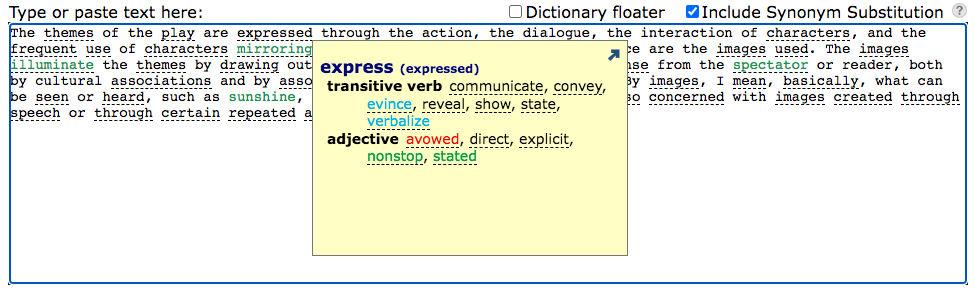
Don’t be discouraged by the essay writing. Check out Wordsmyth’s new writing tool! It is designed to help you communicate your ideas. One of the useful support features offered by the writing tool is Synonym Substitution. This feature gives you choices of synonyms that can help you convey your exact meaning.
After writing or pasting your text into the editing box, click the “analyze” button with the “Include Synonym Substitution” option checked. Words having synonyms or similar words will be underlined in the analyzed text. Click any underlined word to see the color-coded list of synonyms available for that word.
Requested by our teachers for years, Wordsmyth’s Vocabulary Notebook is now online along with our other Vocabulary Activities. We’re happy to announce that teachers can now print out Vocabulary Notebook material using their chosen wordlists or assign Vocabulary Notebook activities to students digitally. Students can work on their assignments either online or with print-outs from the teacher. They can also work online first and then print out what they have done. Working digitally allows students to download images to illustrate their vocabulary words. These images along with text that they have inputted will appear in their print-outs. Both digital and print modes allow and encourage manual creation of images to illustrate vocabulary as well.
As you use the Vocabulary Notebook, please share with us your experiences at support@wordsmyth.net. Our team will continue to improve the activity with your feedback.
Special announcement for users who love our old quiz makers
At your request, we won’t remove our old activities next summer. They are available under the Vocabulary Center menu – listed as “Legacy Activities“. In the meantime, we will continue to develop and improve the new Vocabulary Center Activities to accommodate all that was offered in the older version and more. We hope someday you will move to the new version, with satisfaction in using its new features.
We recommend that you try our new Wordlist Maker with the new activities under the Vocabulary Center top menu. It may take some time to get used to the new features in these activity makers. Here is a user guide to help you master the learning curve quickly.
The new vocabulary system has the following advantages:
The Wordlist Maker’s new text analysis function allows automatic identification and selection of academic vocabulary – from our leveled “Wordsmyth Vocabulary Inventory” (WVI). It is very popular among teachers and language learners.
You can save a wordlist once and then use it with any activities.
These new HTML5 activities have a very easy-to-use print functionality, for blended learning processes.
You can also save a particular activity with particular settings in a Lesson (from Teacher Tools).
Lessons can be assigned to a Class or a particular student from a class. You will then have access to students’ results via the “Reports” Teacher Tool.
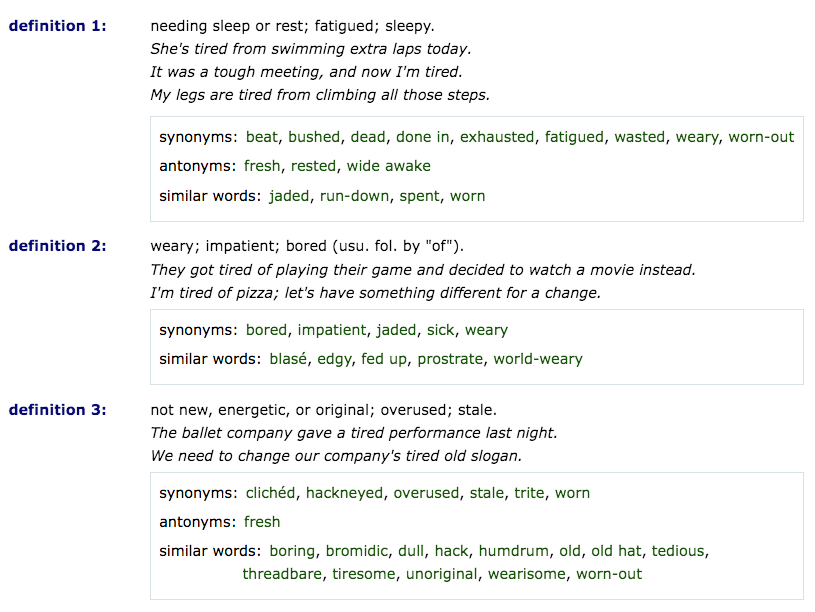
We’re often asked “Where’s the thesaurus in your dictionary?” What some users don’t recognize right away is that synonyms, similar words, and antonyms are matched with each sense of a word and appear directly under the appropriate definition for a particular headword. A user doesn’t need to click anywhere to get thesaurus information and doesn’t need to leave the page in order to see it. In other words, the thesaurus is not a separate entity, but something built into the dictionary entries themselves. This is why we call it an “integrated thesaurus.”
Being integrated into the dictionary entries means that, if you look up the word “tired,” for example, you will see, in the resulting entry, synonyms, antonyms, and similar words listed right under each individual definition. For example, you’ll see that the definition of “tired” meaning “needing sleep” has synonyms including “exhausted,” “fatigued,” and “weary.” The definition meaning “not new, energetic, or original” (as in “a tired performance”), on the other hand, has synonyms including “hackneyed,” “stale,” and “worn-out.”
Occasionally when a user asks about the thesaurus, that person is looking at an entry that simply contains no synonyms, similar words, or antonyms. This can happen because the meaning of the particular word simply does not invite these concepts, or because related words do not meet our criteria to be included in the thesaurus. What would share the same meaning or be the opposite of a “pencil,” for example? Is “pen” an antonym for “pencil”? Is it a synonym? We don’t think it’s either. (To find words like “pen” that relate to the concept of a pencil, however, one can use our Word Explorer feature. By clicking on the keyword “art” in the Word Explorer feature for “pencil” and then clicking on the highlighted word “pencil” in the Word Explorer listings for “art,” one can find words such as “brush,” “crayon,” “charcoal,” “enamel,” “pen,” “ink,” and “paint.” Clicking on the keyword “tool” will also bring up words like “pencil,” “pen,” and many other words denoting implements.)
Not finding thesaurus information for a particular word can also occur because our projects for adding synonyms, similars, and antonyms are still ongoing, and not every word that deserves this information has it yet. In particular, words that are derived from other words, such as “paradoxical” from “paradox,” may be empty of thesaurus information because past projects focused on root forms only. Despite our limitations, our built-in thesaurus has synonym coverage for over 16,000 academic and high-frequency words, and the fact that thesaurus information is matched with individual senses of each of these words rather than just headwords, makes the Wordsmyth thesaurus a particularly useful resource for writers and anyone looking for a better word or a better understanding of a word’s meaning and usage.
For upper elementary, middle school, and high school teachers
The Wordsmyth Children’s Dictionary Suite and Wordsmyth Vocabulary Center are designed for upper elementary school to middle school teachers and students.
The Wordsmyth Comprehensive Dictionary Suite and Wordsmyth Vocabulary Center are designed for middle school students (and up) as well as for older ESL students at varying levels from beginner to advanced.
Below are the links to introductory information about Wordsmyth dictionaries and Vocabulary Center:
Teacher Tools are available on both dictionary sites (Children’s and Comprehensive). Teachers can use the tools to manage their classes, create vocabulary lessons, send assignments, and receive reports on students’ performance.
You can always find more help information that goes beyond description of the basic Wordsmyth features.
For K-2nd grade teachers
WILD, the Wordsmyth Illustrated Learner’s Dictionary, is designed for children in kindergarten through 2nd grade. The following links will give you a quick start.
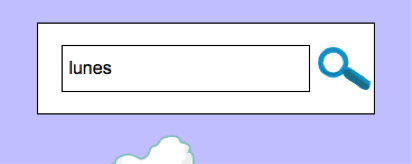
To help young learners whose native language is Spanish or Chinese, WILD allows some level of lookup by Spanish or Chinese directly in the lookup box.
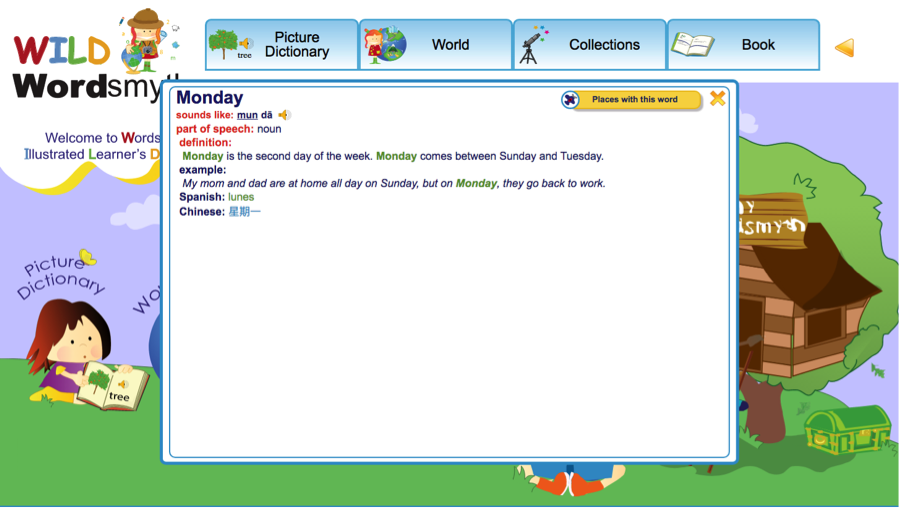
For example, if you type in the Spanish word “lunes” and click the search button, the equivalent English entry will be displayed:
The same lookup method works for Chinese support as well.
Please note:
1. Cognates in Spanish could trigger a spelling check in English. In other words, when a user tries to type in a Spanish word that has a similar spelling to an English word, the system will display auto-correct suggestions.
2. False cognates could also cause some confusion, but we hope that, in WILD, these kinds of words are rare.
After a year of beta testing, Teacher Tools is now officially released on all Wordsmyth sites including kids.wordsmyth.
With a few simple steps, teachers will be able to use their current vocabulary wordlists to create lessons, assign them to their students, and review reports to monitor their students’ performance and vocabulary growth. With the new semester coming up, now is the best time to set up your first class and explore the power and potential of Wordsmyth.
Get started today! We look forward to making your vocabulary teaching easier and more efficient with Wordsmyth’s Teacher Tools.
Kids.Wordsmyth singled out by reading specialist, Thomas Gunning.
In his new (2022) book: Closing the Literacy Gap: Accelerating the Progress of Underperforming Students, the author, reading specialist Thomas Gunning, specifically points to kids.wordsmyth as he describes dictionaries and glossaries as “one of the most effective student tools for closing the vocabulary gap.” Here is his enthusiastic description of our dictionaries.
Two of the most extensive online dictionaries are Wordsmyth WILD and Wordsmyth Word Explorer.Wordsmyth WILD (Wordsmyth Illustrated Learner’s Dictionary) is designed for grades K-2. WILD features illustrations, student-friendly definitions, examples, spoken pronunciations, and animations. It also presents categories of words and a Picture Dictionary in which words are defined by illustrations only. Wordsmyth Word Explorer Children’s Dictionary is designed for grades 3-9. Wordsmyth Word Explorer has similar features. Teacher tools include the ability to set up and manage classes, make use of available wordlists, and to create quizzes and activities. WILD and Word Explorer are free, but subscription versions have more features and activities, including Spanish and Chinese translations of words being looked up and Word Parts. Word Parts defines roots, prefixes and suffixes; provides their history; and lists a large number of examples. Wordsmyth is embedded in ReadWorks.
Thomas G. Gunning, Closing the Literacy Gap: Accelerating the Progress of Underperforming Students
Your teacher will have given you the school start page, or a Class URL. We recommend you bookmark the URL for future use.
Find your class on the school start page
Click and go to your class. If your teacher gave you a Class URL. Copy and paste, or type, the class URL in the browser search box, and then click return to go to your class.
Log in with your class URL
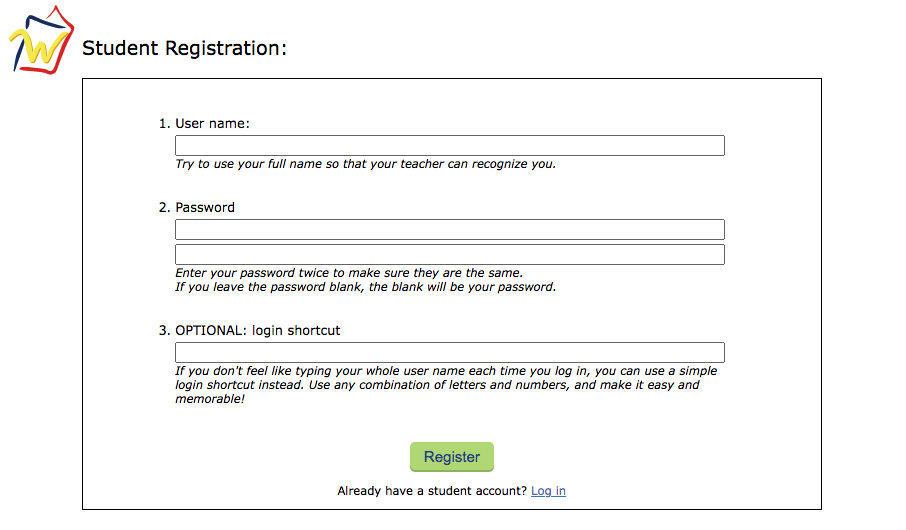
If your teacher also provided you with login information, go ahead and log in. If not, click “register.”
Student registration
Only your student name is required. All other fields are optional, including the password. We recommend you use your full name so that your teacher can recognize you. Click the “register” button and you will be registered. Your name will appear on your teacher’s student list.
Class and Assignments
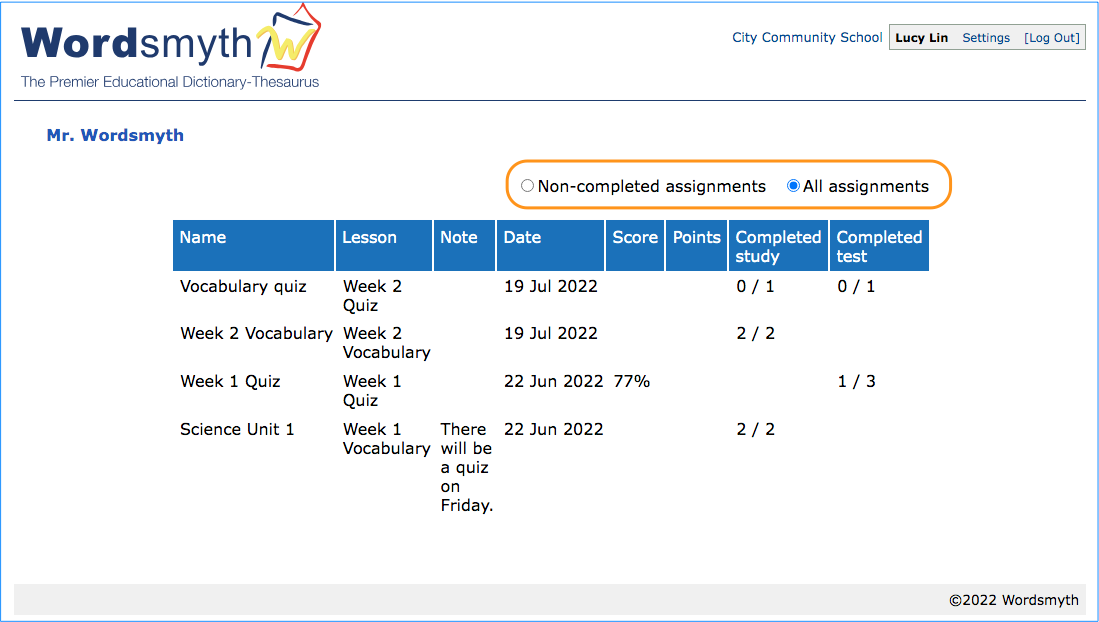
After you have logged in, you will see a list of all your assignments for the class. Later in the school year, there might be a lot of assignments in this list. The most recent will be at the top of the list on the first page, and later assignments will be on the following pages. If you belong to more than one class, you will need to log in using each class URL to complete the different assignments. The two buttons above the list can also help you find the assignments that need to be done. If you click “Non-completed assignments,” this list will show only the assignments that have not been completed. If you click “All assignments,” the list will show all the lessons assigned to you, with the most recent assignments at the top.
Work on your assignments
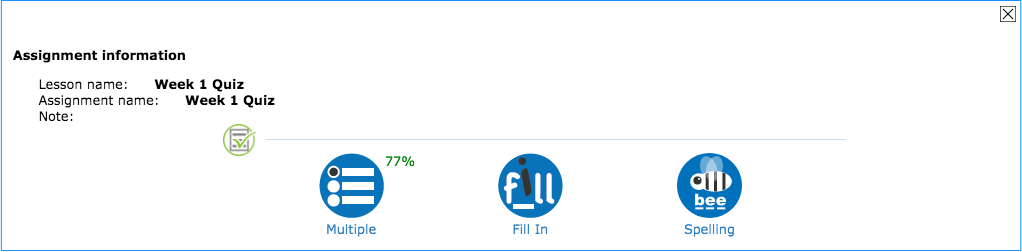
Click on an assignment and you will see the list of activities for you to do. Go on to complete the activities as instructed. The results will be saved and reported to your teacher.
There are two types of reports: student reports and vocabulary reports.
Student reports
“Student reports” show the assignment results for each student, sorted by date and grouped by class. You can filter reports for either “study” or “test” assignments. Depending on the type of activity, you can also choose to show the scores, points, or the time spent.
Viewing information in student reports
There are two levels of detailed information available from student reports. If you click on any cell of the report chart, the report on each activity in the assignment will appear in a pop-up window. If you click on an activity in that window, a second pop-up window showing students’ correct or incorrect answers for each word will appear.
Vocabulary reports
“Vocabulary reports” contain student records for every word in their assignments. If desired, results can be grouped by WVI level—the specific level of academic vocabulary as ranked by the Wordsmyth Vocabulary Inventory.
Viewing information in vocabulary reports
If you click on a cell in the vocabulary report chart, you can view the detailed record of each word that was answered correctly or incorrectly in specific activities.
Filtering reports
Filters can be applied to the reports. The records can be filtered by school, class, students, and date.
Other places to access reports with filtered data
The same filtering mechanism is also available for student lists, lesson lists, and assignment lists. • From the lesson list, you can directly access each lesson’s report. • From the class list, you can directly access the lesson reports for the selected class. • From the student list, you can directly access the lesson reports for the selected student or students.
An assignment is a lesson that you assign to your students. Your students will receive the assignments on the class URL once they have logged in.
Making a new assignment
To make an assignment, click “New.” Then enter a name for the assignment. Add a description if you’d like. Students cannot see the description. The “note” area is where you can send a message to your students about the assignment. Next, choose a lesson, select a class, and then the students. You can select all students or individual students. The new assignment will be sent to the selected students. Set a due date (at your option) and click “Save.” The assignment will now be available to your students.
Students’ view of assignments
While logged in to your class URL, your students will see all the assignments given to their particular class. The assignments are sorted with the most recent on top. The filters above the list can also help your students find the assignments they need to work on. The list of “Non-completed assignments” will show the assignments that this user has not yet completed. The “All assignments” list will show all the lessons assigned to this user, with the most recent at the top. The activities are listed in the same order as that of the tasks on the Lessons page.
Other ways to assign
You can also assign any lesson directly from the lessons list on the Lessons page. Click on the lesson you want to assign and open the lesson information window. Click “Assign” and follow the steps as discussed above.
A lesson contains one or more tasks, which you will assign to your students to work on. Subsequently, you will receive reports of the students’ performance on these tasks. Plan your lessons systematically, as you may wish to reuse them for your future classes.
Setting up a new lesson
To create a lesson, click “New” and enter a name for your lesson. Add a description if you’d like. You can add tasks (particular learning or testing activities) for this lesson now, or you can add them later. If you decide to add them later, go ahead and click “Create lesson.” If you’ve checked the “Activate lesson maker” checkbox, click “Create lesson” and the system will automatically load the activities page with the Lesson Maker floater visible on top of it.
Adding tasks to the new lesson
A “task” is a wordlist combined with an activity, such as flashcards, a quiz, or a game. To add tasks to your lesson, first choose a wordlist. Click the list you want from the sidebar to add it to the floater. The sidebar shows recent lists you have made as well as pre-made Wordsmyth lists. If you don’t see the list you want in the sidebar, you can go to the “My wordlists” page under the “My Wordsmyth” main menu, where you will find all the wordlists you have saved. (If you haven’t created a wordlist yet, you can go to the Wordlist Maker to create one.)
Next, click an activity of your choice for the lesson. This will open a separate browser tab and the selected activity will appear on the Lesson Maker floater. Here you will choose settings for the activity, which will be recorded and saved along with the activity. Make sure to click the “Go” button as there are more settings inside the activity that you will want to choose from. Finally, click “Add to lesson” to add the selected activity with its chosen settings to your lesson. Close this tab and go back to the activities page. If you’d like, you can add more tasks to your lesson.
Tips concerning the lesson maker floater
• Click the “X” to close the floater temporarily on the current page. Refreshing the page will bring the floater back. • Clicking the “Stop” button will end the lesson-making process. • Clicking on the lesson name in the floater will take you back to the lessons page. • For assessment activities—multiple choice, matching, and fill-in-the-blank—there are additional options on the floater for you to choose from. 1. You can choose to randomize the order of the questions each time the assessment task is activated. 2. You can set the activity for “Study” or for “Test.” “Study” mode allows students to change the settings if they like and to add Help functions, such as making the answers available. “Test” mode will lock in the settings that you have chosen and disable all Help functions so that the students can take the quiz as a real test. 3. Please note, the option for test mode becomes active inside the activity after clicking the “Go” button. The option is displayed but disabled on the initial screen.
Editing a lesson
If you don’t add tasks when you first set up a lesson, you can always add them later. You can also add more tasks to an existing lesson anytime. On the Lessons page, click on a lesson. Its information page will pop up. Then click “add new task” and the system will take you through the same process as described above with the Lesson Maker floater.
In the lesson information pop-up window, you can also adjust the order of the tasks, delete a task, or assign lessons to your students.
Filtering lessons
When you have accumulated many lessons, you can sort and filter the list to help you locate the lessons you are looking for.