You’ve created your class, now you need to populate the class with students.
Open enrollment
If you have set your classes for open enrollment, your students’ information will automatically appear on the Students page after they have registered and logged in with the class URL.
Adding students manually
If you choose to manually add your students, click “New” on the Students page. Then in the student information window, choose the class for which you want to add a new student. Then type the name of the new student in the box provided. Other fields are only required in case you happen to have two students with identical names. If you leave the password box blank, a blank will be the password for the student.
Deleting students
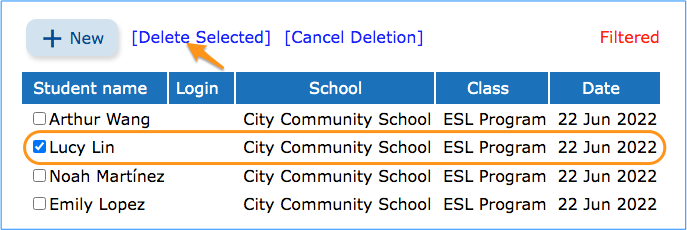
Click “Delete” and select the students you want to delete by checking in the checkboxes beside their names. Then click “Delete Selected.”
Editing student information
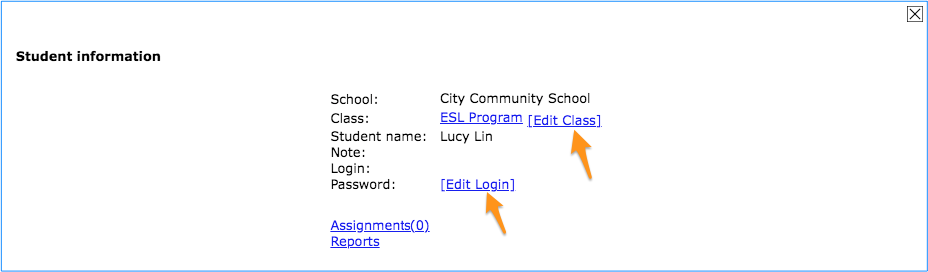
Click on a student in your class list to open the student’s information window. Here you can edit the student’s login information or move the student to another class.
Using the filter
You can choose to show all the students of a particular class, or you can search for the names of specific students. Type in the name of the student. Click “find” and the particular student or students will be displayed.
Setting up your class and any possible subgroups is the first step to using Teacher Tools.
Adding a new class
On the “Classes” page, click “New.” Then name the class and add a description if you’d like. The enrollment option “Open” means that students can register themselves after you have created the class. “Closed” means that students cannot register themselves and you will add students to your class manually. After choosing your enrollment option, click “Create class” and your first class will be ready for registration.
Managing the class
Each saved class has a specific class URL. This URL is the entry point for your students. Right now your new class is empty. Click on the class name to open its class information window as shown below. Now you will see your class URL. Here you can edit your class information, including the wording of the class URL, and add students manually if you’ve opted for “closed” enrollment. When you’ve finished setting up your class, you can assign lessons to your students and view reports.
Adding a subgroup of students as a new class
After creating the first class that contains all of your students, you can create additional classes for selected groups of students, such as students in an ESL program, so that they may receive special support. This allows you to tailor your students’ assignments to the needs of particular groups.
Deleting a class
Click on “Delete.” Then select the class you want to delete by checking in the checkbox next to its name. Then click “Delete Selected.”
Using the filter
Most teachers will not find it necessary to use the class filter. However, if you teach at more than one school or have created classes using the Wordsmyth URL rather than a school URL, you can see all your classes by selecting “All” under “Set Filter.”
To support educators’ needs in assessing students’ vocabulary skills, we’ve added Spelling as a new activity in our Vocabulary Center.
For an easy test, students can play the audio pronunciation to listen to the word, then type out the spelling with the hint of how many letters the word contains. Teachers can also choose the more difficult level, in which the only clue is the definition of the word. This tests for meaning as well as spelling.
Database update
swim
Every year, we update our dictionary data with newly added headwords, phrases, images, and animations. After completing the recent update, Wordsmyth dictionaries contain a total of 58,315 headwords; 12,987 multi-word expressions; 6,317 images; and 370 animations. Our dictionary apps are also updated.
Student & ELL Dictionary app: composed of dictionaries at 3 levels: Beginner, Intermediate, Advanced. Users can easily move up or down between levels to find simpler or more advanced definitions.
Children’s Dictionary app: a dictionary with simple and clear definitions designed for upper elementary and middle school students, which can be used with or without an internet connection.
Idiomatic phrases in Wordsmyth dictionaries
Wordsmyth has recently updated its collection of idiomatic phrases. We’ve added both more senses and more example sentences, especially to phrasal verbs. This update will make Wordsmyth an even more helpful and powerful tool for learners and teachers of English.
Did you know that Wordsmyth phrases each have their own entries? This makes searching for a particular phrase very simple. Just type the phrase into the search box! No need to look up and search through the entry for “get” if you’re looking for “get away with” or “get around to.” Still, if you’d like to see other phrases with “get,” they can easily be seen listed in the entry for “get.”
Wordsmyth would like to invite you to reflect on this year and consider a word that has most drawn our society’s attention to something important, something that links this past year with the future. Please tell us what significance this word has had in your life, through personal experience or through awareness of the experiences of others. As an educational dictionary site, we’d also like to call on those of you who are educators to encourage your students to participate. Please guide your learners to write their reflections on the meaning of the word they choose and the significance it has in connection with our world.
Since we posted the Word of the Year announcement on our homepage, we have received a good number of submissions. Some of the words reflect our users’ feelings while fighting the pandemic, words such as hope, persistence, and perseverance. Some, such as kindness, family, and community, reflect our shared human connection during these changing times, and some refer to the scientific tools we’ve needed to confront the virus—words like mask and vaccine. Of course, some users have put forward words that show their concern about social issues, such as racism and justice.
Many thanks to those of you who have participated. If you haven’t sent in your word, please submit now . We are looking forward to hearing from you!
WILD is updated!
We’ve improved our WILD game design to give young learners a more engaging learning experience. The games in WILD cover three aspects of vocabulary learning: word meaning, word pronunciation, and spelling. Have your students try out the WILD games by clicking on the game console icon in the blue footer in World or Collections.
With this recent WILD update, we’ve also added some new collections, as well as more images and animations.
New word parts lists: suffixes
We hope the Basic Roots list has been helpful for you, whether you are a teacher or an individual English language learner. For your further convenience, we’ve now put together part II of our word parts list: basic suffixes.
Wordsmyth Word Parts: expanding vocabulary with knowledge of prefixes, roots, and suffixes
To support vocabulary learning and teaching, we’ve begun providing word part lists appropriate to different grade levels. For the month of October, we created a list of 24 basic Greek and Latin roots for upper elementary school students.
Watch for more word part lists for different levels in the coming months. Also, you may want to learn more about the Wordsmyth word parts database and how this unique feature can be used in facilitating vocabulary learning and teaching.
Interactive maps in WILD
The Wordsmyth Illustrated Learner’s Dictionary has many hidden treasures. The interactive world maps collection is one such feature you may not have noticed. The Maps Collection contains world maps featuring all of the world’s continents, countries, and important geographical features. With the interactive Continents and Countries Map, you can take your young learners from an overview of the world to a more focused view of each continent and then to each country. The map of North America also features states and provinces. Clicking on any individual country brings up facts about it in the Book. With the other world maps in the Maps Collection, you can also introduce your students to the most important geographical features of our planet, such as its major mountain ranges, deserts, rivers, lakes, and seas.
Word Explorer: writing support feature in our Children’s Dictionary
When you assign a topic to your students, have you thought about providing some vocabulary support for their writing process? Try our Word Explorer in the Children’s Dictionary: a word-finding and knowledge-exploration feature. Imagine your students are writing about spiders—the Word Explorer feature can give them words for what spiders eat, where spiders can be found, what behaviors spiders engage in, what animals are related to spiders, and much more.
Word Explorer is an index of related words that allows a child to find words connected with multiple topics and to explore whole networks of words and their meanings. The dictionary entries also contain an integrated Thesaurus of synonyms and antonyms. The addition of our Word Explorer creates a fun and uniquely valuable educational resource.
Our new educational game app—WILD WORD LEARNER—is now available in Apple’s App Store and in Google Play. Included in the app are close to 1000 carefully selected words from WILD spread over 12 great topics. The app is free with the first 4 topics (over 200 words) preloaded. It’s a perfect game for your kindergarten or first grade class—both for learning new words and for having fun!
The app’s thoughtful illustrations and animations will help young learners grasp the meaning of words at a glance. The audio pronunciations will create and strengthen the link between the sound of each word and its meaning. For more advanced learners, the simple but descriptive full-sentence definitions and examples will get them started in reading for meaning.
A more expansive resource for word-learning is, of course, our interactive WILD dictionary itself. It can be used alongside the app or as the next step once your students have mastered the 1000 words presented in the app.
This month’s highlight: teaching resources contributed by our teachers
We often receive requests for new features from our users. Sometimes, users simply find creative solutions by using Wordsmyth resources with other online tools. The highlight of this month is a Youtube video created by Ms. Michelle Austin. In this video, she demonstrates how she uses Wordsmyth content to create a Kahoot! Check it out!
Also, check out our newly updated Vocabulary Center, with more activities. And don’t forget that we have WILD for K-2 and our Children’s Dictionary for upper elementary school students.
Working together. Have any questions? We’ll try to answer them here. Your requests, feedback, and creative ideas will help us to improve our resources and tools. Contact us and share your ideas with the Wordsmyth community.
Word Awareness
Our mission is to increase word awareness, and to enrich our relationship with words and their meanings. We believe this is crucially important in education and in life. But often it isn’t clear why or how words can be so important. Do they really deserve more than a dutiful effort to memorize new words and meanings?
In an Edutopia article, Rebecca Alber offers three quotes as reminders of the importance of vocabulary study:
• Vocabulary is the best single indicator of intellectual ability and an accurate predictor of success at school. — W.B. Elley
• Because each new word has to be studied and learned on its own, the larger your vocabulary becomes, the easier it will be to connect a new word with words you already know, and thus remember its meaning. So your learning speed, or pace, should increase as your vocabulary grows. — Johnson O’Connor
• We think with words, therefore to improve thinking, teach vocabulary. — A. Draper and G. Moeller
Searching for inspiration: Please send us your favorite quote about words and vocabulary. We’ll share the results in our next Newsletter.
Get your Teacher Tools ready for the new school year!
As schools are set to begin this new year, Wordsmyth invites you to try out the beta version of our new Teacher Tools. It’s easy to set up. With the Teacher Tools, you can manage your students and classes, give vocabulary assignments, and receive reports on student vocabulary growth.
As you use the Teacher Tools, please share with us your experience and feedback. We hope to release the official version of Teacher Tools next year. With your help, the new version will provide a better user experience for you and your students. Thank you in advance!
First 1000 words for beginning learners–Introducing WILD Word Learner
Wordsmyth is proud to announce a new app, WILD Word Learner, for young learners K to 2. This is the first app in a series of vocabulary game apps for beginning learners. With close to 1000 carefully selected words in total, users can play games matching the sound of a word with its image. The next in the series calls for matching a spelled word with its image, and the third app calls for matching a word’s sound with its spelling. The app is free and comes loaded with a generous number of free wordlists. Additional wordlists that are purchased can be used in all game apps in the WILD Word Learner series.
The app is a companion to the Wordsmyth Illustrated Learner’s Dictionary (WILD), but it is not a replacement, as WILD contains a great many more words and features. Please subscribe to Wordsmyth to fully utilize the rich content in WILD, as well as to take advantage of our general subscriber features.
WILD for PreK-2 Vocabulary learning
The Wordsmyth Illustrated Learner’s Dictionary (WILD) is organized into four sections that facilitate children’s vocabulary learning in two ways: (a) learning new words for concepts the child already has, and (b) learning new concepts and new words that add new ways of organizing the child’s thinking. During the crucial early years, this process changes children’s understanding of how meanings work — their concept of definition. WILD’s unique organization reflects the challenges involved in these changes and provides the resources a child needs to move among the new words and new concepts. Each component of WILD focuses on a particular type of word and concept learning. The components of WILD — and the word learning focus for each of them — are:
PICTURE DICTIONARY: forword-object naming;
WORLD: for thematic relations among things in their usual environments;
COLLECTIONS: for topical relations (“loose categories”) and taxonomic categories;
BOOK: for an alphabetical organization of words, outside of their connections with the world.
Our users have told us that setting up student accounts is one of the places where the most friction occurs in trying out new educational software tools. We want to make the process of using our Teacher Tools as easy as possible. So we have taken two steps to make your life easier. First, we have implemented SAML (Security Assertion Mark-up Language) for schools using this technology for data federation, identity management or single sign-on (SSO). If your school uses single sign on service with SAML, teachers and students can use their school account info with Wordsmyth Teacher Tools. Readthe help document to learn more about SAML setup.
Second, we are also exploring possible integration with Google Classroom, Canvas, and other learning systems. . Please let us know what Learning Management System your school is using, And please help us understand your specific needs in student account management, so we can decide which classroom integration we should prioritize.
Vocabulary learning through reading support
From users’ feedback, we realized that some users have difficulty understanding and making full use of our Wordlist Maker. So we have updated the Wordlist Maker, adding help information on the page and a linking to a Wordlist Maker User Guide. We have also improved the algorithm for wordlist extraction.
The Wordlist Maker can automatically extract vocabulary words from any text. There are two types of words that support reading and vocabulary learning. First, readings on many topics contain low frequency words that students are less likely to know. And some of them are important to the topic of the text. We call these “Challenge Words”. Second, the Wordsmyth Vocabulary Inventory was developed from an analysis of The Educators Word Frequency Guide. The WVI identifies Academic Vocabulary words and sorts them into 5 levels. These words are frequently used in educational texts across many different topics, rather than being related mostly to a particular topic.
Challenge wordlist: Pre-reading: Research suggests the value of going over those words before reading. Reading the text will help to reinforce the word knowledge students acquire from pre-reading review. And your students will be able to enjoy a smoother reading experience, without being interrupted by having to look up words.
Academic vocabulary (WVI) wordlist: Practice and assess these vocabulary words before and after reading. They will be important tools for learning content across the curriculum. You can help students improved their vocabulary through reading and improve their reading through vocabulary.
Vocabulary Notes & Quotes
Here is a quote from one of the more important books about teaching vocabulary: Isabel L. Beck, Margaret G. McKeown and Linda Kucan Bringing Words to Life: Robust Vocabulary Instruction 2nd Ed., The Guilford Press, 2013.
“A rich vocabulary supports learning about the world, encountering new ideas, enjoying the beauty of language. A rich vocabulary enhances an interview, allows one to see the humor in wordplay, shores up what an individual wants to say, and, especially, wants to write. It is clear that a large and rich vocabulary is the hallmark of an educated individual. Indeed, a large vocabulary repertoire facilitates becoming an educated person to the extent that vocabulary knowledge is strongly related to reading proficiency in particular and school achievement in general.”
In this edition of our newsletter, we’d like to invite all of our users – especially teachers – to tell us about your interest in vocabulary. For some people, “vocabulary” may mean a weekly challenge to learn the meanings of new words, making reading less of a burden. For others, “vocabulary” may mean learning words important for a new job – opening the doors to a new profession or career. And some may want to focus on the deeper meaning of the most important words in our language – perhaps kindness or joy, justice or forgiveness, love or solitude. All of these are possible ways to relate to “vocabulary”.
We hope to hear from you about your interests in words. Write to support@wordsmyth.net and your thoughts may appear in one of the future editions of this newsletter.
When you create a school URL, SAML settings are set to active. You can start the SAML setup process by clicking “setup”, as shown in the screenshot below.
1. Download Wordsmyth SAML metadata
In the setup section, click the metadata link to get access to Wordmsyth SAML metadata.
The XML file will open in a separate tab. Just send this information to your SAML administrator to create “application” for your school URL.
2. Use Wordsmyth SAML metadata to create a special “application” on your site.
Using this information, the SAML service administrator should create special “Application” on your site. The Metadata file for the “Application” contains all necessary parameters to set up the settings. These parameters are:
Entity ID
Sign On Service Url
Log Out Service Url (optional)
X509cert
Name Id Format
3. Use the application metadata on your site to complete settings on Wordsmyth
The metadata from the application on your site should be specified in our SAML settings form to make the integration work.
4. User information XML attributes
Other parameters are necessary to support information extraction from SAML XML files which are generated after the integration is implemented. In operation, when the SAML XML exchange occurs, the “saml:AttributeStatement” section is sent to our program. For example:
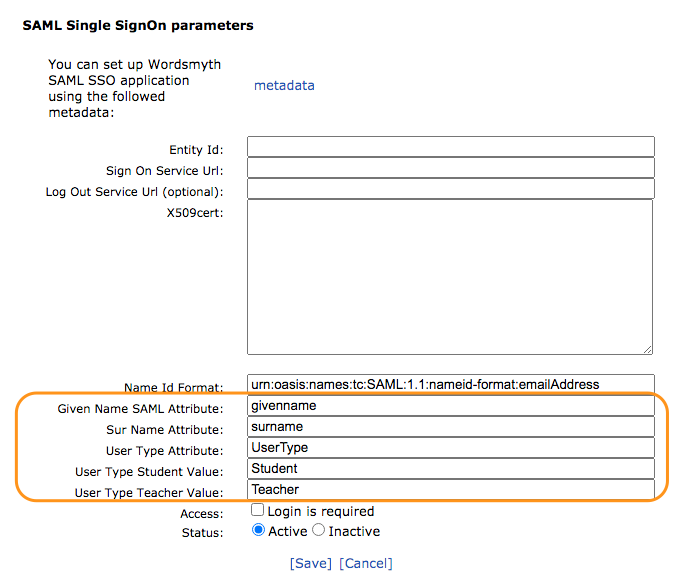
The set of attributes and their names can be different depending on the SAML service provider. But our application require “User Name” and “User Type” information to distinguish the student and teacher user roles. Therefore some special fields are added for the particular attribute values used by the SAML provider (to send us the User Name and User Type information).
These fields are:
Given Name SAML Attribute – the example above contains “givenname” (but “first name” may be used)
Sur Name Attribute – the example above contains “surname” (but “last name” may be used. (
One of these 2 fields can be omitted
User Type Attribute – contains “UserType”
User Type Student Value – contains “Student”
User Type Teacher Value – contains “Teacher”
Additional settings and control for your convenience
Login is required – if ON then access to School URL for users who are not logged in is impossible
Status: Active/Inactive – If “Inactive” then SAML integration is Off, and not used. It can be used for testing, to avoid removing all long parameters, but to just temporarily disable integration.
That’s all the parameters that are used in our page for SAML integration. Click “Save” to complete the setup. If you still have questions, please contact us at support@wordmsyth.net.
Here’s the great news! We have completed the first version of our Teacher Tools, with the basic functions needed to manage student accounts and classes, create and assign vocabulary lessons, and review vocabulary reports. However, this current version of our Teacher Tools lacks the finishing touches of “user experience” design. That’s where you come in. We would like to ask you to participate in our design research and help us to work out the best user experience for you. Since you and your students are receiving a free subscription to Wordsmyth resources, we hope this is a fair deal – a win-win arrangement.
New vocabulary words added in our dictionary database
In the academic year 2020-2021, we’ve updated our dictionary database to include Covid pandemic related vocabulary words, in addition to our regular update based on the requests from Wordsmyth users, including both language learners and educators.
Here are a few sample entries you might check it out:
At users’ request, we’ve increase the limit of words in a wordlist from 50 to 100 words. We understand each user has their own unique way of learning vocabulary or managing their students’ assignment. A large list gives users more flexibility to accommodate various learning habits and strategies. While a very long list might be desirable for making glossaries, it can make some activities, like the games or quizzes, very hard to navigate. So you can create both short and long lists on the same topic.