To help with online study and learning during these difficult times, Wordsmyth would like to introduce you to its free dictionary widget that you and your students can use to look up words on any web page.
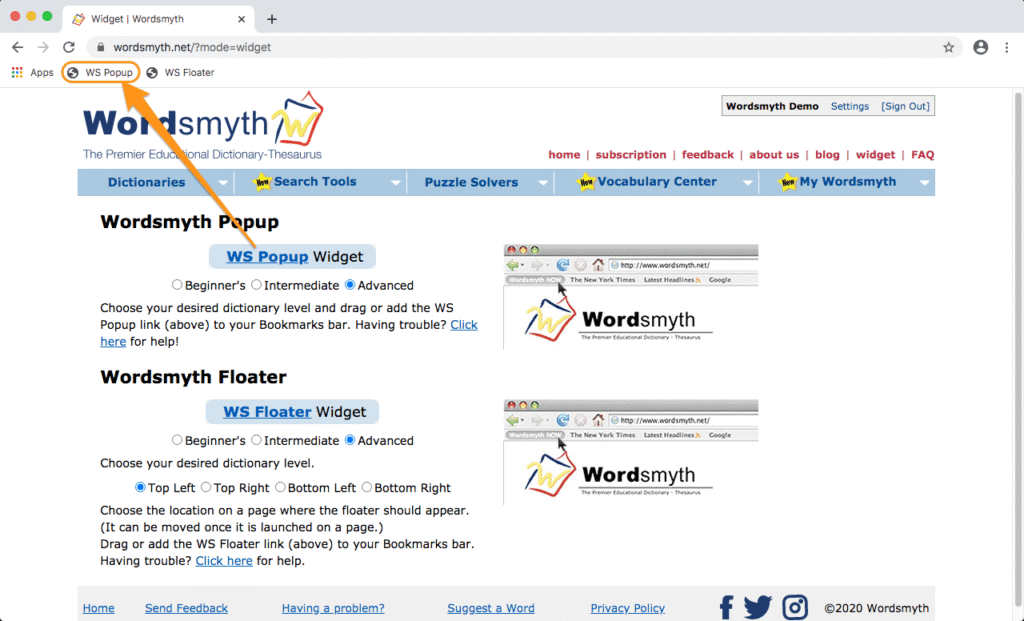
Installing the widget is very easy. Simply go to Wordsmyth’s widget page and then “drag and drop” the widget onto your browser’s bookmark toolbar.
Let’s say you are reading online and want to look up a word; select the word and click the widget link on your toolbar. After this first lookup, the widget is launched and you can simply double click any word and the widget will pop up automatically with the entry information you are looking for. If you want to look up a word that isn’t on the page, click the widget link and the widget search box will appear. You can then type in a word and click the “OK” button to retrieve the dictionary entry for the word you typed. (Please note that ad blockers may interfere with the functioning of the widget.)
We invite you to read the Wordsmyth online teaching resources guide to learn more about Wordsmyth’s tools and resources that will support your online teaching and learning. Follow us on Facebook, Twitter, and Instagram for Word of the Day and updates on features that are coming soon.
Wordsmyth’s Wordlist Maker is preset for automatic text analysis and automatic word extraction. Type, or copy and paste, any text into the input box. Then click to enter. The Wordlist Maker will extract up to fifteen of the best academic vocabulary words from your text based on the Wordsmyth Vocabulary Inventory (WVI). Then it will automatically create a wordlist for you. It’s just that simple.
Adjust Wordlist Maker settings to tailor the list
When you open the Wordlist Maker settings, you can adjust the options to tailor the wordlist to better meet your needs.
Definitions from
You can choose a lower dictionary level to provide easier definitions that suit the needs of your students.
Parental filter
The default mode for the Wordlist Maker is with the Parental Filter on. You can turn off the parental control here if you don’t feel any need to restrict potentially offensive language with your particular students.
Word selection default settings
Automatic text analysis:
As mentioned above, the setting for the selection of words for your wordlist is preset for “Automatic text analysis.” If this is unchanged, the system will extract fifteen of the “Top academic vocabulary words” from whatever text you enter into the input box. Alternatively, you may choose the “Top Challenge” setting to create a list of low frequency words according to a standard frequency measure. Note also that you can adjust here the number of words for your wordlist, should you feel that fifteen is too many or too few.
When “Automatic text analysis” is selected, the setting for “Automatic detection” of multiple word expressions is also selected. This means that items consisting of more than one word, such as “tectonic plate” or “continental drift” will be detected as single units in your text. Even if these expressions are not selected to be part of your wordlist through automatic text analysis, they can easily be added by you during customization, as they will appear in the complete list of the items from your text.
Precise wordlist:
If you have a particular list of words you want to use in activities, choose the “precise wordlist” option. This setting allows you to create a list with precisely the words you type into the input box. Note that when you select “Precise wordlist,” the setting regarding the detection of multiple word expressions changes along with it. Since the “precise wordlist” setting asks the system to include in the wordlist each individual word typed into the box, it will not detect that “Abraham Lincoln” is a single unit. In order to include these multi-word units in your wordlist, you will need to enclose them within quotation marks.
Customize the wordlist
After the list is created, you will get a quick preview. If you are not happy with what you see, you have many options for editing and customizing.
preview options
There are several preview options in the sidebar which you can use to evaluate your wordlist. Seeing example sentences, for instance, can help you decide if the list is showing you the precise meaning that you want for each word. Checking the dictionary level can help you decide if the words are in the right range of difficulty for your students. For your convenience, here also are links to proceed to editing and customization of your list. Of course, if your list looks just right, click to save your wordlist and you’re ready to go! If you’d like to rename your wordlist or attach a description before you go, click on the little marker next to the name at the top.
If you need more space to review your wordlist, you can close the sidebar by clicking the little arrow on the side.
Customization
If you click on “customize definitions and examples” in the sidebar, you will access the customization page. There you will see the words of your list with all their Wordsmyth definitions and example sentences. Note that many words will have multiple senses and multiple parts of speech. The most commonly used definitions will have been pre-selected for your use in activities. Here you can change or edit the definitions and examples, add a note in connection with the word, and more. Mouse over any option icon to find out what you can do there.
Add/Select words: Add new words that are not found in Wordsmyth dictionaries
No dictionary can cover all the words and phrases that are generated in this ever-changing world, especially those within specialized fields. If you have a specific word not currently found in our dictionary database, you can add it and write your own definition and example sentence.
First, click on “Add/Select words” in the sidebar of the preview page. Whether you’ve created a wordlist using Wordsmyth text analysis or put in your own precise wordlist, the system will now display any words that are not found in our database under the “Add a word” input box. If you’d like to add one of these words to your list, click on the word or type it into the input box. (If the item needs to be capitalized, you will need to type rather than click on the word. Also, since typos and misspellings can occur in any text, you may wish to double check the spelling of your item before adding it to your list. The item could still potentially be in our database.) Next, click on the arrow next to the input box and select “Customize definition and example” at the top of the page. Once on the customization page, choose a part of speech for your word. (You can also attach a note to your word at this point.) Once you’ve chosen a part of speech for your word, add at least one definition. A note can be added at this point too. After the definition is added, the new word can become part of your wordlist.
Add/Select words: Select words for your wordlist
On the “Add/Select word” page, you can see the complete list of words from your text, including any multiple word expressions that were detected automatically or were enclosed within quotation marks in a precise list. Here you can adjust the word selection for your wordlist by checking or unchecking any of the boxes next to words. In this list, you can also see the level of each word in the Wordsmyth Vocabulary Inventory (WVI), the word’s frequency in school texts—the lower the number, the higher the frequency—and how many times the word occurs in your text. This information may help you judge which words are important to use in your final list.
Smooth connection with activities
After your list is edited and saved, you can use it in any activities from the Wordsmyth Activities page. Connections to the Activities page can be found in the following places as you go through your wordlist-making process.
in the sidebar on the preview window
at the top right of any customization page
in the “more options” dropdown menu on the “My WordLists” page
Share your lists with your students
If you are a teacher, you may be making wordlists for your students to study and learn. Sharing your lists with your students is easy. Just copy and paste the unique sharing URL of any list and send it to your students by email or any other means of communication that your school tools provide.
The sharing URL is available on the preview page right under the wordlist name. Is is also found in the “share” option from the “more options” dropdown menu on the “My WordLists” page.
Below is the URL for the example wordlist used in this guide. It can help you get a feeling for how wordlist sharing works. https://www.wordsmyth.net/?sl=6f8b6611d9ad Clicking this URL will lead you to the Activities page with the wordlist preloaded and ready to use in any activities of your choice.
Check out our amazing Wordlist Maker and see how easy it is to make excellent wordlists for your students or for yourself!
Save glossaries and quizzes (online and printable)
Customize your Wordsmyth experience
select your preferred dictionary level,
change the entry presentation style, and more.
Receive our newsletter, contribute to online discussions, and add personal annotations to your dictionary entries.
Help us learn about you so that we can develop our site to more effectively to serve your needs.
1. Click “Register”
You will find the “Register” link on the top right of the page.
2. Fill out the user registration form
Screen name: This is the name that will identify you on the site. You may want to use your name or nickname, or an alias. You can change this at any time after you register, in your Settings.
Email address: Enter a valid email address so we can send you an activation code for completing your registration. (We take great care to create a secure website.)
Password (enter twice): Your password must be at least 5 characters. If you don’t enter a password, one will be automatically generated for you.
Optional: Login Shortcut: If you don’t feel like typing your whole email address each time you log in, you can use a single login shortcut instead. Use any combination of letters and numbers, and make it easy to remember.
Click the “Register” button. An email will be sent to you with an activation code.
3. Activate your account
After clicking the “register” button, you will be asked to activate your account. An email has been sent to you with an activation code. Leave this page open until the email arrives.
Fill in your password and then Copy and paste the activation code in the email that was sent to you. A sample email is shown below. Make sure not to include extra spaces before or after the activation code.
Please note that sometimes the email sent to you might end up in a junk mail folder. Or it may be blocked by a firewall that protects your organization.
When you have pasted your activation code and filled in your password, click “ Activate.”
If for any reason you cannot finish the activation process at the moment, you can come back to our site anytime to complete activation.
4. Complete activation
You can close the window, and you will be logged in. Now you will see your name on the screen.
Wordsmyth’s Student & ELL Dictionary is now available on the App Store and Google Play. The app is designed for students (middle school-age and up) and English Language Learners at various stages of learning.
3 Dictionaries in One: Beginners, Intermediate, and Advanced levels.
Integrated Thesaurus: Synonyms, Antonyms, and Similar Words.
Customizable entry display: Lets you select which information you want to see.
This app provides the full set of features of our online leveled dictionary suite for better user experience on mobile phones or tablets. Once downloaded, it will always be available for you and your students even without internet.
Many young children are still having difficulty understanding why they are having to stay at home these days and why they are not going to school. Many children may be confused and anxious. To help caregivers and teachers answer questions relating to the current crisis, Wordsmyth has developed a story that not only explains, in a clear and simple manner, the basics concerning the virus but also helps children see that they are not alone in wondering why “everything is different now.”
Wordsmyth’s charmingly illustrated story about how one little girl is coping with staying at home is both realistic and heartening as she expresses both her anxiety and her positive attitude in connection with this very new and strange situation.
We cordially invite you to download the Wordsmyth story Why is Everything Different Now? Print it out or use it online. Use it as a teaching tool or just for something both soothing and fun.
If you’re a Wordsmyth subscriber, you can take advantage of the linking of key vocabulary words in the text with easy-to-read definitions and example sentences in WILD, our dictionary for K-2 readers (the Wordsmyth Illustrated Learner’s Dictionary). These entries can be used to create a glossary or to create other pre-teaching or post-reading activities for your students. Entries for all the other words of the story are also available in WILD.
It’s rare, but it happens. You may want to delete an inactive and unwanted school URL. Here is how you can do it:
1. Go to settings on the account that set up the URL in the first place.
2. Go to the subscription tab in your settings, and click “Delete School URL”
Please note the delete school URL option will not be available on an active paid school subscription. It’s only available for free trial, expired subscription or URLs that are inactive for other reasons.
3. Type in your account password to click “delete”. Some browsers may ask you again if you are sure about your action. If you are sure, click yes to complete the deletion.
After you delete this URL, it will be available for other users in their subscription process.
Wordsmyth is proud to announce its first dictionary app — TheWordsmyth Children’s Dictionary — available on both iOS and Android mobile devices.
This app’s design is based on feedback and requests from teachers and students. What we’ve been hearing especially are comments like the following:
” We just want a good dictionary for the kids, even when we don’t have an internet connection.”
Simple Design
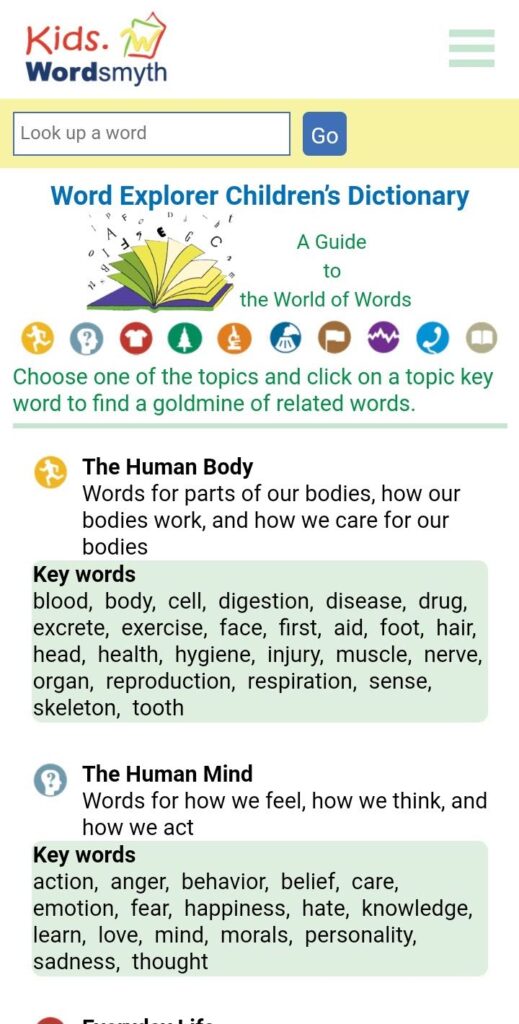
The lookup box is on the top. Just type in the word you want to look up, and click “Go.”
Offline Operation
The app has been designed for use either online or offline. If you are offline, you have the option of using the app with or without media. If you click “settings” and download audio and images, you will have the full dictionary on your device, all accessible without the internet. Anytime you want to switch back to using online media, you can simply click the “remove” button and delete the downloaded material to free up storage space on your device.
Customize your entry display!
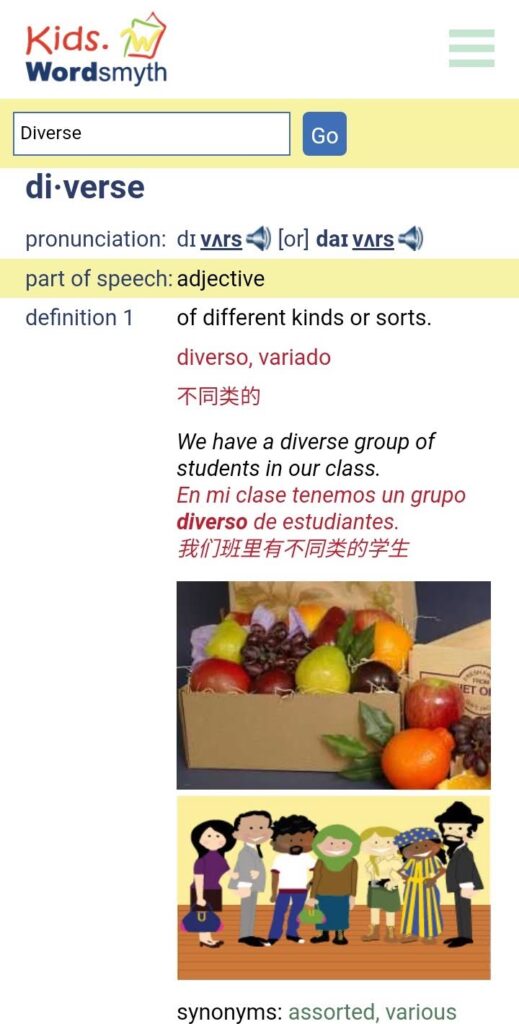
To personalize your dictionary experience, you can explore the display options and set the dictionary to show just the dictionary features you want to see.
If you’d like to learn more about this app, please read the full app description. Thanks for taking a moment to find out about our newest and most exciting Wordsmyth offering!
With the old activity makers (quizzes and glossaries) the wordlist that was entered was saved with each activity. That made it harder to re-use wordlists. In the newVocabulary Center, users can create re-usable wordlists that are saved separately from the activities. A list can then be used with any activity– study tools, games, or quizzes.
But what about the old wordlists? Now, with one click, you can extract the wordlists from your old saved activities in the My Activities section (under My Wordsmyth). You will then be able to use the wordlists with all of our new activities in the “Activities” section.
Go to My Activities under My Wordsmyth, where you can see all your old activities saved with a specific wordlist. First, select one or more of the activities. Then look for the magic button on the bottom right.
Click the “Extract WordList” button, and the wordlist will be saved and made immediately available in My WordLists under the My Wordsmyth menu. You can change the name of the wordlist if you wish.
In this example, if you go to My WordLists — under the My Wordsmyth menu — you will see that the wordlist extracted from the old Multiple Choice activity is already available for you to use.
Click on Activities from the (More) Options dropdown menu next to the list. Now you can use the list with all of the new activities.
Saving scores and other activities related information will come soon. Stay tuned!
When you edit an existing word list but didn’t click the “preview and save” button, you will see this button next to your list in “My Word Lists.”
It means that we noticed you made some changes but you didn’t directly confirm the changes. To be cautious, we saved your changes temporarily, just in case. The icon is to remind you to make a decision.
So, if you go to “preview,” you will see your options: discard the changes, or save them.
Clicking on either of the buttons will bring the green check mark back. Your word list will now be good to use with any activities.
The following is a basic formula for citing a particular
word’s entry in one of our dictionaries, which you can modify according to
whatever style guide you are using. (Specific
examples using APA or MLA follow this introduction.)
1. Begin with the headword,
as Wordsmyth does not list an author or authors. (The examples below are for the headword “bay,”
which is included in all of our dictionaries.)
2. Follow the headword with the name ofthe particular Wordsmyth dictionary you are citing. The formal names of each of our dictionaries are as follows:
Wordsmyth Advanced Dictionary
Wordsmyth Intermediate Dictionary
Wordsmyth Beginner’s Dictionary
Wordsmyth Word Explorer Children’s Dictionary
Wordsmyth Illustrated Learner’s Dictionary (WILD)
3. Follow with the
date of publication. Dictionary
entries can be updated at any time, so, for the publication date, it is best to
use the copyright date that appears at the bottom of each of our webpages.
4. Next, include the
URL of the specific page for the dictionary entry.
5. Give the date
you accessed the entry. We feel it
is important to provide the access date, as, again, any page can be revised at
any time. The example below shows that this
person accessed the entry for “bay” on August 5, 2019.
If you are using APA style, the first example above would be
modified so that it looks like the following:
bay. (2019). In Wordsmyth Advanced Dictionary. Retrieved August 5, 2019, from https://www.wordsmyth.net/?level=3&ent_l=bay&rid=3500
MLA Handbook
If you are using MLA style, the second example above would look
like the following. (Note that MLA does not use “https://” in citing URLs. Also, MLA does not require an access date,
but, again, we do recommend including one, as entries can be modified at any
time.)
“bay.” Wordsmyth Word Explorer Children’s Dictionary, www.kids.wordsmyth.net/we/?ent=bay. Accessed 5 August, 2019.
Note that if you do not include the access date, you will need to
include the date of publication, for which you can use our current copyright
year:
“bay.” Wordsmyth Word Explorer Children’s Dictionary, 2019, www.kids.wordsmyth.net/we/?ent=bay.
One final note…
For in-text citations and citing specific definitions of a
headword, please follow the format prescribed by the particular style manual
you are using in your writing. We also
suggest that you check to be sure that your style manual hasn’t changed its general
guidelines for citing online resources.
Best wishes from Wordsmyth on your writing project!