We advise our users to have only one account with Wordsmyth. Your account information can be edited very easily when needed. Registering multiple account would likely cause confusion in the future.
Change email address
1. Go to your account settings
2. As you can see, all account info fields are editable. Simply click [Edit] next to your email address.
3. Type in the new email address you want to change to. You can change Screen name and Login shortcut as well. To save your change, type in your current password and click “Save” button.
Change password
After you reset your password, we always recommend you change the system generated password to something more memorable. You may want to change your password for other security concerns.
In your account settings, under the “Account Info” tab, click [Edit] next to password field.
Type in new password twice and make sure the two inputs are identical.
To save your change, type in your current password and click “Save” button.
“Reverse search” is an advanced search tool that allows you to search within the full text of the dictionary for words, word parts, or phrases that may be useful to you, either in finding a word for a meaning you have in mind or in finding a pool of words for writing inspiration or assignments. A typical way of using the reverse search feature in Search Tools is to search for words that have the search term in their definitions or example sentences. Just type the word in the search box provided and choose between the listed options for searching. Typing in “oil,” for example, can help you find words like “anoint,” “cottonseed,” “crude,” “deep-fry,” “diesel,” and “pesto.” Or let’s say you type in “Latin.” This can help you find all the examples of Latin phrases included in the dictionary (as well as other words with definitions and examples that simply include the word “Latin.”) Next to each item in the search results is its definition, or the first of its definitions. This can help you evaluate the usefulness of your search results. Moreover, you can click on any item in the results list to go to its entry. This can be very helpful in finding additional synonyms and related words.
Why do I need reverse search?
“Hmm… I know the idea I want to express, but I can’t think of what the word for it is.”
You probably have moments like this now and then when you are writing. Reverse search can be useful for finding the word that matches the idea you have in mind. Let’s say you are thinking of a meaning that is a special type of happiness. You could look up the word “happiness” in the regular dictionary search box and find synonyms, of course, but the word you’re looking for might be somewhat more specialized. Instead of using just the thesaurus, you could broaden your search using reverse search so that you could find all definitions that contain the word “happiness,” AND, by selecting additional fields in which to search, you could find a great number of words that relate to the idea of happiness. Perhaps the word you were looking for was the word “mirth” or “beatitude,” or “seventh heaven.” Reverse search would be the way to find these items.
For teachers, reverse search can be a great tool for coming up with a pool of words to organize a lesson around or to help students write about a particular topic. Let’s say the students are learning about volcanoes. You could use reverse search to find words like “magma,” “lava,” “erupt,” “dormant,” “extinct,” “active,” “explode,” “caldera,” “crater,” “cinder,” “tsunami,” and many others. (These words were found by entering “volcano” and “volcanic” into the search box and then clicking on “definition” and “example.”)
How do I use reverse search?
If you click on Reverse Search under Search Tools, you’ll be taken to a special page. The Reverse Search page contains explanations of all the kinds of searches you can perform.
The reverse search tool lets you search for any word, part of a word, or set of words within the text of definitions or other dictionary fields. In addition to searching within definitions and example sentences, you can find words within the synonym, similar, antonym or “related words” fields. Moreover, you can choose which dictionary or dictionaries you wish to search within. Choosing one of the lower level dictionaries is probably best for younger students, as the Advanced Dictionary may bring up far too many words to sift through, including words that are homographs with completely unrelated meanings to your search term. (For creating a pool of words for younger children, we might suggest using the Word Explorer tool rather than reverse search, however. Words listed under Word Explorer topics have been specially selected because they are, in fact, related to the topic, and they are related in clearly specified ways. They are not selected by an automated process as is reverse search.)
Reverse Search works best when the search parameters are not too limited. For example, if you want to find words related to sharks (the fish), you may be disappointed if your search term is only “shark.” This is because there are not too many words in the dictionary that have “shark” in their definition, and there may not be a large number of example sentences that use the word “shark” either (not as a fish at least). Moreover, few, if any, words have “shark” as a synonym or antonym. It would be better to search for a more general concept like “fish” or expand the search terms to something like “fish shark” and set the tool simply at “Word(s)” so that it will look for either the word “shark” or “fish.” Moreover, it can be helpful to click “example” because this will bring up useful additional words that have the search terms in their example sentences. By using the search terms “fish shark” and clicking on “example,” you will allow the tool to bring up words like “bony,” “hunt,” “saltwater,” “scaly,” “deepwater,” “reel, and “prey,” which do not contain either “fish” or “shark” in their definitions. Notice that this type of search also includes a greater number of words of a different part of speech from the search terms.
Reverse search is just one of the tools that Wordsmyth offers its users to help them find the right word or the particular set of words they are looking for. We know it can be helpful for certain types of searches, but we are also aware that it has its limitations. If you can think of ways that we might improve the tool, or, on the other hand, if you discover ways that the tool has been uniquely helpful to you, we’d appreciate your feedback.
• Look-up box: To look up a word, type it in the search box and click Go or hit Enter on your keyboard.
• Default dictionary levels: the Elementary Dictionary is for grades 3-5, the Intermediate Dictionary is for grades 6-8.
•Alphabetical Results: Here are words and phrases that appear alphabetically before and after your search word. Those in the list that are headwords are in dark gray, and words that are derived or inflected forms of headwords are in light gray. Double click on a word or phrase in the list to go to its entry.
• Multi-Word Results: If there are phrases or compound words that include the word you have looked up, they will appear in Multi-Word Results.
• Similar Spellings: Click on the Similar Spellings tab to see other headwords that are close in spelling to the one you looked up.
Entry display options
• More Results: The More results menu, located above the headword, provides three further options for getting information from your search. Show multi-word results shows phrases and compounds that contain the entry word, along with the first definition for each. Browse in word list shows the word in the middle of the dictionary word list so you can see the words coming before and after it. The third option, See entries that contain…, shows a list of entries using your looked-up word in their definitions.
• Display Options: Several display features can be controlled in your settings panel. (If you are signed in, you will see the Settings link in the top right corner of the page.) In addition, the Display options menu located on the entry page allows you to change existing settings right in the entry itself. The options include:
Show Syllables (displays how words are divided in writing)
Show Lookup History
Double-Click Lookup (allows double-clicking on any word in a definition or example sentence to go to that entry)
Show Word Parts (allows the user to see the roots and affixes that make up the headword and gives additional information)
Show Spanish Support/Show Chinese support (translates headwords and examples sentences)
Pronunciation (allows choice of pronunciation systems. Options are Wordsmyth pronunciation system, Phonics, and International Phonetic Alphabet)
Entry Formats (offers options of “Standard” or “Classic”)
• Lookup History: If you have chosen to display your lookup history on the results page, the last five words you have looked up will be displayed in this box, along with an option to see more looked-up words along with definitions.
Entry
• Headwords: Words that have an entry in the dictionary are called entry words or headwords. They always appear at the top of the entry in large blue letters. Dots are used in entry words of more than one syllable to show how the word is divided in writing. The blue arrow next to the syllabified word allows you to turn syllabification on or off.
• WVI label: Words that are part of the Wordsmyth Vocabulary Inventory are marked with a label that shows what level they have been assigned to. Levels range from 1 to 5, with 5 being the most advanced.
• Pronunciation: Headword pronunciation is provided using both written phonemic symbols and human-voiced audio recordings. Clicking on the speaker icon allows you to hear the headword pronounced, and clicking on the word “Pronunciation” provides you with an explanation of the particular pronunciation system being used to display the written symbols—Wordsmyth, Phonics, or IPA. (The pronunciation system shown is the one that has been selected in your display settings.)
• Features: The features list shows the particular special features, such as Word History, Word Explorer, and Word Parts that accompany the word’s entry. Clicking on a feature’s name will lead you down the entry to the feature’s location.
• Part of Speech: The Part of Speech label indicates the way, or one of the ways, that a headword can be used in a sentence—for example, as a noun, transitive verb, intransitive verb, or adjective. In any entry, click on the Part of Speech label (in dark blue) to see an animation explaining what a part of speech is in general. Click on the name of the part of speech listed next to the label (in light blue) to see an explanation of that particular part of speech.
• Inflections: The inflections field shows the different forms that a headword can take—forms such as “eats,” “eating,” “ate,” and “eaten”—which make up the inflections for the verb “eat.” In any entry, click on the Inflections label (in dark blue) to learn more about what “inflections” are and how Wordsmyth displays them.
• Definitions and Examples: A definition is an explanation of what a word means. Each word may have several meanings, also called “senses,” depending on how the word is used. The definitions in the Intermediate Dictionary are written simply and are somewhat concise. Definitions in the Elementary Dictionary use full-sentences and are more explanatory. They tend to be somewhat longer but are highly readable for younger readers. The examples below the definition show typical usage of the word. Examples demonstrate both the meaning and the grammatical context that the word is typically found in. Examples are always in italic type.
• Images and Animations: Thumbnail images are shown beneath the definition and example sentence. Clicking on a thumbnail will enlarge it. Some images are photographs and some are illustrations done by Wordsmyth artists.
• Synonyms and Antonyms: Synonyms are different words whose meanings are the same or almost the same as each other. Antonyms are words whose meanings are the opposite or nearly the opposite. Synonyms and antonyms are listed with the definitions of a headword with which they match. Click on any synonym or antonym (in green) to see its entry and compare usage.
Derivations: The Derivations field shows words that are derived from the headword, such as “heaviness” from the headword “heavy” and “agreeably” from the headword “agreeable.” Bear in mind that many words that are derived from headwords may not be listed as derivations as they have their own individual entries in the dictionary.
Special features
• Word Parts: The Word Parts feature shows the headword broken down into its roots and affixes. Each significant word part is identified and its origin, type, and meaning provided. You can also view a list of other example words containing the word part and jump to those words’ dictionary entries to explore further.
• Language Notes: There are four kinds of language notes: Word History, Usage Note, Homophone Note, and Word Builder. These notes appear with a yellow background toward the end of the entry. In some cases, a word has more than one language note.
• Word Explorer: Word Explorer is a word finder and vocabulary exploration tool. Several thousand words in the dictionary have Word Explorer information. These entries are linked with a main Word Explorer entry (a “keyword” such as “art,” “weather, or “energy”). The headword “easel,” for example, would refer you to the keyword “art.” The Word Explorer keyword entries display related words in categories, e.g., words that describe kinds of art, things used in art (such as an “easel”), people who make art, places for art, etc.Word Explorer is an especially useful tool for children writing on a particular topic, as it sparks ideas for what they may want to say and provides them with needed vocabulary.
• Look-up box: To look up a word, type it in the search box and click Go or hit Enter on your keyboard.
• Default Selection: Click on the radio button next to the dictionary you want us to check first when searching for a word. This will be your default level. If you want to see entries that contain easy-to-read definitions and the smallest number of definitions for each word, select “Beginner’s Dictionary.” If you want to see entries that contain more advanced language and the greatest number of definitions for each word, select “Advanced Dictionary.” (After you select your default level, you can still navigate between levels if you want to see more or less advanced definitions for a particular word that you’ve looked up. This will not change your default.)
•Alphabetical Results: Here are words and phrases that appear alphabetically before and after your search word. Those in the list that are headwords are in dark gray, and words that are derived or inflected forms of headwords are in light gray. Double click on a word or phrase in the list to go to its entry.
• Multi-Word Results: If there are phrases or compound words that include the word you have looked up, they will appear in Multi-Word Results.
• Similar Spellings: Click on the Similar Spellings tab to see other headwords that are close in spelling to the one you looked up.
Entry display options
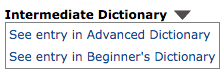
• Dictionary menu: This gives you the option to see the entry for the word you looked up in one of our other dictionaries, at a different level of writing.
• More Results: The More Results menu provides three further options for getting information from your search. Multi-Word Results shows phrases and compounds that contain the entry word, along with the first definition for each. Browse in word list shows the word in the middle of the dictionary word list so you can see the words coming before and after it, along with their definitions. The third option, See entries that contain…, shows a list of entries using your looked-up word in their definitions.
• Display Options: Several display features can be controlled in your settings panel. (If you are signed in, you will see the Settings link in the top right corner of the page.) In addition, the Display options menu on the entry page allows you to change existing settings in the entry itself. The options include:
Show Syllables (displays how words are divided in writing)
Show Lookup History
Double-Click Lookup (allows double-clicking on any word in a definition or example sentence to go to that entry)
Show Grammatical Patterns (reveals the patterns verbs follow as demonstrated in their example sentences and provides links to more information on the patterns)
Show Word Combinations (shows words that often combine with the word you looked up)
Show Word Parts (allows the user to see the roots and affixes that make up the headword and gives additional information)
Show Spanish Support/Show Chinese support (translates headwords and examples sentences for intermediate level words)
Pronunciation (allows choice of pronunciation systems. Options are Wordsmyth pronunciation system, Phonics, and International Phonetic Alphabet)
Entry Formats (offers options of “Standard” or “Classic”)
• Lookup History: If you have chosen to display your lookup history on the results page, the last five words you have looked up will be displayed in this box, along with an option to see more looked-up words along with definitions.
Entry
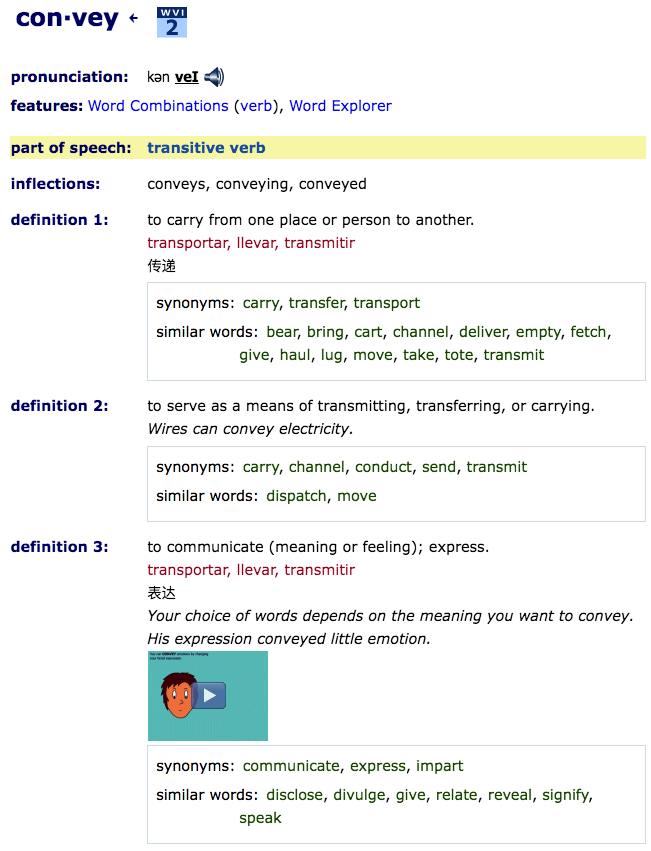
• Headword: Words that have an entry in the dictionary are called entry words or headwords. They always appear at the top of the entry in large blue letters. Dots are used in entry words of more than one syllable to show how the word is divided in writing. The blue arrow next to the syllabified word allows you to turn syllabification on or off.
• WVI label: Words that are part of the Wordsmyth Vocabulary Inventory are marked with a label that shows what level they have been assigned to. Levels range from 1 to 5, with 5 being the most advanced.
• Pronunciation: Headword pronunciation is provided using both written phonemic symbols and human-voiced audio recordings. Clicking on the speaker icon allows you to hear the headword pronounced, and clicking on the word “Pronunciation” provides you with an explanation of the particular pronunciation system being used to display the written symbols—Wordsmyth, Phonics, or IPA. (The pronunciation system shown is the one that has been selected in your display settings.)
• Features: The features list shows the particular special features, such as Word Combinations, Word Explorer, and Word Parts that accompany the word’s entry. Clicking on a feature’s name will lead you down the entry to the feature’s location.
• Part of Speech: The Part of Speech label indicates the way, or one of the ways, that a headword can be used in a sentence—for example, as a noun, transitive verb, intransitive verb, or adjective. In any entry, click on the Part of Speech label (in dark blue) to see an animation explaining what a part of speech is. Click on the name of the part of speech listed next to the label (in light blue) to see an explanation of that particular part of speech.
• Inflections: The inflections field shows the different forms that a headword can take—forms such as “eats,” “eating,” “ate,” and “eaten”—which make up the inflections for the verb “eat.” In any entry, click on the Inflections label (in dark blue) to learn more about what “inflections” are and how Wordsmyth displays them.
• Definitions and Examples: A definition is a short explanation of what a word means. Each word may have several meanings, also called “senses,” depending on how the word is used. The example sentence or phrase below the definition shows a typical usage of the word. Examples consist mostly of full sentences and demonstrate both the meaning and the grammatical context that the word is typically found in. Examples are always in italic type.
• Images and Animations: Thumbnail images are shown beneath the definition and example sentence. Clicking on a thumbnail will enlarge it. Some images are photographs and some are illustrations done by Wordsmyth artists. Illustrations and animations are geared toward children but are still helpful for older learners.
• Synonyms and Antonyms: Synonyms are different words whose meanings are the same or almost the same as each other. Antonyms are words whose meanings are the opposite or nearly the opposite. Synonyms and antonyms are listed with the definitions of a headword with which they match. Click on any synonym or antonym (in green) to see its entry and compare usage.
Derivations: The Derivations field shows words that are derived from the headword, such as “heaviness” from the headword “heavy” and “agreeably” from the headword “agreeable.” Bear in mind that many words that are derived from headwords may not be listed as derivations as they have their own individual entries in the dictionary.
Special features
• Word combinations: The Word Combinations feature displays words that are frequently used in combination with the headword you looked up. The sets of words that are shown in this field can help you find a word that is correct or appropriate to complete a particular meaning that you intend.
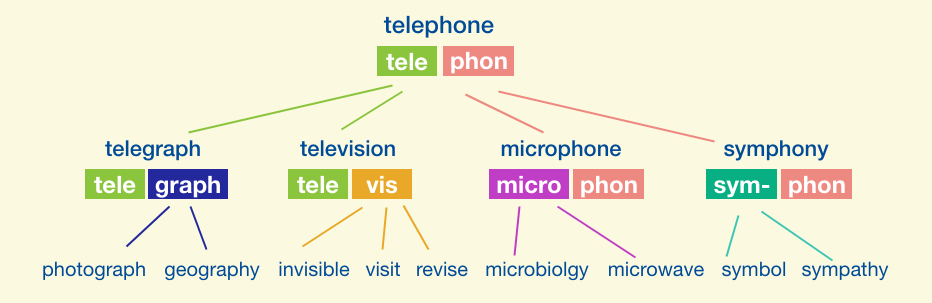
• Word Parts: The Word Parts feature shows the headword broken down into its roots and affixes. Each significant word part is identified and its origin, type, and meaning provided. You can also view a list of other example words containing the word part and jump to those words’ dictionary entries to explore further.
• Grammatical Patterns: (in Advanced Dictionary only) The grammatical patterns feature allows you to see what patterns a headword verb follows. Example sentences that demonstrate a pattern are marked with the name of that pattern, and clicking the pattern name will open up a more detailed explanation of the pattern, along with a list of other words that function in the same way and links to our full grammatical patterns list.
• Language Notes: There are four kinds of language notes: Word History, Usage Note, Homophone Note, and Word Builder. These notes appear with a yellow background toward the end of the entry. In some cases, words have more than one language note.
• Word Explorer: Word Explorer is a word finder and vocabulary exploration tool. Several thousand words in the dictionary have Word Explorer information. These entries are linked with a main Word Explorer entry (a “keyword” such as “art,” “weather, or “energy”). The headword “easel,” for example, refers you to the keyword “art.” The Word Explorer keyword entries display related words in categories, e.g., words that describe kinds of art, things used in art (such as an “easel”), people who make art, places for art, etc.Word Explorer is an especially useful tool for children writing on a particular topic, as it sparks ideas for what they may want to say and provides them with needed vocabulary.
The importance of learning Word Parts (roots, prefixes, and suffixes)
Studying word parts equips us to do the following:
Identify the meaningful elements that make up words.
Learn the characteristics of roots and of affixes, their origin, meaning, and grammatical function.
Guess (or recall) the meaning of unfamiliar words from the clues given by word parts.
Recognize the relationship among words that share a common root or affix.
Recognize patterns among changing word forms (e.g., -cept, -ceive).
Improve spelling by gaining awareness of the internal logic of words.
Increase vocabulary, cultivate morphological awareness, and have fun discovering some of the interesting ways the English language works.
For a general introduction to the terms and concepts used in our Word Parts database, see this downloadable pdf . Access to the Word Parts feature comes with your Wordsmyth subscription or a 15-day free trial.
Three ways to view the Word Parts data
1. Dictionary entries:
More than 8000 Wordsmyth dictionary entries now display information about the word parts that make up the headword. In the new Word Parts section of the entry, the headword is broken down into its roots and affixes.
Each significant word part is identified, and its origin, type, and meaning are provided. The user can also view here a list of other example words containing the word part and jump to those words’ dictionary entries to explore further. “More about this word part” notes explain in more detail how particular affixes combine with bases to form words.
2. A-Z Word Parts Page:
In addition to the Word Parts feature appearing in individual dictionary entries, where the composition of a word can be studied in the context of looking up a particular word, the user can search, sort, and browse more than 600 roots and affixes on the A-Z Word Partspage. This page can be accessed from the Search Tools menu.
3. Search Filters:
Finally, for a list of all the words in the dictionary that contain word parts information, the user can go to the Search Filter page (under the Search Tools menu), select “Word parts information” under “Entries with special features,” and click “Set filter.” This takes the user to a page that displays the list of words in an alphabetical, browsable format.
Word Parts Data in the Word Explorer Children’s Dictionary
Users of the Word Explorer Children’s Dictionary have these same three modes of access to roots and affixes information but with the example words limited to the headwords in the Children’s Dictionary. To maximize flexibility, there are links to the complete Word Parts Database from any point in the Children’s Word Parts data. In the case of roots and affixes that have no example words in the Children’s Dictionary, the word part and information about it can still be found in the Children’s Dictionary A-Z Word Parts look-up.
You can print any wordlist with the Glossary Maker activity.
Select the list you want to print
You can click the list from the Recent Wordlists sidebar. If you don’t see your desired list there, go to “My wordlist” under “My Wordsmyth.”
Find the list you want to print and go back to the Activities page
On the “My Wordlists” page, select the list you are looking for and then click the “more” option icon. From the options shown there, click on “Activities” to go back to Activities page with your target list selected.
Choose Glossary on the Activities page
The Glossary will be opened in a separate tab. Make sure the list is the one you want and click “GO”. Note here you can also decide how simple or detailed you want to make your glossary and what fields in the entries you would like to print out. If you would like a detailed glossary with example sentences and synonyms, for example, click “Custom Glossary” and then mark those items you’d like to see shown.
Click the “Print” button inside the Glossary activity
Your list will be downloaded as a PDF file. Now you can save it as a PDF and print it out with a printer anytime.
We’re often asked “Where’s the thesaurus in your dictionary?” What some users don’t recognize right away is that synonyms, similar words, and antonyms are matched with each sense of a word and appear directly under the appropriate definition for a particular headword. A user doesn’t need to click anywhere to get thesaurus information and doesn’t need to leave the page in order to see it. In other words, the thesaurus is not a separate entity, but something built into the dictionary entries themselves. This is why we call it an “integrated thesaurus.”
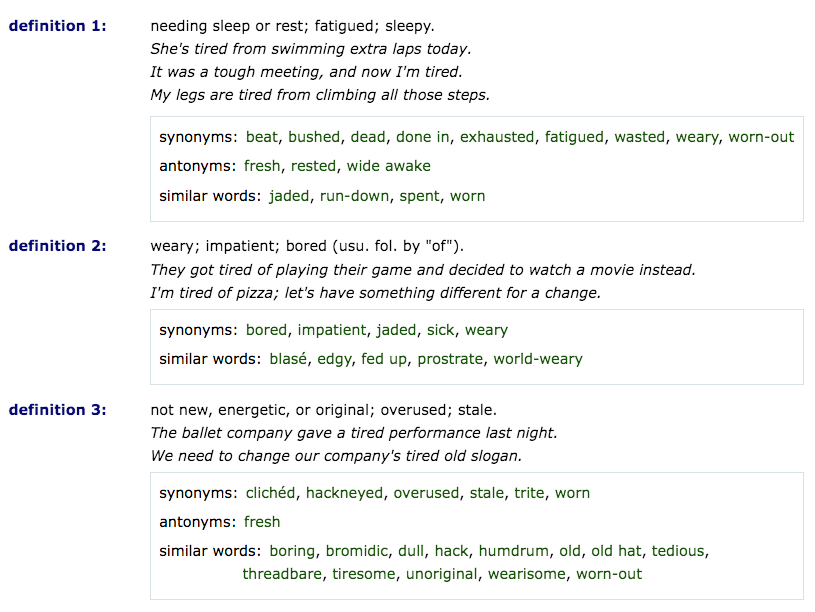
Being integrated into the dictionary entries means that, if you look up the word “tired,” for example, you will see, in the resulting entry, synonyms, antonyms, and similar words listed right under each individual definition. For example, you’ll see that the definition of “tired” meaning “needing sleep” has synonyms including “exhausted,” “fatigued,” and “weary.” The definition meaning “not new, energetic, or original” (as in “a tired performance”), on the other hand, has synonyms including “hackneyed,” “stale,” and “worn-out.”
Occasionally when a user asks about the thesaurus, that person is looking at an entry that simply contains no synonyms, similar words, or antonyms. This can happen because the meaning of the particular word simply does not invite these concepts, or because related words do not meet our criteria to be included in the thesaurus. What would share the same meaning or be the opposite of a “pencil,” for example? Is “pen” an antonym for “pencil”? Is it a synonym? We don’t think it’s either. (To find words like “pen” that relate to the concept of a pencil, however, one can use our Word Explorer feature. By clicking on the keyword “art” in the Word Explorer feature for “pencil” and then clicking on the highlighted word “pencil” in the Word Explorer listings for “art,” one can find words such as “brush,” “crayon,” “charcoal,” “enamel,” “pen,” “ink,” and “paint.” Clicking on the keyword “tool” will also bring up words like “pencil,” “pen,” and many other words denoting implements.)
Not finding thesaurus information for a particular word can also occur because our projects for adding synonyms, similars, and antonyms are still ongoing, and not every word that deserves this information has it yet. In particular, words that are derived from other words, such as “paradoxical” from “paradox,” may be empty of thesaurus information because past projects focused on root forms only. Despite our limitations, our built-in thesaurus has synonym coverage for over 16,000 academic and high-frequency words, and the fact that thesaurus information is matched with individual senses of each of these words rather than just headwords, makes the Wordsmyth thesaurus a particularly useful resource for writers and anyone looking for a better word or a better understanding of a word’s meaning and usage.
For upper elementary, middle school, and high school teachers
The Wordsmyth Children’s Dictionary Suite and Wordsmyth Vocabulary Center are designed for upper elementary school to middle school teachers and students.
The Wordsmyth Comprehensive Dictionary Suite and Wordsmyth Vocabulary Center are designed for middle school students (and up) as well as for older ESL students at varying levels from beginner to advanced.
Below are the links to introductory information about Wordsmyth dictionaries and Vocabulary Center:
Teacher Tools are available on both dictionary sites (Children’s and Comprehensive). Teachers can use the tools to manage their classes, create vocabulary lessons, send assignments, and receive reports on students’ performance.
You can always find more help information that goes beyond description of the basic Wordsmyth features.
For K-2nd grade teachers
WILD, the Wordsmyth Illustrated Learner’s Dictionary, is designed for children in kindergarten through 2nd grade. The following links will give you a quick start.
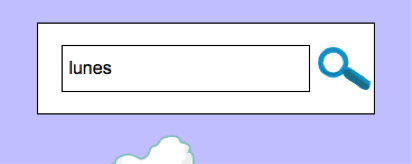
To help young learners whose native language is Spanish or Chinese, WILD allows some level of lookup by Spanish or Chinese directly in the lookup box.
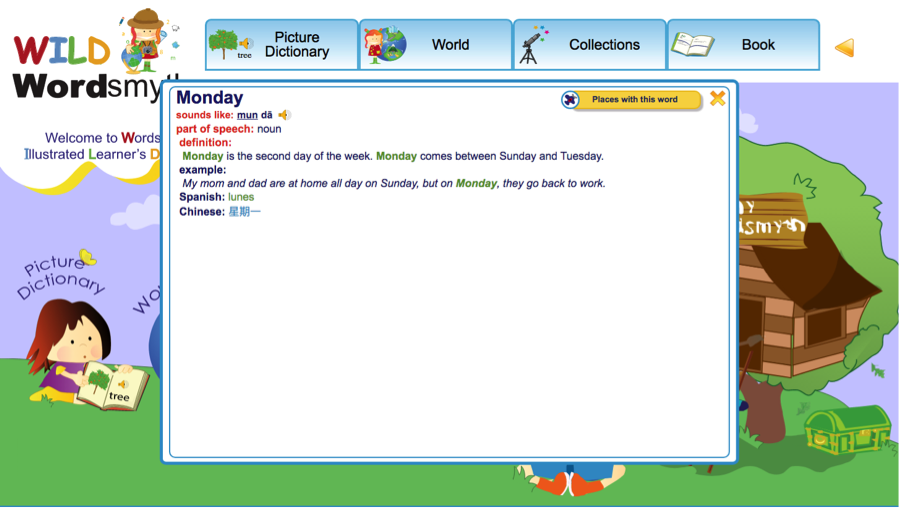
For example, if you type in the Spanish word “lunes” and click the search button, the equivalent English entry will be displayed:
The same lookup method works for Chinese support as well.
Please note:
1. Cognates in Spanish could trigger a spelling check in English. In other words, when a user tries to type in a Spanish word that has a similar spelling to an English word, the system will display auto-correct suggestions.
2. False cognates could also cause some confusion, but we hope that, in WILD, these kinds of words are rare.
Your teacher will have given you the school start page, or a Class URL. We recommend you bookmark the URL for future use.
Find your class on the school start page
Click and go to your class. If your teacher gave you a Class URL. Copy and paste, or type, the class URL in the browser search box, and then click return to go to your class.
Log in with your class URL
If your teacher also provided you with login information, go ahead and log in. If not, click “register.”
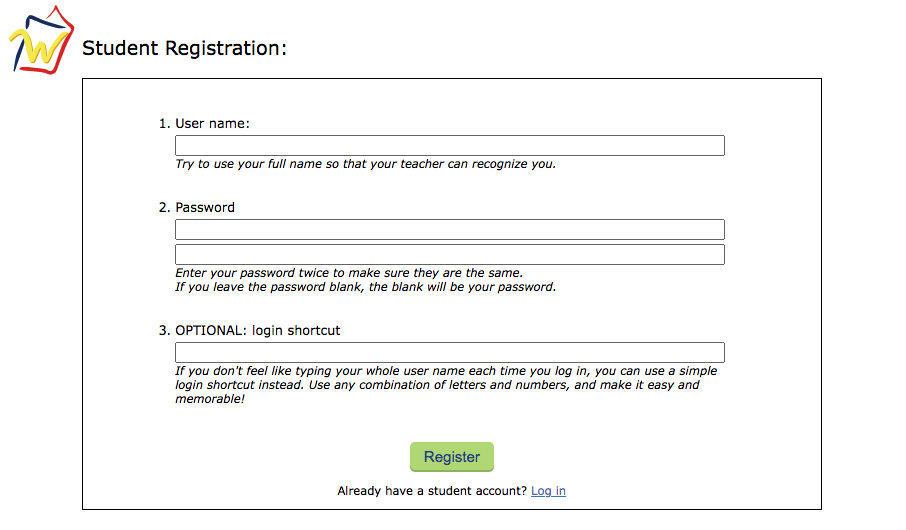
Student registration
Only your student name is required. All other fields are optional, including the password. We recommend you use your full name so that your teacher can recognize you. Click the “register” button and you will be registered. Your name will appear on your teacher’s student list.
Class and Assignments
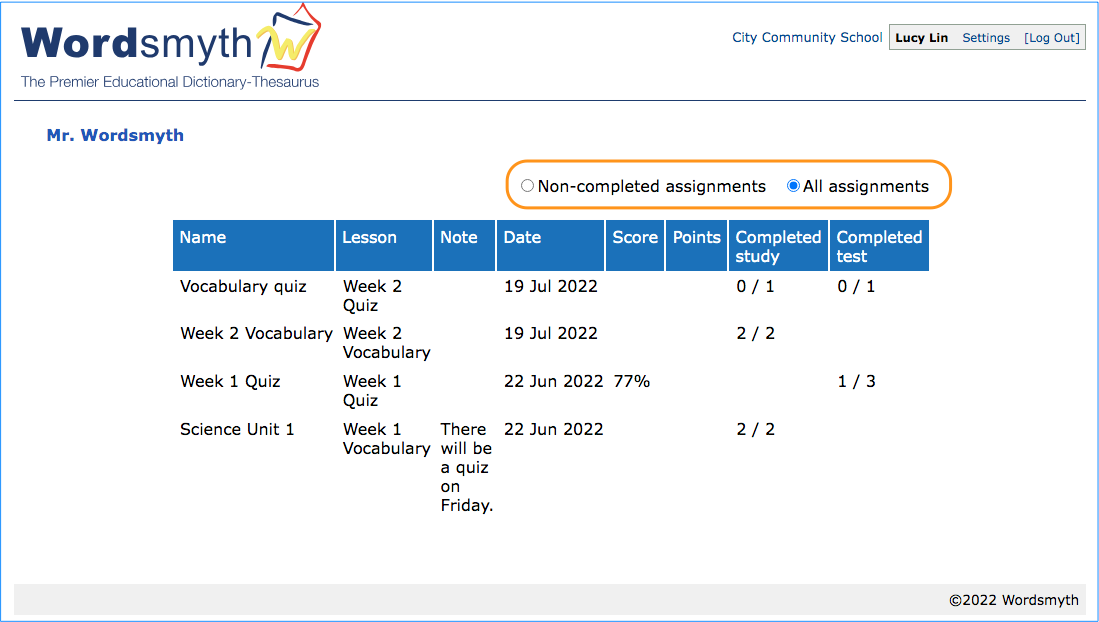
After you have logged in, you will see a list of all your assignments for the class. Later in the school year, there might be a lot of assignments in this list. The most recent will be at the top of the list on the first page, and later assignments will be on the following pages. If you belong to more than one class, you will need to log in using each class URL to complete the different assignments. The two buttons above the list can also help you find the assignments that need to be done. If you click “Non-completed assignments,” this list will show only the assignments that have not been completed. If you click “All assignments,” the list will show all the lessons assigned to you, with the most recent assignments at the top.
Work on your assignments
Click on an assignment and you will see the list of activities for you to do. Go on to complete the activities as instructed. The results will be saved and reported to your teacher.