“Automatic text analysis” is the default setting
Wordsmyth’s Wordlist Maker is preset for automatic text analysis and automatic word extraction. Type, or copy and paste, any text into the input box. Then click to enter. The Wordlist Maker will extract up to fifteen of the best academic vocabulary words from your text based on the Wordsmyth Vocabulary Inventory (WVI). Then it will automatically create a wordlist for you. It’s just that simple.
Adjust Wordlist Maker settings to tailor the list
When you open the Wordlist Maker settings, you can adjust the options to tailor the wordlist to better meet your needs.

Definitions from
You can choose a lower dictionary level to provide easier definitions that suit the needs of your students.
Parental filter
The default mode for the Wordlist Maker is with the Parental Filter on. You can turn off the parental control here if you don’t feel any need to restrict potentially offensive language with your particular students.
Word selection default settings
- Automatic text analysis:
As mentioned above, the setting for the selection of words for your wordlist is preset for “Automatic text analysis.” If this is unchanged, the system will extract fifteen of the “Top academic vocabulary words” from whatever text you enter into the input box. Alternatively, you may choose the “Top Challenge” setting to create a list of low frequency words according to a standard frequency measure. Note also that you can adjust here the number of words for your wordlist, should you feel that fifteen is too many or too few.
When “Automatic text analysis” is selected, the setting for “Automatic detection” of multiple word expressions is also selected. This means that items consisting of more than one word, such as “tectonic plate” or “continental drift” will be detected as single units in your text. Even if these expressions are not selected to be part of your wordlist through automatic text analysis, they can easily be added by you during customization, as they will appear in the complete list of the items from your text.
- Precise wordlist:
If you have a particular list of words you want to use in activities, choose the “precise wordlist” option. This setting allows you to create a list with precisely the words you type into the input box. Note that when you select “Precise wordlist,” the setting regarding the detection of multiple word expressions changes along with it. Since the “precise wordlist” setting asks the system to include in the wordlist each individual word typed into the box, it will not detect that “Abraham Lincoln” is a single unit. In order to include these multi-word units in your wordlist, you will need to enclose them within quotation marks.
Customize the wordlist
After the list is created, you will get a quick preview. If you are not happy with what you see, you have many options for editing and customizing.
preview options
There are several preview options in the sidebar which you can use to evaluate your wordlist. Seeing example sentences, for instance, can help you decide if the list is showing you the precise meaning that you want for each word. Checking the dictionary level can help you decide if the words are in the right range of difficulty for your students. For your convenience, here also are links to proceed to editing and customization of your list. Of course, if your list looks just right, click to save your wordlist and you’re ready to go! If you’d like to rename your wordlist or attach a description before you go, click on the little marker next to the name at the top.

If you need more space to review your wordlist, you can close the sidebar by clicking the little arrow on the side.
Customization
If you click on “customize definitions and examples” in the sidebar, you will access the customization page. There you will see the words of your list with all their Wordsmyth definitions and example sentences. Note that many words will have multiple senses and multiple parts of speech. The most commonly used definitions will have been pre-selected for your use in activities. Here you can change or edit the definitions and examples, add a note in connection with the word, and more. Mouse over any option icon to find out what you can do there.

- Add/Select words: Add new words that are not found in Wordsmyth dictionaries
No dictionary can cover all the words and phrases that are generated in this ever-changing world, especially those within specialized fields. If you have a specific word not currently found in our dictionary database, you can add it and write your own definition and example sentence.

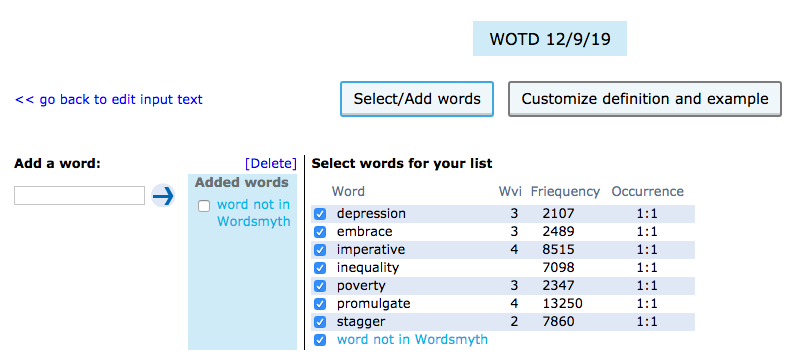
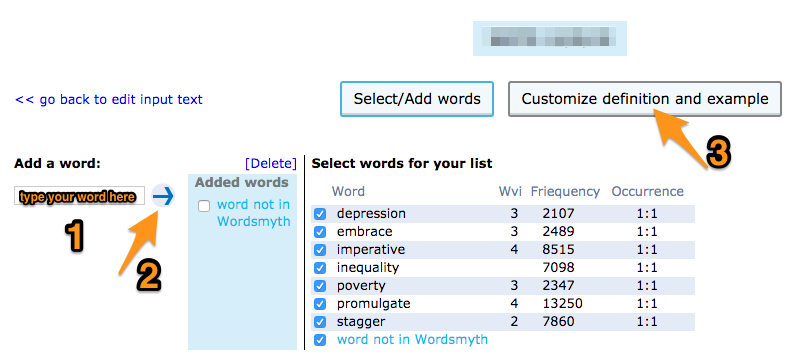
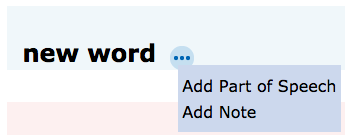
First, click on “Add/Select words” in the sidebar of the preview page. Whether you’ve created a wordlist using Wordsmyth text analysis or put in your own precise wordlist, the system will now display any words that are not found in our database under the “Add a word” input box. If you’d like to add one of these words to your list, click on the word or type it into the input box. (If the item needs to be capitalized, you will need to type rather than click on the word. Also, since typos and misspellings can occur in any text, you may wish to double check the spelling of your item before adding it to your list. The item could still potentially be in our database.) Next, click on the arrow next to the input box and select “Customize definition and example” at the top of the page. Once on the customization page, choose a part of speech for your word. (You can also attach a note to your word at this point.) Once you’ve chosen a part of speech for your word, add at least one definition. A note can be added at this point too. After the definition is added, the new word can become part of your wordlist.
- Add/Select words: Select words for your wordlist
On the “Add/Select word” page, you can see the complete list of words from your text, including any multiple word expressions that were detected automatically or were enclosed within quotation marks in a precise list. Here you can adjust the word selection for your wordlist by checking or unchecking any of the boxes next to words. In this list, you can also see the level of each word in the Wordsmyth Vocabulary Inventory (WVI), the word’s frequency in school texts—the lower the number, the higher the frequency—and how many times the word occurs in your text. This information may help you judge which words are important to use in your final list.
Smooth connection with activities
After your list is edited and saved, you can use it in any activities from the Wordsmyth Activities page. Connections to the Activities page can be found in the following places as you go through your wordlist-making process.
- in the sidebar on the preview window
- at the top right of any customization page
- in the “more options” dropdown menu on the “My WordLists” page

Share your lists with your students
If you are a teacher, you may be making wordlists for your students to study and learn. Sharing your lists with your students is easy. Just copy and paste the unique sharing URL of any list and send it to your students by email or any other means of communication that your school tools provide.

The sharing URL is available on the preview page right under the wordlist name. Is is also found in the “share” option from the “more options” dropdown menu on the “My WordLists” page.
Below is the URL for the example wordlist used in this guide. It can help you get a feeling for how wordlist sharing works.
https://www.wordsmyth.net/?sl=6f8b6611d9ad
Clicking this URL will lead you to the Activities page with the wordlist preloaded and ready to use in any activities of your choice.
Check out our amazing Wordlist Maker and see how easy it is to make excellent wordlists for your students or for yourself!