There are two types of reports: student reports and vocabulary reports.
Student reports
“Student reports” show the assignment results for each student, sorted by date and grouped by class. You can filter reports for either “study” or “test” assignments. Depending on the type of activity, you can also choose to show the scores, points, or the time spent.
Viewing information in student reports
There are two levels of detailed information available from student reports. If you click on any cell of the report chart, the report on each activity in the assignment will appear in a pop-up window. If you click on an activity in that window, a second pop-up window showing students’ correct or incorrect answers for each word will appear.
Vocabulary reports
“Vocabulary reports” contain student records for every word in their assignments. If desired, results can be grouped by WVI level—the specific level of academic vocabulary as ranked by the Wordsmyth Vocabulary Inventory.
Viewing information in vocabulary reports
If you click on a cell in the vocabulary report chart, you can view the detailed record of each word that was answered correctly or incorrectly in specific activities.
Filtering reports
Filters can be applied to the reports. The records can be filtered by school, class, students, and date.
Other places to access reports with filtered data
The same filtering mechanism is also available for student lists, lesson lists, and assignment lists. • From the lesson list, you can directly access each lesson’s report. • From the class list, you can directly access the lesson reports for the selected class. • From the student list, you can directly access the lesson reports for the selected student or students.
An assignment is a lesson that you assign to your students. Your students will receive the assignments on the class URL once they have logged in.
Making a new assignment
To make an assignment, click “New.” Then enter a name for the assignment. Add a description if you’d like. Students cannot see the description. The “note” area is where you can send a message to your students about the assignment. Next, choose a lesson, select a class, and then the students. You can select all students or individual students. The new assignment will be sent to the selected students. Set a due date (at your option) and click “Save.” The assignment will now be available to your students.
Students’ view of assignments
While logged in to your class URL, your students will see all the assignments given to their particular class. The assignments are sorted with the most recent on top. The filters above the list can also help your students find the assignments they need to work on. The list of “Non-completed assignments” will show the assignments that this user has not yet completed. The “All assignments” list will show all the lessons assigned to this user, with the most recent at the top. The activities are listed in the same order as that of the tasks on the Lessons page.
Other ways to assign
You can also assign any lesson directly from the lessons list on the Lessons page. Click on the lesson you want to assign and open the lesson information window. Click “Assign” and follow the steps as discussed above.
A lesson contains one or more tasks, which you will assign to your students to work on. Subsequently, you will receive reports of the students’ performance on these tasks. Plan your lessons systematically, as you may wish to reuse them for your future classes.
Setting up a new lesson
To create a lesson, click “New” and enter a name for your lesson. Add a description if you’d like. You can add tasks (particular learning or testing activities) for this lesson now, or you can add them later. If you decide to add them later, go ahead and click “Create lesson.” If you’ve checked the “Activate lesson maker” checkbox, click “Create lesson” and the system will automatically load the activities page with the Lesson Maker floater visible on top of it.
Adding tasks to the new lesson
A “task” is a wordlist combined with an activity, such as flashcards, a quiz, or a game. To add tasks to your lesson, first choose a wordlist. Click the list you want from the sidebar to add it to the floater. The sidebar shows recent lists you have made as well as pre-made Wordsmyth lists. If you don’t see the list you want in the sidebar, you can go to the “My wordlists” page under the “My Wordsmyth” main menu, where you will find all the wordlists you have saved. (If you haven’t created a wordlist yet, you can go to the Wordlist Maker to create one.)
Next, click an activity of your choice for the lesson. This will open a separate browser tab and the selected activity will appear on the Lesson Maker floater. Here you will choose settings for the activity, which will be recorded and saved along with the activity. Make sure to click the “Go” button as there are more settings inside the activity that you will want to choose from. Finally, click “Add to lesson” to add the selected activity with its chosen settings to your lesson. Close this tab and go back to the activities page. If you’d like, you can add more tasks to your lesson.
Tips concerning the lesson maker floater
• Click the “X” to close the floater temporarily on the current page. Refreshing the page will bring the floater back. • Clicking the “Stop” button will end the lesson-making process. • Clicking on the lesson name in the floater will take you back to the lessons page. • For assessment activities—multiple choice, matching, and fill-in-the-blank—there are additional options on the floater for you to choose from. 1. You can choose to randomize the order of the questions each time the assessment task is activated. 2. You can set the activity for “Study” or for “Test.” “Study” mode allows students to change the settings if they like and to add Help functions, such as making the answers available. “Test” mode will lock in the settings that you have chosen and disable all Help functions so that the students can take the quiz as a real test. 3. Please note, the option for test mode becomes active inside the activity after clicking the “Go” button. The option is displayed but disabled on the initial screen.
Editing a lesson
If you don’t add tasks when you first set up a lesson, you can always add them later. You can also add more tasks to an existing lesson anytime. On the Lessons page, click on a lesson. Its information page will pop up. Then click “add new task” and the system will take you through the same process as described above with the Lesson Maker floater.
In the lesson information pop-up window, you can also adjust the order of the tasks, delete a task, or assign lessons to your students.
Filtering lessons
When you have accumulated many lessons, you can sort and filter the list to help you locate the lessons you are looking for.
You’ve created your class, now you need to populate the class with students.
Open enrollment
If you have set your classes for open enrollment, your students’ information will automatically appear on the Students page after they have registered and logged in with the class URL.
Adding students manually
If you choose to manually add your students, click “New” on the Students page. Then in the student information window, choose the class for which you want to add a new student. Then type the name of the new student in the box provided. Other fields are only required in case you happen to have two students with identical names. If you leave the password box blank, a blank will be the password for the student.
Deleting students
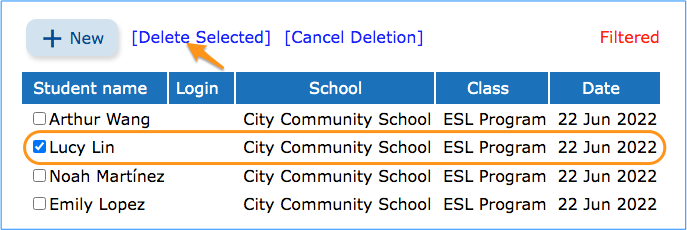
Click “Delete” and select the students you want to delete by checking in the checkboxes beside their names. Then click “Delete Selected.”
Editing student information
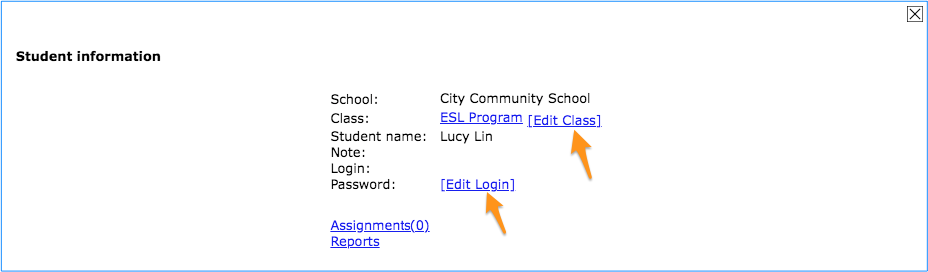
Click on a student in your class list to open the student’s information window. Here you can edit the student’s login information or move the student to another class.
Using the filter
You can choose to show all the students of a particular class, or you can search for the names of specific students. Type in the name of the student. Click “find” and the particular student or students will be displayed.
Setting up your class and any possible subgroups is the first step to using Teacher Tools.
Adding a new class
On the “Classes” page, click “New.” Then name the class and add a description if you’d like. The enrollment option “Open” means that students can register themselves after you have created the class. “Closed” means that students cannot register themselves and you will add students to your class manually. After choosing your enrollment option, click “Create class” and your first class will be ready for registration.
Managing the class
Each saved class has a specific class URL. This URL is the entry point for your students. Right now your new class is empty. Click on the class name to open its class information window as shown below. Now you will see your class URL. Here you can edit your class information, including the wording of the class URL, and add students manually if you’ve opted for “closed” enrollment. When you’ve finished setting up your class, you can assign lessons to your students and view reports.
Adding a subgroup of students as a new class
After creating the first class that contains all of your students, you can create additional classes for selected groups of students, such as students in an ESL program, so that they may receive special support. This allows you to tailor your students’ assignments to the needs of particular groups.
Deleting a class
Click on “Delete.” Then select the class you want to delete by checking in the checkbox next to its name. Then click “Delete Selected.”
Using the filter
Most teachers will not find it necessary to use the class filter. However, if you teach at more than one school or have created classes using the Wordsmyth URL rather than a school URL, you can see all your classes by selecting “All” under “Set Filter.”
When you create a school URL, SAML settings are set to active. You can start the SAML setup process by clicking “setup”, as shown in the screenshot below.
1. Download Wordsmyth SAML metadata
In the setup section, click the metadata link to get access to Wordmsyth SAML metadata.
The XML file will open in a separate tab. Just send this information to your SAML administrator to create “application” for your school URL.
2. Use Wordsmyth SAML metadata to create a special “application” on your site.
Using this information, the SAML service administrator should create special “Application” on your site. The Metadata file for the “Application” contains all necessary parameters to set up the settings. These parameters are:
Entity ID
Sign On Service Url
Log Out Service Url (optional)
X509cert
Name Id Format
3. Use the application metadata on your site to complete settings on Wordsmyth
The metadata from the application on your site should be specified in our SAML settings form to make the integration work.
4. User information XML attributes
Other parameters are necessary to support information extraction from SAML XML files which are generated after the integration is implemented. In operation, when the SAML XML exchange occurs, the “saml:AttributeStatement” section is sent to our program. For example:
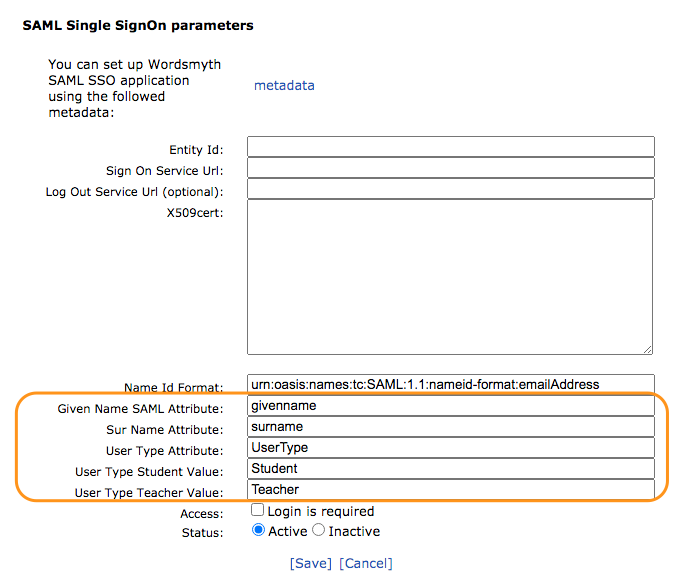
The set of attributes and their names can be different depending on the SAML service provider. But our application require “User Name” and “User Type” information to distinguish the student and teacher user roles. Therefore some special fields are added for the particular attribute values used by the SAML provider (to send us the User Name and User Type information).
These fields are:
Given Name SAML Attribute – the example above contains “givenname” (but “first name” may be used)
Sur Name Attribute – the example above contains “surname” (but “last name” may be used. (
One of these 2 fields can be omitted
User Type Attribute – contains “UserType”
User Type Student Value – contains “Student”
User Type Teacher Value – contains “Teacher”
Additional settings and control for your convenience
Login is required – if ON then access to School URL for users who are not logged in is impossible
Status: Active/Inactive – If “Inactive” then SAML integration is Off, and not used. It can be used for testing, to avoid removing all long parameters, but to just temporarily disable integration.
That’s all the parameters that are used in our page for SAML integration. Click “Save” to complete the setup. If you still have questions, please contact us at support@wordmsyth.net.
The following is a guide designed to make clear the real nitty-gritty of navigation within WILD. It discusses all four components of WILD—the Book, Collections, World, and Picture Dictionary—but it focuses most particularly on navigation within the Collections and within the WILD World. If you are looking for just a basic overview of WILD functionality, you may wish to go to the Quick-Start Guide to using WILD.
This detailed guide is intended to assist teachers in using WILD’s entertaining visual components to their fullest potential in support of learning. In particular, it seeks to help teachers understand the ways in which they can both allow their students to explore WILD in a fun and independent way as well as to call their students’ serious attention to those things they desire them to learn or to learn about.
The Book: Navigation to and from the expanded entry
The Book’s expanded entry for a word is the place where the largest amount of information about a word is found, as it contains all its images (both illustrations and photographs), definitions, example sentences, and translations. Expanded entries are reached by typing a word into the search box, clicking on the “See more” instruction next to a word on the top level of the Book, or by clicking on an image or entry icon in one of the other WILD components.
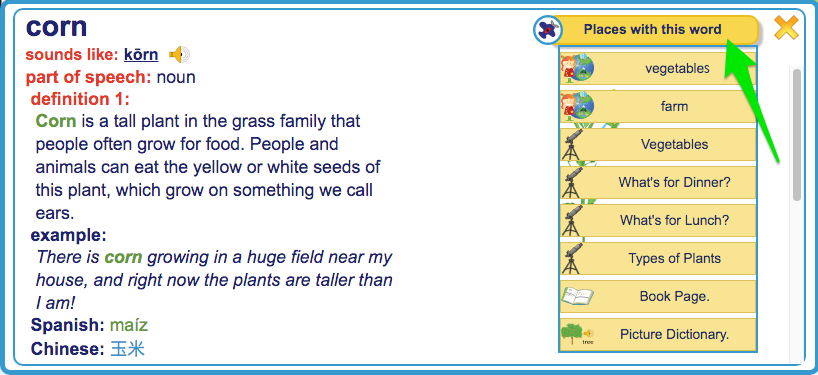
Besides being a repository of information about a word, the full Book entry is also the hub that links it to all the other parts of WILD where the word can be found. Every entry in the Book contains the banner “Places with this word.” Under this banner are listed all the different WILD environments where this word appears.
For example, if you are looking at the entry for “corn,” you can see in the “Places with this word” menu that “corn” can also be found in the Vegetables setting in the Grocery Store in the City. It can also be found in the Farm setting in Nature as well as in the Types of Plants collection, the What’s for Dinner collection, and the Vegetables Collection. Clicking on any one of these labels under “Places with this Word” takes you to the labeled environment. Once in an environment outside the Book, you can always click on the word’s image or entry icon in that environment and return to the word’s entry in The Book. Then, using “Places with this word,” you can navigate again to see the same word in another environment.
Navigation within the Book component
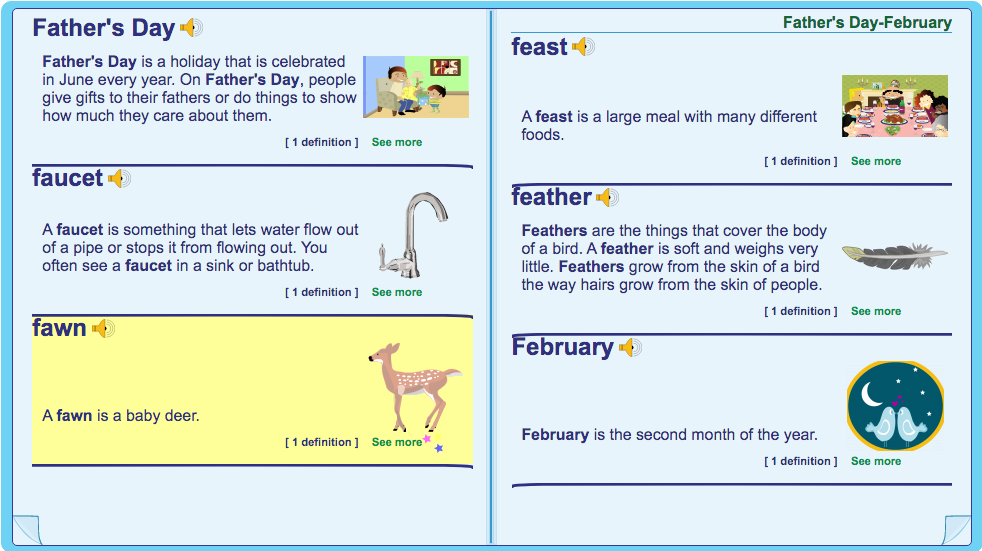
“The Book Page” in the “Places with this word” menu refers to the top level of the Book, which has the appearance of an open dictionary. The “pages” of the Book display images and concise dictionary entries. (They do not offer multiple meanings of words, example sentences, pronunciation, or grammatical information.) Navigating in the Book is done by turning the “pages” or using the search box at the top of the sidebar. Clicking on the “See more” instruction for a word opens the item’s full expanded entry.
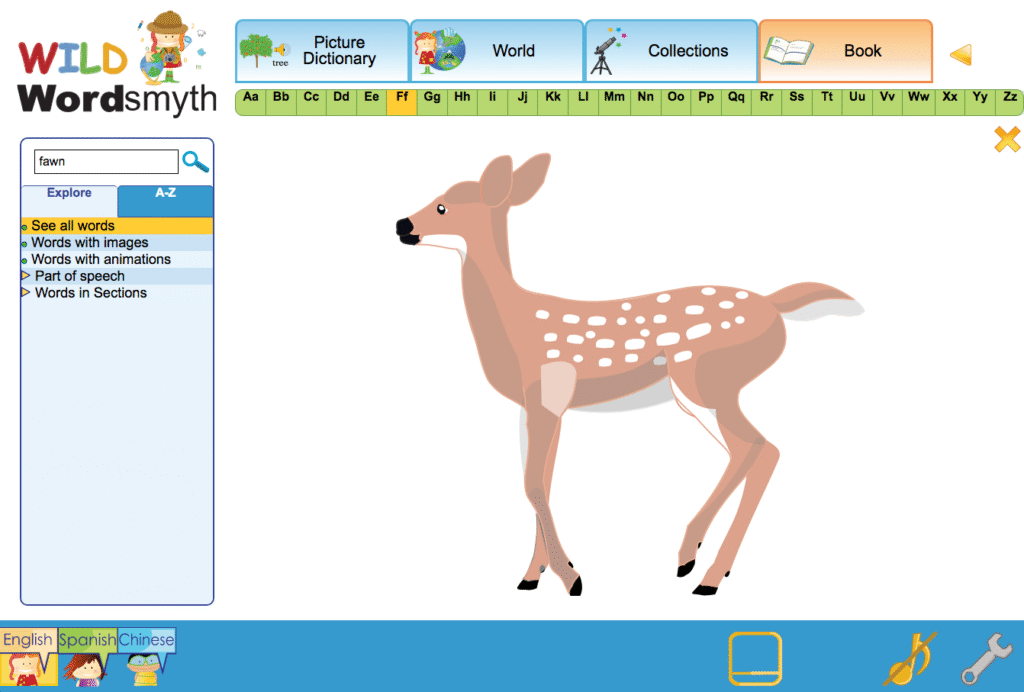
It may be useful to note that the largest images for any item in WILD are found in the Book Page environment. So, for example, there is an illustration for “fawn” in the Young Animals collection and in the expanded dictionary entry, but the “fawn” illustration is at its largest size when you click on the image in the Book Page environment. The many photographs included in WILD are also at their largest size in this environment.
Please note that if you have navigated to the Book Page image from a place in the Collections or World, you can easily get back to your earlier place in either of those environments by using the back arrow at the top right of the screen next to the Book tab.
Navigation within the Collections component
Sidebar navigation versus navigating within the main display: WILD offers two main arenas in which to navigate: the sidebar and the main display. Teachers are more likely to navigate using the sidebar while children are more likely to navigate within the main display. The sidebar provides a more direct way of finding items in WILD and allows the teacher to better control what children are viewing in the main display. This lets the teacher focus the students’ attention on selected items that are to be taught or discussed.
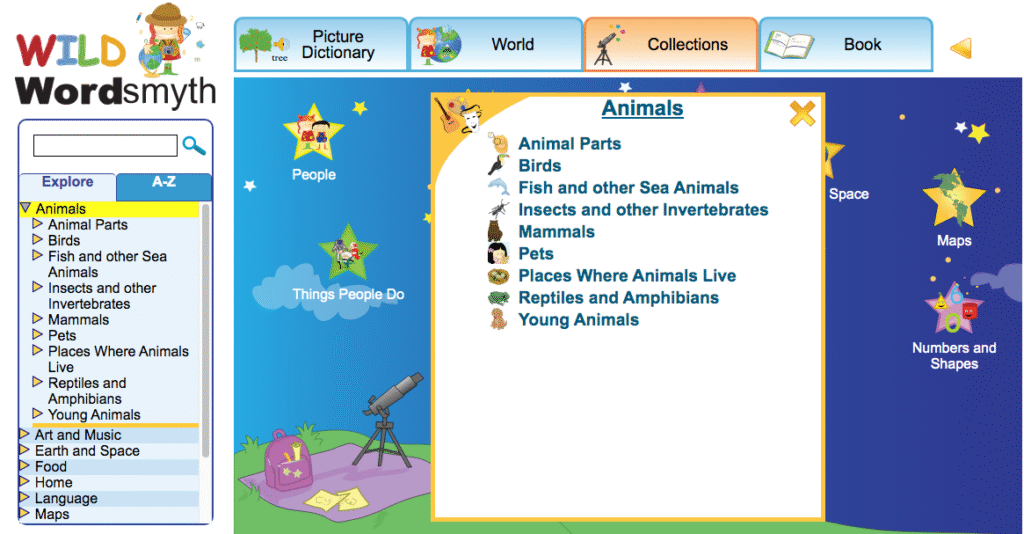
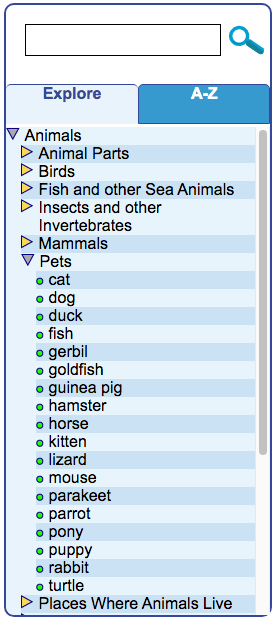
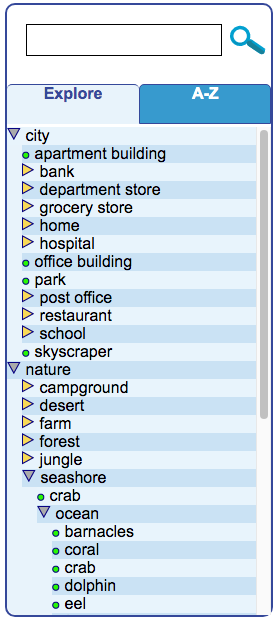
Using the sidebar in Collections: The Collections component is made up of twelve top categories and numerous individual “collections” under each category. The screenshot here shows the top category “Animals,” for example, with its numerous collections, such as “Birds,” “Pets,” “Young Animals,” and “Mammals.” Clicking on a top category label in the sidebar will display there the names of collections that can be accessed under that category. It will also open a visual/textual menu of these collections in the main display, as in the screenshot above. Clicking on the name of a collection in either place will open the collection so that its individual items can be viewed—“ostrich,” “parrot,” “toucan” in the Birds collection, for example. In the sidebar, individual items that make up a collection will appear in a bulleted list under the collection name.
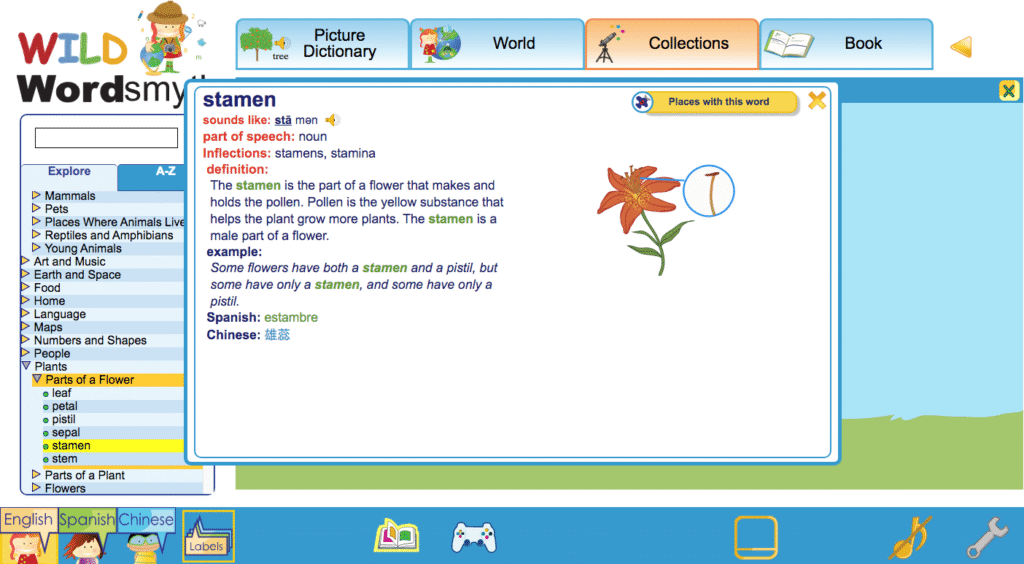
The teacher can also use the sidebar to pop up a desired item from an open collection in the main display (e.g., “stamen” in the “Parts of a Flower Collection”). Popping up an item both expands its image and brings up its audio and dictionary icons. This is done by single-clicking on that item in the sidebar. Double-clicking, or clicking a second time, on a word’s label in the sidebar will pop open the dictionaryentry for that item in the main display. The dictionary entry will show the definition, one or more example sentences, translations, images, as well as other information. (It’s important to note that images in the Book entry can be popped up larger than they first appear and that the Book entry will often contain multiple photographs in addition to the illustration that comes from the collection. If even larger images are desired, clicking on “Book Page” under “Places with this word” will allow you to access images of the item that are even larger.)
The yellow triangle (or “arrow”) next to a top category or collection name in the sidebar can be used for viewing other menus and lists of individual words that make up collections while leaving the main display unchanged. Single-clicking on any of the triangles allows teachers to search through other categories and collections while students continue to view what has already been selected for viewing in the main display. (If one should double-click on a triangle, it will have the same effect as clicking on a sidebar label, however. It will open up a menu or collection in the main display.)
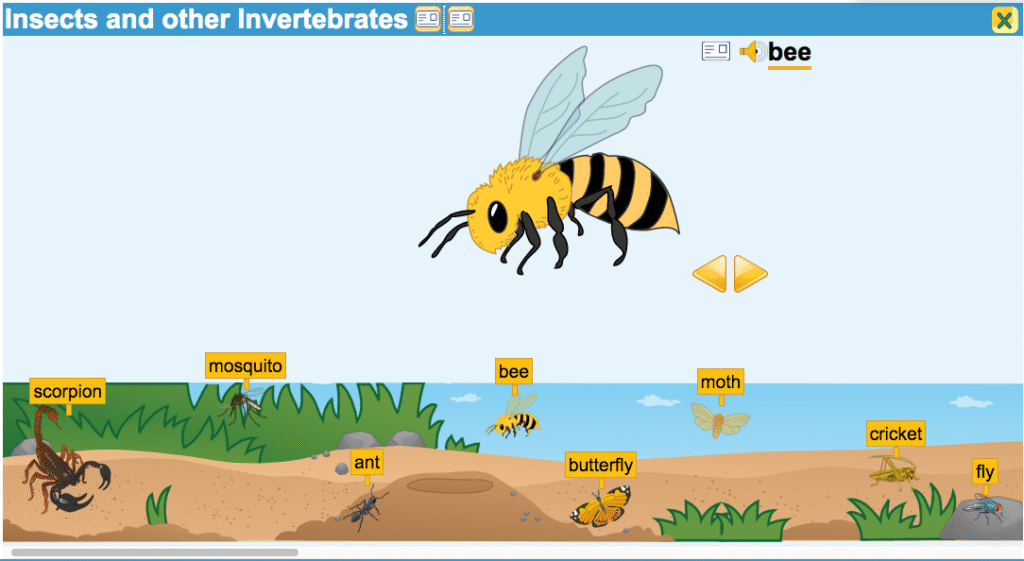
Collections navigation within the main display: When a child (or teacher) mouses over a category in the “stargazer” visual menu—the top level for Collections in the main display—it will simply highlight the image in yellow. Clicking on the image will open the menu of collections for that category in the center of the screen. Making a selection from the menu brings up the selected collection. When opened, the name of the collection (e.g., “Insects and Other Invertebrates,” “Reptiles and Amphibians”) will appear in the blue banner at the top of the display, and Book entry icons next to the collection name will let the child look up the meaning of any unknown words contained in that name in the Book.
Collections are typically displayed as a set of images in a strip which the child can scroll through. Each image in the strip can be clicked on to pop up a larger image of the item. Once an image is popped-up, its audio icon and Book entry icon will appear, giving access to the word’s audio pronunciation and its defining information in the Book. From the popped-up image, the child can also choose to use the navigational arrows to see other popped-up images from the collection instead of scrolling through the strip.
Once an image of an item is popped up, its Book entry can also be accessed by clicking directly on the popped-up image or clicking once again on the item in the strip. Once finished with the Book entry, using the close box or clicking away from the entry will return one to the strip and popped-up image.
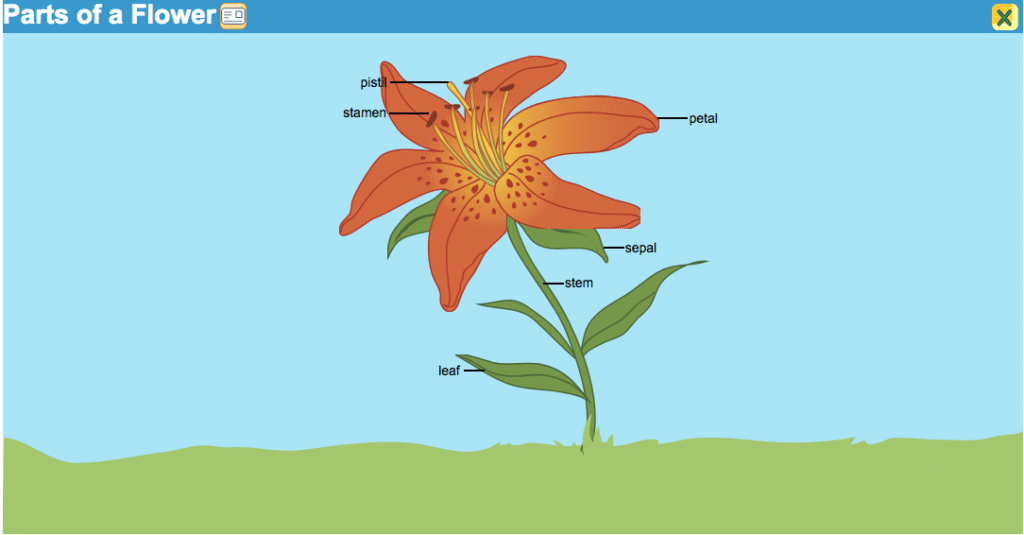
While most collections use the strip format, certain collections are displayed in diagram fashion with one large illustration marked with individual labels. For example, the “Parts of a Flower” collection shows the plant parts labeled on a single illustration of a flower. Mousing over a labeled plant part will highlight it and give access to audio pronunciation for its name as well as defining information in the Book.
When the child is ready to view a different collection from the same top category, the back arrow located at the top right next to the Book tab can be used to leave the current collection and go back to the previously selected menu. So, if one is in the “Flowers” collection, for instance, one can use the back arrow to see other collections under the “Plants” menu. (The back arrow can, of course, be used within any component to return to the previous screen.)
If the child wishes to leave the collection and go to a different component of WILD or to the main Collections menu, the tabs at the top of the display can be used to go to the top level of any WILD component—the stargazer menu in Collections, the choice of City or Nature in the World, or the first page of the letter A in the Book or Picture Dictionary.
Navigation within the World component
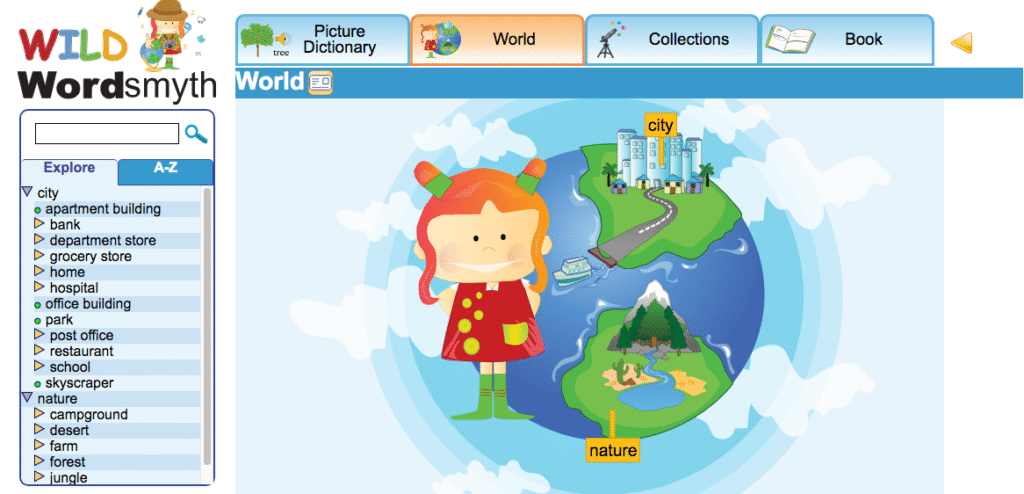
Sidebar navigation in the World: The World is made up of a large number of different settings divided between City settings such as “School,” Home,” and “Grocery Store” and Nature settings such as “Forest,” “Seashore,” and “Desert.” Within these settings are further sub-settings, such as “Menu” in the “Restaurant” and “Music Room” in the “School.” Some sub-settings even have sub-settings of their own, such as the “Refrigerator” in the “Kitchen” of the “Home” in the City.
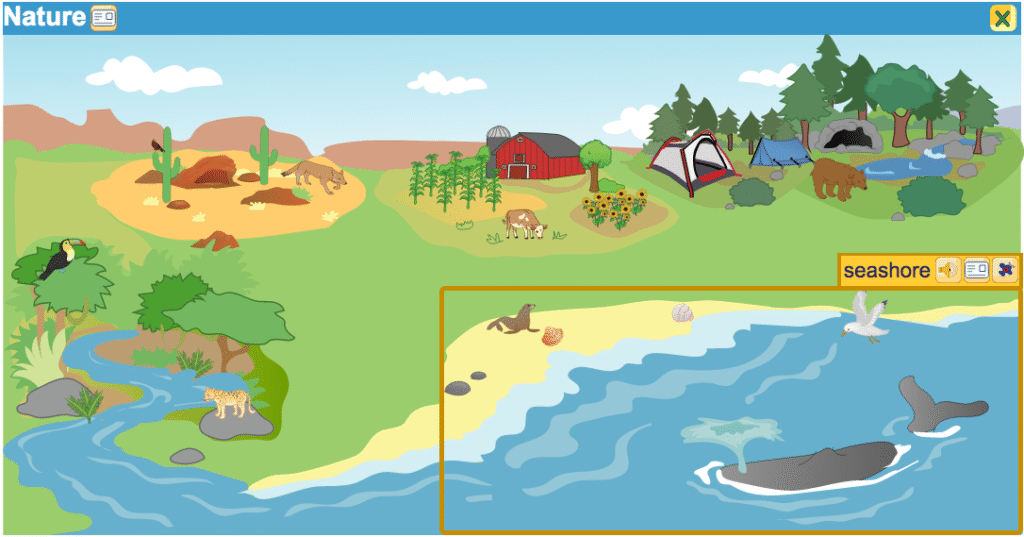
When the sidebar shows the initial choice of City or Nature, single-clicking on one of the labels will highlight the category image in the main display and darken the rest of the display, but it will not affect what is visible in the sidebar. Double-clicking, or clicking a second time, on either the City label or Nature label in the sidebar will display the menu of settings under the chosen category in the sidebar and will also open the visual menu in the main display. Once the settings menu is visible under either Nature or City, a single click on the other label will reveal the settings menu for that other category.
Double-clicking, or clicking a second time, on a setting label, such as “Seashore” or “Hospital,” will reveal in the sidebar the alphabetized names of individual items in the setting as well as the names of any sub-settings, such as “Ocean” or “Waiting Room,” for example. It will also openthesetting in the main display.
Single-clicking on a setting label in the sidebar will simply highlight that setting in the main display while the other parts of the display are darkened. It will not affect what is seen in the sidebar. However, once one setting has been opened and the contents have been revealed, a single click on any other setting label at the same level of operation will show the list of its contents and open that setting in the main display. (Sub-settings, such as the “Den” in the Desert setting or “Pond” in the Forest setting, are at a level below the main settings, so opening these sub-settings, requires a double-click. A single click will highlight a sub-setting and darken the rest of the setting.)
The ability to highlight a setting in the main display without opening it allows the teacher to discuss the concept of that setting (or sub-setting) with students without having to present them with all the visual and textual information that the opened setting offers, which could potentially distract the students from the discussion. This is the strategy behind there being a difference between single-clicking and double-clicking on these sidebar labels.
If a setting is currently open and one wishes to go back to just highlighting other settings rather than immediately opening one or more of them at that level, all that is necessary is to click on the label of the category above the current level. So, for example, if the Seashore is open and one wants to return to highlighting other settings such as Forest or Desert in the main display, one would click on the Nature label. This closes the Seashore and makes the other main Nature settings visible again.
As with the Collections, the yellow triangle, or “arrow,” next to a setting name can be used to search through menus and lists of words in the sidebar while not affecting what is being viewed in the main display. A single click on a triangle reveals the contents of a setting—its individual words and sub-settings–but does not open the setting in the main display. The teacher can also view the contents of multiple settings at the same time by single-clicking on multiple triangles.
At any point that the teacher wishes to focus students’ attention on a particular word while navigating in the World, its listing in the sidebar can be single-clicked to highlight the item in its setting. (The rest of the setting will darken.) Double-clicking on the word’s listing in the sidebar will open the item’s Book entry. A larger image and possibly additional images can be accessed there as well as other dictionary information. The search box, can, of course, be used at any time to highlight a word in a setting or go to its entry if it is not contained in the current setting.
It should be noted that because the highlighting of large items in a setting in the main display can sometimes overlap with that of smaller items in the setting, smaller items can sometimes be tricky to highlight and select—the highlighting of the larger item blocks the smaller items, in other words. When this occurs, the sidebar can be used to highlight and select these smaller items. Album view can also be used in these cases, as album view isolates each item from the rest of those in the setting, making each clickable. (Album view can be turned on by clicking on its icon in the footer.) The sidebar and album view can be useful for this same purpose in the Collections, particularly in the World Maps, where smaller countries can sometimes be blocked by the highlighting of larger ones.
Main display navigation in the World: The main display is designed for easy navigation and exploring. When a child (or teacher) mouses over a setting in the main display, the setting is highlighted and three icons appear: the audio icon, Book entry icon, and airplane icon. Clicking the airplane icon opens the setting. Clicking within the yellow box surrounding the setting also opens it and displays sub-settings contained within it as well as individual items that make up the setting.
Once in a setting, a child may explore individual word items by mousing over images or clicking on them. Mousing over an item highlights it and brings up its audio icon and Book icon. Clicking on an item immediately opens its Book entry. (Note that it is the item itself, the image, that is clicked on. Clicking on a wordlabel in a setting does not cause any action to occur.)
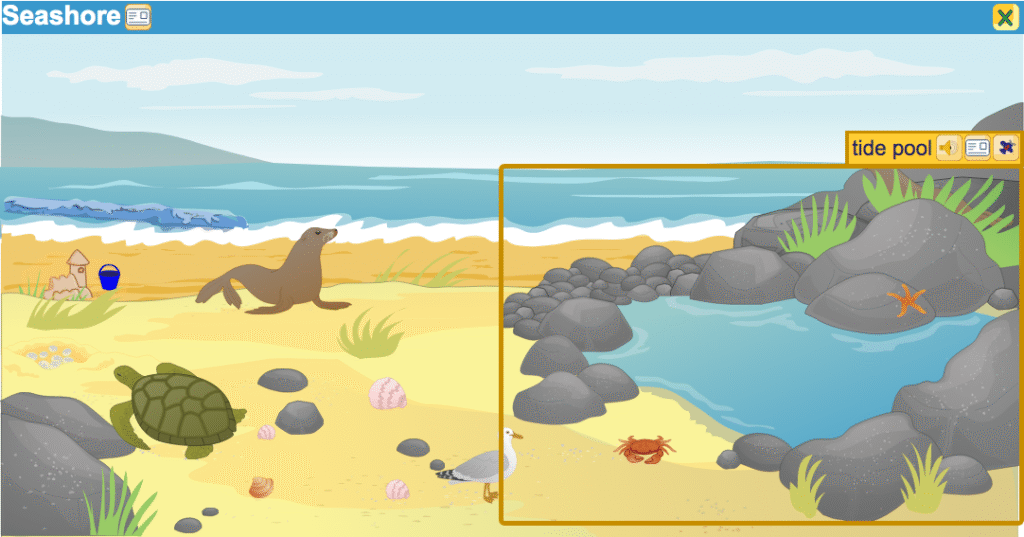
When mousing over images in a setting, the child will find that some highlighted images have airplane icons and others do not. The airplane indicates that the image represents not only a word but a setting—the Tidepool, for example, in the Seashore setting. The child can enter the setting by clicking on the airplane icon or by clicking within the highlighting box surrounding the image.
One scenario for World navigation in the main display might include clicking on the image at the top level to open Nature, clicking to open the Seashore setting, hearing how to pronounce the word “sea turtle,” looking up the word “tide pool” by clicking on its entry icon, clicking off the Book entry and looking again at the Seashore, clicking to open the Ocean setting, and, finally, reading a bit about starfish.
After exploring in one setting, the child may leave that setting by clicking on the close button or using the back arrow. Then the child can click on any other highlighted setting. In addition, as in the Collections, it is always possible to click on any one of the tabs at the top of the screen to go to the top level of any of the WILD components.
Navigation in the Picture Dictionary
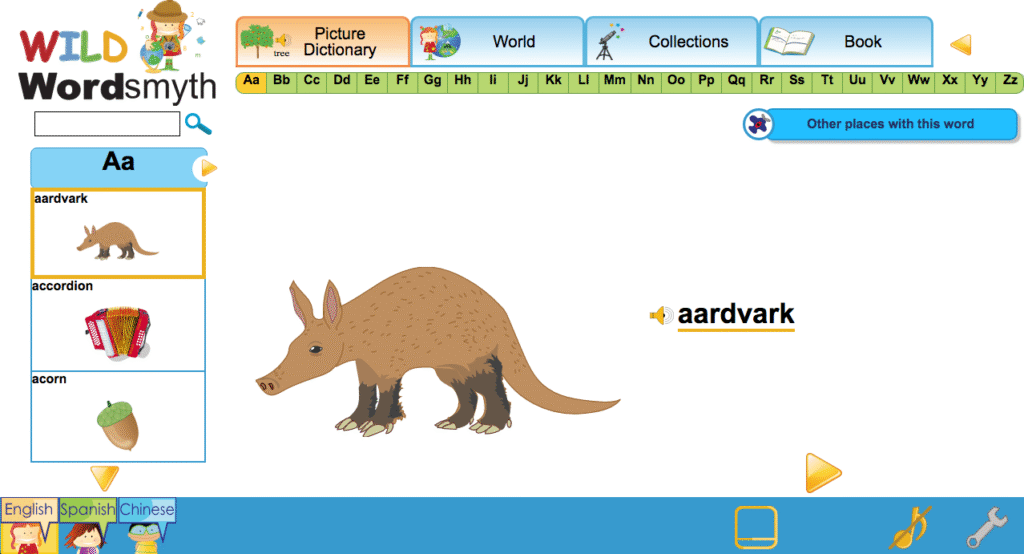
Children can browse through the Picture Dictionary by clicking on the yellow navigational arrows in the main display or by using the scroll bar on the left side of the screen. Children can also use the thumb index at the top of the page to go to words beginning with a certain letter. Of course, teachers can navigate directly to a particular word by using the search box.
The Picture Dictionary defines words by picture only, but more information can be easily accessed through the word’s link with its dictionary entry in the Book. From there the child can navigate to that word in any other environment where it appears in WILD.
This overview of the structure and general operation of WILD is designed to help teachers get started using this rich online resource with their young students. For more detailed information on how to use WILD, please go to A Detailed Look at Navigating in WILD.
WILD’s structure
WILD consists of four components, or learning environments, each providing unique information to assist young learners as they develop skill in different areas of literacy.
The Book: An illustrated K-2 dictionary of nearly 4000 words with easy-to-read definitions, multiple senses of words, and kid-friendly example sentences. All labeled items throughout WILD are linked to their entries in the Book, and the Book entries themselves serve as hubs between the different WILD components.
World: Interactive picture dictionary showing labeled items in natural and urban settings (such as “Forest,” “Farm,” “School,” and “Grocery Store”) with multiple levels for children to explore.
Collections: An expansive set of illustrated objects and concepts arranged in categories called “collections.”
Picture Dictionary: A simple dictionary for very young children with words defined by picture only. As in all other WILD components, human-voiced audio is also included for each word, and each word is linked with its entry in the larger dictionary, the Book.
The WILD Display
The component tabs
At the top of the display are tabs that give access to the top levels of each of the four WILD components (as shown in the screenshot below). No matter where you are in WILD, you can always click on one of the blue tabs at the top of the screen to go to the starting level of any of these four components.
The main display
The center area of the screen, “the main display,” offers simple, visual ways for children to browse and explore in WILD. In the World, children click on settings in the main display to enter those settings and explore what is there. In the Collections, children first click on a choice from the visual/textual menu and then browse through the selected collection by sliding the strip at the bottom of the screen or clicking from one popped-up item to the next. In the Book, children can browse through the dictionary by electronically turning the pages, and, in the Picture Dictionary, children can scroll through the pictures using the sidebar or clicking the navigational arrows.
The search box and the sidebar
The simplest and most direct route to a word in WILD is the search box. If you have a particular word you want to focus on, you can simply type it in the search box, which is always found in the upper left corner of the page. If the word is contained within the learning environment that you are currently in—the Jungle in the World, for example—the result will be highlighted there. If it is not contained in that environment, the word will come up from the Book.
Below the search box, the sidebar in each WILD component allows for more structured, textual browsing. The sidebar is an excellent tool for teachers to quickly find words, settings, and collections they wish their students to focus on. Teachers will likely use the sidebar as their primary means of navigating the site.
At the top of the sidebar, there are two tabs: Explore and A-Z. The sidebar tab labeled “Explore” displays a table of contents for the WILD component you are presently in, or shows ways of filtering the contents of that component. If you are in the World, the sidebar shows the menu of the places (“settings”) where you can go and all the items that can be found in each place. In Collections, it shows a menu of all the various top categories and collections, and a list of all the individual items in each. And in the WILD Book, it shows a menu of features by which you can filter the dictionary list so that you can see only those entries containing a desired feature—only words that are adjectives, for example, or only words that have animated illustrations in their entries.
The tab labeled “A-Z” in the sidebar gives access to an alphabetical list of all the individual words that can be found in the particular WILD component that you are currently in.
The footer: ways to customize the display
The footer in the WILD display gives various options to control and customize the learning environment.
Language options: While English is the default language for WILD, you can choose to add Spanish or Chinese by clicking on the respective language icon. Clicking once again will turn the selected language off. (English can be turned off as well. However, if English is turned off, it will need to be turned on again in order to turn off Spanish or Chinese.)
Labels: The default view for World and Collections shows individual items labeled in their settings or collections. Word labels can be turned off or turned back on by clicking the Labels icon in the footer.
Album View: Album View takes the individual labeled images out of a Collection or a World setting and displays them against a plain, white background as in a photo album. (The images are presented in alphabetical order.) Album View can be helpful in focusing students’ attention on particular items that are being taught or discussed. Clicking the Album View icon turns the view on or off. Clicking the close box also returns you to the setting or collection that you came from.
Games: In World and Collections, you will see a games icon in the footer. Clicking on the games icon will activate vocabulary games using the words of the particular collection or setting you are in.
Full screen: Full screen view hides the sidebar. The sidebar is primarily for teachers to use for searching and browsing when planning a lesson or activity or when guiding a lesson. When children are using WILD to explore on their own, full screen view can help them concentrate. Full screen view with labels off can also be used for fun and informal quizzing.
Audio tooltips and tooltips language: Audio tooltips can help a child who can’t read yet to explore WILD easily. When audio tooltips are on and a user mouses over an icon anywhere in WILD, an audio explanation about the icon will play automatically. In the footer, the audio tooltips icon looks like a musical note. The icon next to it in the footer—the wrench—can be used to change the tooltip audio language to Spanish or Chinese.
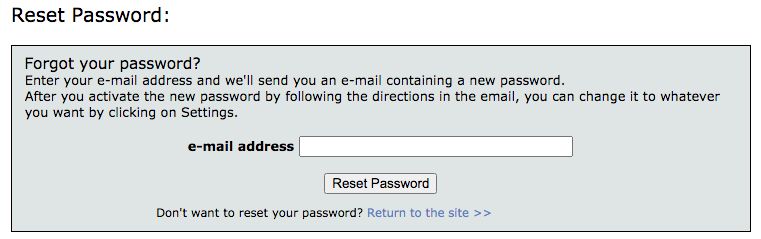
If you forget your password, you can reset it by clicking “Forgot your password?” on the sign up screen.
On the next screen, type in your email address, and click “Reset Password”.
An email will be sent to you with a new password (generated by the system) and an activation code. Please note that sometimes the email might end up in a junk mail folder.
Copy and paste the activation code and new password in the respective input boxes, and click Activate.
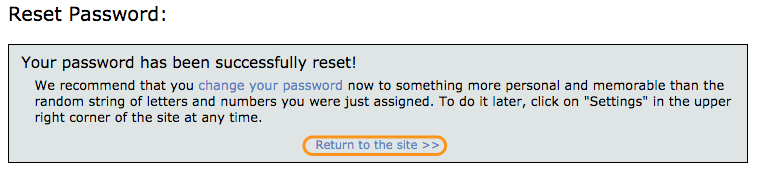
At that point, your password is the one Wordsmyth assigned to you. We recommend you to change it right away to a secure password of your own.
Click the link to return to the Wordsmyth site, and go to settings.
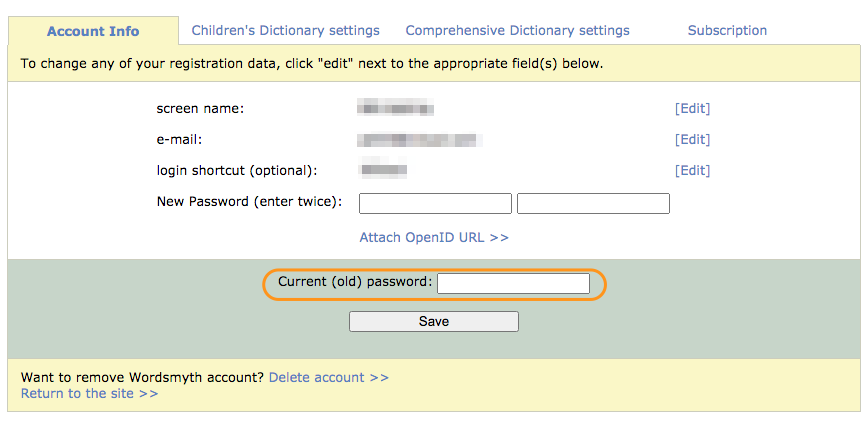
Under Account Info tab, click on [edit Password].
Type in a new password of your choice – twice. We also require you to provide the current password to identify you and verify that it is you who are making the change. It’s easier to copy the current password from the reset password email and paste it in. As you can see, we take security very seriously.
Teachers, the Wordsmyth Vocabulary Center offers some of the best vocabulary-teaching tools you’ll find online and supports your curriculum’s vocabulary component for all subjects. In addition, it provides a remarkably easy way for your students to personalize their vocabulary learning on their own.
Just pick a list and choose an activity. It’s simple!
On the Activities page of the Vocabulary Center, you can pick a word list from the yellow sidebar. If you haven’t created any lists of your own yet, you can always choose one from the Wordsmyth Vocabulary Inventory (WVI) lists according to your grade level. These are leveled and curated academic vocabulary lists. After you’ve selected your list, its name will appear in the blue banner above the activities.
Now you can choose to have your students study the list of words with one of the study tools, or play a game using the words, or take a quiz to see how well they know them.
For a customized learning experience, you can make your own word lists with ease
If you have a list of words you want your students to learn, or that you want to learn yourself, go to the Word List Maker. You can type or copy and paste your list of words into the space provided. If you want to make a word list based on a reading, you can copy and paste your article into the space and the text analysis system will automatically extract the best vocabulary words and create a word list for you.
By adjusting the Word list maker settings, you can decide what type of words you would like to have in your list.
All your word lists are saved in the My Word List section of the My Wordsmyth menu. There you can preview, edit, or rename your lists. You can use your lists anytime with any activities.
As an educator, you can share your lists with your students. Anybody who has the URL of a particular word list can use the list with any of the Vocabulary Center activities.
Subscribe to access full Wordsmyth dictionary features and vocabulary tools. Teacher Tools allow educators to manage classroom, create and send assignments to students, and get comprehensive reports on their vocabulary growth.