Category: News & Announcements

  • Tips for finding what you need in Wordsmyth

    Tips for finding what you need in Wordsmyth

    Wild card search

    Did you know that Wordsmyth’s dictionary search box permits the use of wild card symbols?  

    The question mark (?) and the asterisk (*)—these unassuming symbols are surprisingly powerful, as they can represent any letter or string of letters in a word. Understanding how to use them will increase your ability to find words you can’t spell or don’t fully recall. Wild card symbols also allow you to find groups of words that contain a particular letter pattern.

    Read more…

    Where is the thesaurus?

    We’re often asked “Where’s the thesaurus in your dictionary?” What some users don’t recognize right away is that synonyms, similar words, and antonyms are matched with each sense of a word and appear directly under the appropriate definition for a particular headword.  A user doesn’t need to click anywhere to get thesaurus information and doesn’t need to leave the page in order to see it.  In other words, the thesaurus is not a separate entity, but something built into the dictionary entries themselves. This is why we call it an “integrated thesaurus.”

    Read more…

    Have an idea but not the word?

    “Reverse search” is an advanced search tool that allows you to search within the full text of the dictionary for words, word parts, or phrases that may be useful to you, either in finding a word for a meaning you have in mind or in finding a pool of words for writing inspiration or assignments. A typical way of using the reverse search feature in Search Tools is to search for words that have the search term in their definitions or example sentences.

    Read more…

  • Wordsmyth News

    Wordsmyth News

    Since last year’s release of Teacher Tools, the key component of our Educational Group Subscription, we have received a good deal of constructive feedback as well as questions about the new features. We have collected the most frequently asked questions to help you get started with Teacher Tools this new school year.

    Teacher Tools FAQ

    • As a teacher, I wonder if I can hide or disable the “Check Answer” feature in the quizzes that I create for my students?

    When you set the lessons for “test” mode, Help functions such as “check answers” will be disabled for your students. Other functions will also be locked exactly as you have determined them. Please note that the quiz operates in test mode only after you click the “Go” button. This is to make sure you’ve reviewed the activity and decided that what you see if what you want for your students.   

    • I can’t choose the test mode while assigning assessments to my students. What’s worng?

    The option for test mode becomes active inside the activity after clicking the “Go” button. The option is displayed but disabled on the initial screen. 

    Our development team has been working to improve the design to convey the message more clearly and changes will be implemented at our next update. We may decide that radio buttons should be in gray when they are disabled. Let us know if you have any more questions or suggestions for improvement. 

    • I’m a teacher who still prints tests.  When tests print, the choices for one question sometimes get bumped to the next page.  Please tell me how to fix this.  

    In Multiple Choice, after you click the print button, check the “Set Page Break by Click” option shown at the top of the page. Then when you move your mouse, you will see a gray line appear at the bottom of the question where you put your cursor. Find the best spot to break the page, and just click on the page break line.

    Now click Print. The page should print as you set it.  

    • I’ve tried out Teacher Tools with an Individual Subscription, what makes an Educational Group Subscription different?

    The Educational Group Subscription provides premium features through a unique school URL. After the payment transaction is completed, teachers receive a confirmation email with a link to their school start page (www.wordsmyth.net/school/your_school_name/start). Through the start page, all users on the group subscription, (teacher or teachers, students, assistants) will be able to make use of Wordsmyth’s premium educational features, including Teacher Tools that allow educators to interact with their students. In other words, each subscription is given its own start page and each teacher or student can use this start page to get access to subscription privileges. We recommend bookmarking your school start page or adding the URL as a link on your school’s website.

    Subscribe now and start your new school year with the support of Wordsmyth dictionaries and vocabulary tools.

  • Wordsmyth for Educators: Parts of Speech

    Wordsmyth for Educators: Parts of Speech

    Explaining parts of speech for young children

    The Wordsmyth Illustrated Learner’s Dictionary (WILD) is adding a new collection–Parts of Speech–to its Language collections. With fully animated explanations, now you can help your students get a clear and basic understanding of concepts such as noun, adjective, verb, or adverb. Here is a quick peek:

    The full Parts of Speech collection will be available in WILD this summer. Watch for it in the Collections under the Language category. While waiting, subscribe and check out the amazing features already in WILD such as the following:

    And so much more…

    Helping older children understand part-of-speech concepts as well as how to use a dictionary

    The Wordsmyth Children’s Dictionary, designed for upper elementary students, offers simply-written but slightly expanded definitions of the different parts of speech, which can be accessed by clicking on the part of speech labels that are listed for any particular word in the dictionary—the word “plant” for example, has various definitions for “plant” as a noun and “plant” as a verb.  Clicking on the Part of Speech label for “noun” or the Part of Speech label for “verb” will bring up animated explanations of these concepts.  Understanding of the parts of speech, besides being important for language and academic development generally, is important for understanding how a dictionary functions, as they are key to the way dictionaries organize and present information about a word.  As words tend to have multiple meanings, understanding the parts of speech will help children locate the particular sense of the word they are looking for when they use a dictionary by themselves.

    And now, for your convenience, we’ve gathered all the explanations of Parts of Speech contained in the Children’s Dictionary into one post in our blog!  It’s called “Parts of speech explained for grades 3 to 6,” and it’s there to support you in your teaching of these important concepts.

    Advanced support for teaching ESL students and older students the parts of speech and related concepts

    A unique feature called Grammatical Patterns in the Advanced level of the Comprehensive Dictionary provides even more support for ESL students and teachers.  In addition to offering a guide to verb constructions in English, the feature offers a glossary of grammatical terms, which are explained in quite simple language but go into a fair amount of detail in order to answer often-ignored questions about parts of speech and other fundamental grammatical concepts (such as “clause,” “phrase,” “direct object,” “participle,” “gerund,” etc.). These are truly a must-read for teachers!  Click here for a look in our blog to see how the grammatical patterns feature explains the parts of speech. We also hope you will look at the additional comprehensive offerings we have in the Grammatical Patterns Glossary. We’re sure you will enjoy exploring all the topics!

  • Wordsmyth News

    Wordsmyth News

    Wordsmyth dictionaries have been updated!

    Wordsmyth updates its dictionaries every year with new entries, additional example sentences for existing entries, new images, and additional animations. This year we’ve also continued to expand our coverage of phrasal verbs and idioms in our dictionaries, and these improvements will be reflected in this update.

    Subscribe to get access to the full features of all 3 dictionaries:

    And so much more…

    Wordsmyth feature highlight: Word Parts

    The study of word parts (roots and affixes) is an important tool used by teachers and individual language learners to boost vocabulary learning.  Wordsmyth Word Parts is one of the most popular features of our dictionaries. We’ve recently put together a series of blog posts to support learners and educators in making the best use of Wordsmyth word parts data and related features. So far, there are five posts in the series:

    Wordsmyth word parts database user guide
    Word Parts I: basic roots
    Word Parts II: basic suffixes
    Word Parts III: Intermediate level suffixes
    Word Parts IV: basic prefixes

    We’ll be continuing to provide more supportive materials for Word Parts and other Wordsmyth features. Stay tuned!

    Response to User Feedback: improved print function in activities

    In response to requests from long-time users, we are in the process of extending the full print functionality of our legacy activities to our new Vocabulary Center activities. The first activity we have extended the functionality to is Multiple Choice. Now if you click on the print button inside the Multiple Choice activity, you will see a print page that allows you to set the page border, adjust the font size, randomize the order of the questions, and more. You can also save the print as a PDF using the browser print option.

    Please check out the Multiple Choice activity and give us your feedback by taking a short survey. This will help us tailor the print functionality to your needs. Thank you!

    Happy Wordsmything!

  • Activity print function improvement survey

    In response to requests from long-time users, we are in the process of extending the full print functionality of our legacy activities to our new Vocabulary Center activities. The first activity we have extended the functionality to is Multiple Choice. Now if you click on the print button inside the Multiple Choice activity, you will see a print page that allows you to set the page border, adjust the font size, randomize the order of the questions, and more. You can also save the print as a PDF using the browser print option.

    Please check out the Multiple Choice activity and give us your feedback by taking a short survey. This will help us tailor the print functionality to your needs.

  • Wordsmyth News

    Wordsmyth News

    Word of the Year 2022

    Word lovers, vocabulary learners, teachers and students: it is time to start thinking about the Word of the Year 2022! Write a short essay reflecting on the Year of 2022. After writing, choose the word that you feel is most key to your essay. It will be your word of the year!

    Wordsmyth Writing Tool

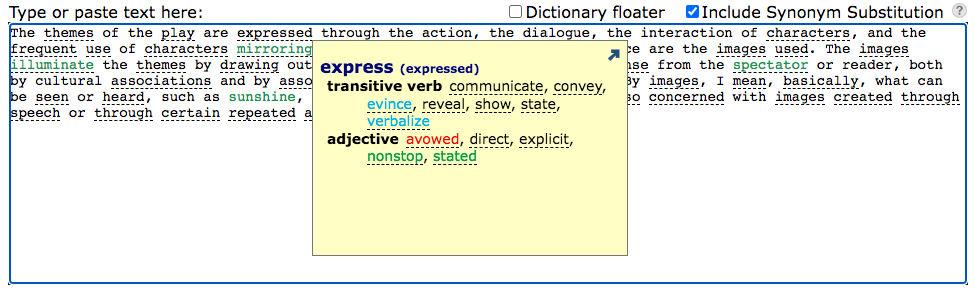
    Don’t be discouraged by the essay writing. Check out Wordsmyth’s new writing tool! It is designed to help you communicate your ideas. One of the useful support features offered by the writing tool is Synonym Substitution. This feature gives you choices of synonyms that can help you convey your exact meaning.

    After writing or pasting your text into the editing box, click the “analyze” button with the “Include Synonym Substitution” option checked. Words having synonyms or similar words will be underlined in the analyzed text. Click any underlined word to see the color-coded list of synonyms available for that word.

    Read the writing tools user guide to learn more the features that can support your writing.

    Vocabulary Notebook

    Requested by our teachers for years, Wordsmyth’s Vocabulary Notebook is now online along with our other Vocabulary Activities. We’re happy to announce that teachers can now print out Vocabulary Notebook material using their chosen wordlists or assign Vocabulary Notebook activities to students digitally. Students can work on their assignments either online or with print-outs from the teacher. They can also work online first and then print out what they have done. Working digitally allows students to download images to illustrate their vocabulary words. These images along with text that they have inputted will appear in their print-outs. Both digital and print modes allow and encourage manual creation of images to illustrate vocabulary as well.

    As you use the Vocabulary Notebook, please share with us your experiences at support@wordsmyth.net. Our team will continue to improve the activity with your feedback.

    Special announcement for users who love our old quiz makers

    At your request, we won’t remove our old activities next summer. They are available under the Vocabulary Center menu – listed as “Legacy Activities“. In the meantime, we will continue to develop and improve the new Vocabulary Center Activities to accommodate all that was offered in the older version and more. We hope someday you will move to the new version, with satisfaction in using its new features. 

    We recommend that you try our new Wordlist Maker with the new activities under the Vocabulary Center top menu. It may take some time to get used to the new features in these activity makers. Here is a user guide  to help you master the learning curve quickly. 

    The new vocabulary system has the following advantages:

    • The Wordlist Maker’s new text analysis function allows automatic identification and selection of academic vocabulary – from our leveled “Wordsmyth Vocabulary Inventory” (WVI). It is very popular among teachers and language learners. 
    • You can save a wordlist once and then use it with any activities.
    • These new HTML5 activities have a very easy-to-use print functionality, for blended learning processes.
    • You can also save a particular activity with particular settings in a Lesson (from Teacher Tools).
    • Lessons can be assigned to a Class or a particular student from a class. You will then have access to students’ results via the “Reports” Teacher Tool.
  • Wordsmyth News

    Wordsmyth News

    Teacher Tools coming to Kids.Wordsmyth

    After a year of beta testing, Teacher Tools is now officially released on all Wordsmyth sites including kids.wordsmyth.

    With a few simple steps, teachers will be able to use their current vocabulary wordlists to create lessons, assign them to their students, and review reports to monitor their students’ performance and vocabulary growth.  With the new semester coming up, now is the best time to set up your first class and explore the power and potential of Wordsmyth.

    Get started today!  We look forward to making your vocabulary teaching easier and more efficient with Wordsmyth’s Teacher Tools.

    Kids.Wordsmyth singled out by reading specialist, Thomas Gunning.

    In his new (2022) book: Closing the Literacy Gap: Accelerating the Progress of Underperforming Students, the author, reading specialist Thomas Gunning, specifically points to kids.wordsmyth as he describes dictionaries and glossaries as “one of the most effective student tools for closing the vocabulary gap.”  Here is his enthusiastic description of our dictionaries.

    Two of the most extensive online dictionaries are Wordsmyth WILD and Wordsmyth Word Explorer. Wordsmyth WILD (Wordsmyth Illustrated Learner’s Dictionary) is designed for grades K-2. WILD features illustrations, student-friendly definitions, examples, spoken pronunciations, and animations. It also presents categories of words and a Picture Dictionary in which words are defined by illustrations only. Wordsmyth Word Explorer Children’s Dictionary is designed for grades 3-9. Wordsmyth Word Explorer has similar features. Teacher tools include the ability to set up and manage classes, make use of available wordlists, and to create quizzes and activities.  WILD and Word Explorer are free, but subscription versions have more features and activities, including Spanish and Chinese translations of words being looked up and Word Parts. Word Parts defines roots, prefixes and suffixes; provides their history; and lists a large number of examples. Wordsmyth is embedded in ReadWorks.

    Thomas G. Gunning, Closing the Literacy Gap: Accelerating the Progress of Underperforming Students

  • Wordsmyth News

    Wordsmyth News

    New! Wordsmyth’s Spelling activity for assessment

    To support educators’ needs in assessing students’ vocabulary skills, we’ve added Spelling as a new activity in our Vocabulary Center.

    For an easy test, students can play the audio pronunciation to listen to the word, then type out the spelling with the hint of how many letters the word contains. Teachers can also choose the more difficult level, in which the only clue is the definition of the word. This tests for meaning as well as spelling.

    Database update

    swim

    Every year, we update our dictionary data with newly added headwords, phrases, images, and animations. After completing the recent update, Wordsmyth dictionaries contain a total of 58,315 headwords; 12,987 multi-word expressions; 6,317 images; and 370 animations. Our dictionary apps are also updated.

    Student & ELL Dictionary app: composed of dictionaries at 3 levels: Beginner, Intermediate, Advanced. Users can easily move up or down between levels to find simpler or more advanced definitions.

    Children’s Dictionary app: a dictionary with simple and clear definitions designed for upper elementary and middle school students, which can be used with or without an internet connection.

    Idiomatic phrases in Wordsmyth dictionaries

    Wordsmyth has recently updated its collection of idiomatic phrases.  We’ve added both more senses and more example sentences, especially to phrasal verbs.  This update will make Wordsmyth an even more helpful and powerful tool for learners and teachers of English.

    Did you know that Wordsmyth phrases each have their own entries? This makes searching for a particular phrase very simple. Just type the phrase into the search box! No need to look up and search through the entry for “get” if you’re looking for “get away with” or “get around to.” Still, if you’d like to see other phrases with “get,” they can easily be seen listed in the entry for “get.”

    Learn more about Wordsmyth phrases and how language learners can benefit from this richly defined and easily accessed resource.

  • Wordsmyth news

    Wordsmyth news

    Word of the year 2021

    Wordsmyth would like to invite you to reflect on this year and consider a word that has most drawn our society’s attention to something important, something that links this past year with the future. Please tell us what significance this word has had in your life, through personal experience or through awareness of the experiences of others. As an educational dictionary site, we’d also like to call on those of you who are educators to encourage your students to participate. Please guide your learners to write their reflections on the meaning of the word they choose and the significance it has in connection with our world.

    Since we posted the Word of the Year announcement on our homepage, we have received a good number of submissions. Some of the words reflect our users’ feelings while fighting the pandemic, words such as hope, persistence, and perseverance. Some, such as kindness, family, and community, reflect our shared human connection during these changing times, and some refer to the scientific tools we’ve needed to confront the virus—words like mask and vaccine. Of course, some users have put forward words that show their concern about social issues, such as racism and justice.

    Many thanks to those of you who have participated. If you haven’t sent in your word, please submit now . We are looking forward to hearing from you!

    WILD is updated!

    We’ve improved our WILD game design to give young learners a more engaging learning experience. The games in WILD cover three aspects of vocabulary learning: word meaning, word pronunciation, and spelling. Have your students try out the WILD games by clicking on the game console icon in the blue footer in World or Collections.

    With this recent WILD update, we’ve also added some new collections, as well as more images and animations.

    New word parts lists: suffixes

    We hope the Basic Roots list has been helpful for you, whether you are a teacher or an individual English language learner. For your further convenience, we’ve now put together part II of our word parts list: basic suffixes.

    Happy Wordsmything!

  • Wordsmyth Newsletter

    Wordsmyth Newsletter

    Wordsmyth Word Parts: expanding vocabulary with knowledge of prefixes, roots, and suffixes

    To support vocabulary learning and teaching, we’ve begun providing word part lists appropriate to different grade levels. For the month of October, we created a list of 24 basic Greek and Latin roots for upper elementary school students.

    Watch for more word part lists for different levels in the coming months. Also, you may want to learn more about the Wordsmyth word parts database and how this unique feature can be used in facilitating vocabulary learning and teaching.

    Interactive maps in WILD

    The Wordsmyth Illustrated Learner’s Dictionary has many hidden treasures. The interactive world maps collection is one such feature you may not have noticed. The Maps Collection contains world maps featuring all of the world’s continents, countries, and important geographical features. With the interactive Continents and Countries Map, you can take your young learners from an overview of the world to a more focused view of each continent and then to each country. The map of North America also features states and provinces. Clicking on any individual country brings up facts about it in the Book. With the other world maps in the Maps Collection, you can also introduce your students to the most important geographical features of our planet, such as its major mountain ranges, deserts, rivers, lakes, and seas.

    Word Explorer: writing support feature in our Children’s Dictionary

    When you assign a topic to your students, have you thought about providing some vocabulary support for their writing process? Try our Word Explorer in the Children’s Dictionary: a word-finding and knowledge-exploration feature. Imagine your students are writing about spiders—the Word Explorer feature can give them words for what spiders eat, where spiders can be found, what behaviors spiders engage in, what animals are related to spiders, and much more.

    Word Explorer is an index of related words that allows a child to find words connected with multiple topics and to explore whole networks of words and their meanings.  The dictionary entries also contain an integrated Thesaurus of synonyms and antonyms. The addition of our Word Explorer creates a fun and uniquely valuable educational resource.