Wordsmyth Dictionary’s entry display menu contains enhanced browsing and word learning features. These integrated features let users choose what information to include in their dictionary entries. The entry display menu also manages your lookup history and enables support features. All of these tools are located at the top of each dictionary entry.
(more…)Category: Wordsmyth Features
-
Introducing Grammatical Patterns!
The Grammatical Patterns feature offers a comprehensive guide to the structural patterns of verbs and is accompanied by a detailed yet easy-to-understand glossary of general grammatical terms that clarifies these concepts for both teachers and students. Future updates to the Grammatical Patterns feature will include pattern data relating to adjectives and nouns as well. Grammatical Patterns is a new subscriber feature. If you’re not currently a subscriber, take a look by signing up for a free 15-day trial.
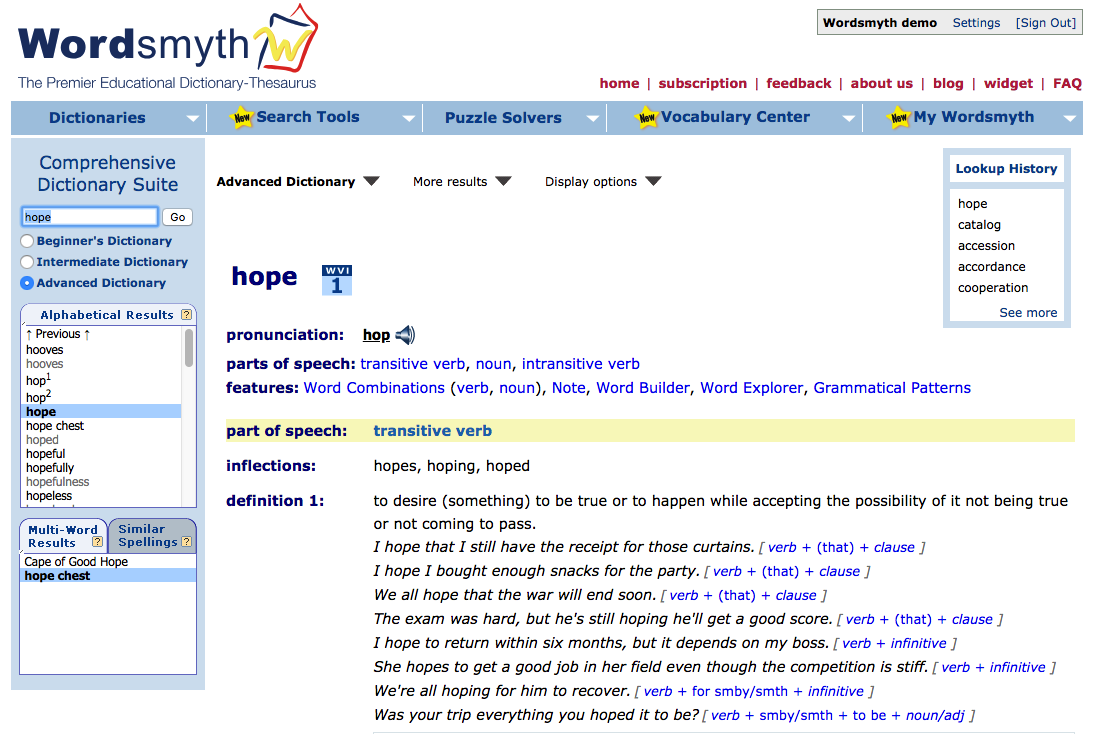
Within individual dictionary entries, the grammatical patterns feature provides example sentences illustrating the particular patterns the entry word can be used in, and each example sentence is marked with the name of the pattern. Each pattern is linked to its description in the grammatical patterns guide, which can be accessed under Search Tools. The Grammatical Patterns guide provides a list of patterns that English verbs follow, and clicking on any of the patterns reveals verbs that follow each pattern, detailed descriptions of each of these patterns, and numerous usage examples.
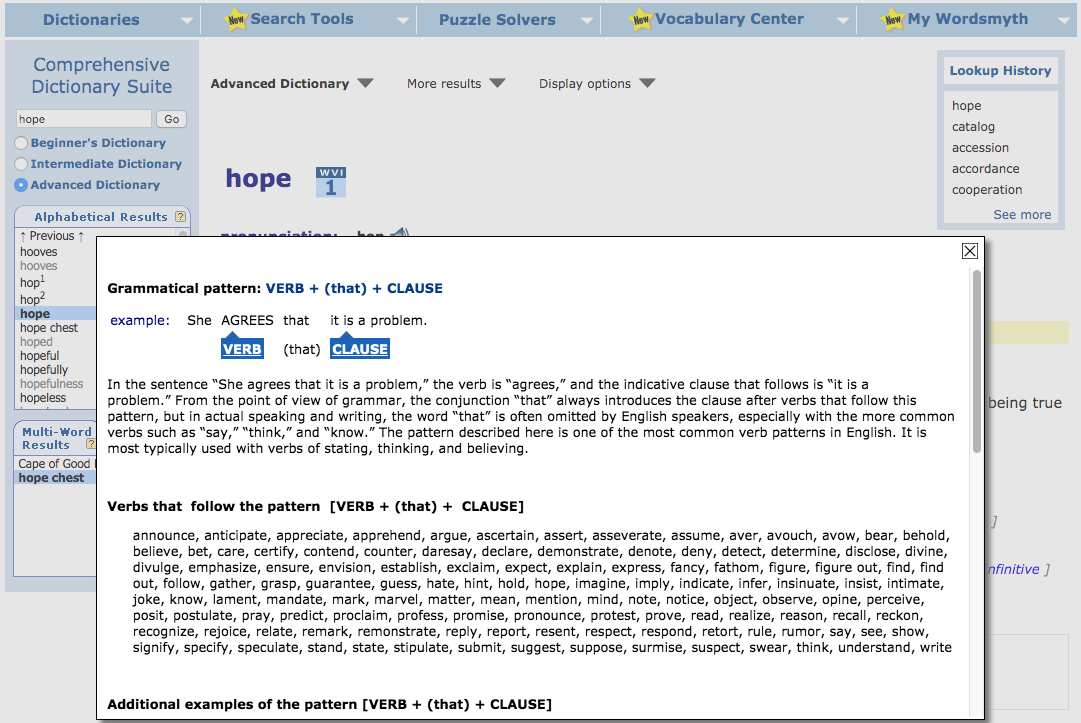
The image below shows an example of how the grammatical patterns feature looks within a dictionary entry. The example shows the numerous patterns in which the verb “hope” can be used. The name of each pattern appears in blue after its example sentence. Don’t forget to turn on “Grammatical Patterns” in the display options in order to view the patterns.Once again, clicking on the name of a pattern, such as verb + (that) + clause, will take you directly to information about that pattern in the guide. Each pattern description identifies its parts, provides additional example sentences, and lists other verbs following the pattern.
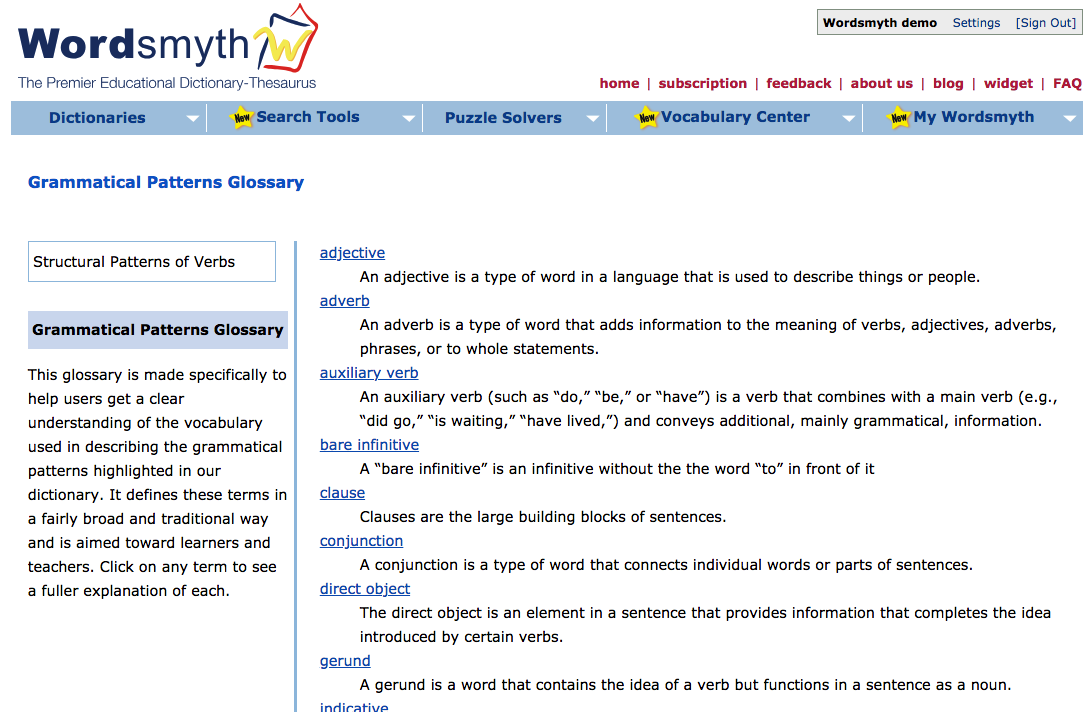
Grammatical Patterns GlossaryThe Grammatical Patterns Glossary carefully defines all the grammatical terms used in the descriptions of patterns. Some topics covered include individual parts of speech, sentence components (e.g., “subject,” “object,” “clause”), and verb forms (e.g., “infinitive,” “participle”).
The Glossary can also be used as a stand-alone guide by those interested in refining their understanding or teaching of grammatical terminology. Clicking on any highlighted term in the glossary list brings up a detailed explanation.
The Grammatical Patterns feature demonstrates how specific words operate in a sentence and clarifies the ways in which English generally constructs sentences.Marking of grammatical patterns in entries is a subscriber feature. Subscribing also gives you access to the Word Parts and Word Combinations features, as well as Spanish and Chinese support within entries. You can review all these features with a free 15-day trial. If you’d like information on subscription, click here.
Want to keep up with all things Wordsmyth? Check out our Facebook, Twitter, and blog. Get in touch with us on our feedback page if you have any questions.
-
Wordsmyth Features: Grammatical Patterns
Wordsmyth’s Grammatical Patterns feature provides a comprehensive database of grammatical patterns, pattern explanations, and grammar-related definitions. Whether you’re learning the structure of English or teaching it, these tools can help!
Grammatical Patterns Features
Grammatical Patterns Glossary
The Grammatical Patterns Glossary contains definitions and explanations of the terms used in the Grammatical Patterns feature. To view the Glossary in Search Tools:
- Click “Grammatical Patterns Glossary” on the left side of the screen.
- To read a complete explanation of each term, click the link above its brief definition.
Grammatical Patterns List and Descriptions
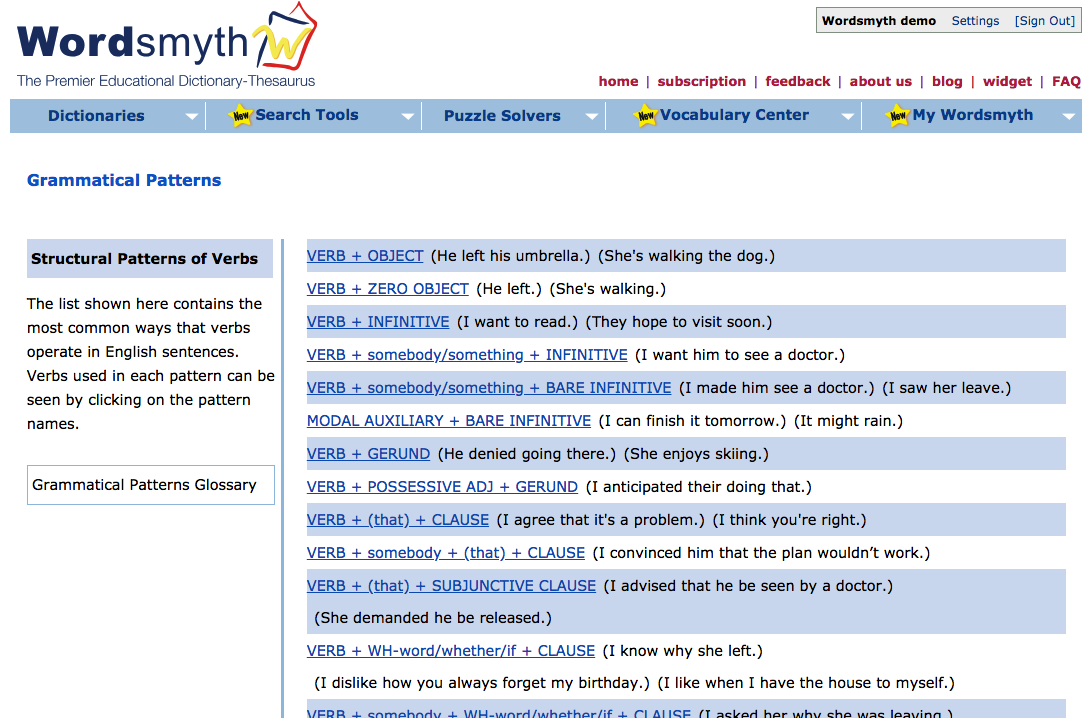
In Search Tools, you’ll find the list of grammatical patterns that we identify in our dictionary. Clicking on a pattern name will take you to a list of the most common words that follow the pattern.
Clicking on the provided link to further discussion of the pattern will take you to an explanation of the pattern, example sentences using the pattern, as well as the list of words that follow the pattern.
In order to fully understand how a Grammatical Pattern works, you may need help in understanding how its parts operate. Large sentence elements, parts of speech, and names of particular grammatical forms identified in a pattern are linked to their definitions in the Glossary. It’s as easy as one click! To learn more about the structural elements within a Grammatical Pattern:
- Click any of the underlined terms beneath the introductory example sentence.
Using Grammatical Patterns Within Dictionary Entries
All Wordsmyth Grammatical Patterns are integrated within applicable dictionary entries. Want to learn how a particular verb can operate in all of its various senses? Take a look at its marked patterns next to its example sentences and click on the pattern links for more information!
Grammatical Patterns in Dictionary Entries
Grammatical Patterns is only available for Wordsmyth subscribers. As it’s a new Wordsmyth feature, you will have to add it to your dictionary display. To activate Grammatical Patterns within an entry:
- Under “Display options,” click “Show Grammatical Patterns”
- Links to Grammatical Patterns will appear next to each applicable example sentence
Examples of Grammatical Structure within Dictionary Entries
To learn more about a particular grammatical pattern attached to a sense of a word, click the bracketed pattern next to an example sentence. You will be taken to the description of the pattern, illustrative example sentences, and the list of words following the particular pattern.
Access Full List of Grammatical Patterns from Entry Examples
You can access the full Grammatical Patterns list from an entry example window. Simply scroll down to the bottom of the pop-up window and click “All Grammatical Patterns” to go to the main list.
Marking of grammatical patterns in entries is a subscriber feature. Subscribing also gives you access to the Word Parts and Word Combinations features, as well as Spanish and Chinese support within entries. You can review all these features with a 15-day free trial. For information on subscription, click here.
Want to keep up with all things Wordsmyth? check out our Facebook, Twitter, and blog. Get in touch with us on our feedback page if you have any questions.
-
Building chunks of language with Word Combinations
Wordsmyth’s Word Combinations, technically known as “collocations,” provide what is almost like a thesaurus in another dimension. You will find them in most entries in the Advanced Dictionary. Instead of listing synonyms, that is, words you might use instead of the word you are using, Word Combinations provide words to use with the word you are using. In other words, they help you start building a bigger chunk of a sentence.
Compare the thesaurus’s “similar words” for the verb “laugh”:cackle, chortle, chuckle, giggle, guffaw, howl, snicker, snigger, tee-hee, titter…
…with the Word Combination adverbs for the verb “laugh”:
The similar words allow you to choose from among words for more specific kinds of laugh: from a quiet titter to a hearty guffaw. The Word Combinations allow you to choose from among adverbs that writers frequently use to modify the verb “laugh.” “Ashley laughed uneasily at the cruel joke,” you might write. Or, “Ashley laughed good-naturedly when her error was pointed out.” (Ashley’s a likable person, evidently.)Word Combinations are the most frequent companions of the headword in published writing and broadcast speech. Thus, they represent the many ways in which the headword-concept is typically talked about and the words typically used to talk about them.
In the entries, word combinations are organized by part of speech combination. Take, for example, the word “election.” The word combinations for the noun “election” fall into four kinds:
adjective + (n.) electionverb + (n.) election
(n.) election + verb
noun + (n.) election
These formulas show you the kind of word (part of speech) and the position (before or after “election”) in which it appears in the corpus of texts. Notice that “election” has some verbs that appear before it and some that appear after it. Here are the full word combinations entries, with some comments in red:adjective + (n.)election coming, competitive, congressional, contested, democratic, direct, disputed, fair, federal, forthcoming, fraudulent, free, general, gubernatorial, judicial, legislative, local, mayoral, mid-term, multi-party, multiracial, municipal, nationwide, nonpartisan, off-year, parliamentary, periodic, presidential, primary, provincial, scheduled, statewide, transitional, upcomingverb + (n.)election boycott, cancel, certify, contest, delay, disrupt, influence, hold, monitor, oversee, overturn, postpone, precede, rig, schedule, steal, supervise (These verbs that frequently have the word “election” as their object will give you a glimpse at all the things we can do to an election. )(n.)election + verb loom, near(Which of these two verbs would you choose to talk about a coming election? It really depends how you feel about it.)noun + (n.)election ballot, boycott, candidate, eve, fall, financing, landslide, legitimacy, midterm, month, outcome, poll, primary, recall, registration, round, run-up, runoff, turnout, vote, votingIf you have read through these words, you may have noticed that some make sense when placed immediately before or after the headword “election”: “a fair election,” “postponed the election,” and “a fall [i.e., autumn] election.” True, you have to insert an article, “the” between “postpone” and “election,” but generally these are recognizable phrases that make sense.Others, especially in the noun+noun category, don’t seem like a chunk of a sentence: “legitimacy election” and “voting election,” for example. Often a preposition will need to be inserted between the words: “the legitimacy of the election,” “voting in this election” are some possible ways the word combinations will work in these cases.If you don’t know how to fit the two words together, a Google search on the two words will often return a number of similar examples of how they do.You can try this little exercise to get a feel for how to fill out a word combination:Complete these common noun + noun word combinations with the correct prepositions and articles.
1. the eve ____ ____ election2. the outcome ____ ____ election3. the turnout ____ ____ electionWord Combinations is a subscription feature, but you can try it by signing up for a 15-day free Trial Subscription, no strings attached. (There is a Trial Subscription button on most pages of the Wordsmyth website.) We also include Word Combinations with many Academic Vocabulary of the Day posts.Read more about collocations here. -
About the Word(s) of the Day
Every weekday we feature two words: Word of the Day and Academic Vocabulary of the Day. The rationale and target audience for each is different.
Academic Vocabulary of the Day is aimed at intermediate to advanced English language learners and middle and high school native speakers who need exposure to Tier 2 academic vocabulary words.
The words are selected from the 2000 most frequent general academic vocabulary words in American English. These 2000 words come from Mark Davies’ analysis of published academic texts in the Corpus of Contemporary American English. This academic vocabulary list is comparable to Coxhead’s Academic Word List (AWL), but is based on 120 million words of academic texts in the 425 million word corpus. Words are considered to be general academic vocabulary if they fulfill these criteria:
-
They appear at least 50% more frequently in academic texts than in non-academic texts.
-
Across disciplines, they appear more frequently than in non-academic texts. In other words, they are words important in all academic domains, rather than specialized, domain-specific technical terms.
-
Finally, they are among the 2000 most frequent of these general academic terms–the core.
Because the context in which the Academic Vocabulary Word of the Day will be most useful is academic writing, we also highlight the sense or senses of these words that are most frequently used in academic discourse. For example, the verb “conduct” has an important meaning of “leading an orchestra,” and a specialized meaning in the study of electricity, yet in the context of general academic vocabulary, the most important meaning is “to carry out or lead,” as in “conduct a study/investigation/seminar.”
The Academic Vocabulary of the Day words belong to the Tier 2 words which have been identified as of especial importance in the Common Core State Standards.
Word of the Day
Word of the Day covers less frequent, more advanced Tier 2 words, useful for SAT study and for acquiring a wider and deeper knowledge of English words. The Word of the Day is drawn from levels 3 to 5 (grades 7-12+) of the Wordsmyth Vocabulary Index (WVI), a forthcoming resource covering vocabulary words for K-12+ in five levels. WOTD is often accompanied by images, quotations from literature, or other aids to word learning, such as Greek and Latin roots and endings.
-
-

How to s*rch the diction?ry using wild card symbols
Did you know that Wordsmyth’s dictionary search box permits the use of wild card symbols?
The question mark (?) and the asterisk (*)—these unassuming symbols are surprisingly powerful, as they can represent any letter or string of letters in a word. Understanding how to use them will increase your ability to find words you can’t spell or don’t fully recall. Wild card symbols also allow you to find groups of words that contain a particular letter pattern.
The question mark
The symbol ? stands for any single character (letter or number). For example, if you search for “cat??” you will find all five-letter headwords that begin with “cat”: “catch,” “cater,” “catty [1]” and “catty [2]”. (“Catty [2]” is a unit of weight used in Southeast Asia.) Search for “???cat,” and you will find all six-letter words that end in “cat,” including “bobcat,” “fat cat” and “muscat” (a type of grape used to make wine). The query “c?a?t?” will return “coast” and “craft.” If you’re thinking this search mode sounds handy for solving word puzzles, you would be right. In fact, Wordsmyth has a Crossword Solver that tailors wild card searching for this specific purpose.
The asterisk
The symbol * stands for zero or more letters. For example, if you search for “cat*,” you will find all headwords that start with “cat,” including “catty,” “cater,” “catalog,” and “catabolism.” If you search for “*cat*,” you will find headwords that contain “cat” in the middle, such as “application” and “beef cattle.” Because an asterisk can also represent zero letters, all these searches would also turn up “cat” itself.
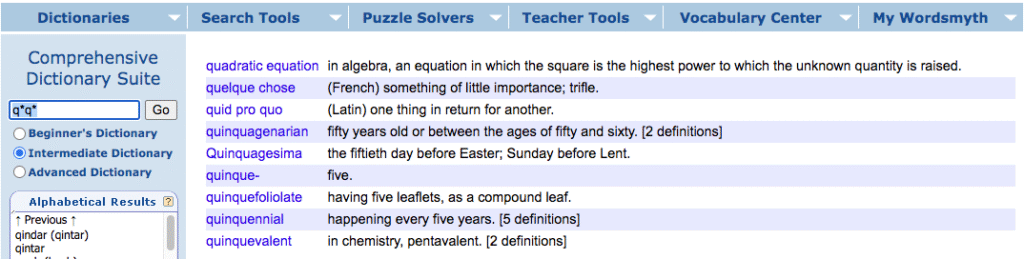
wild card search Pictured above is a query for words that start with and contain the letter “q.” Amusing, yes, but wild cards searches do also have applications in an educational context. Using wild card symbols, you can find all the words that contain a particular Latin or Greek root. Try *cept* or *graph* for example.
With a little cleverness, you can also find words that you are not sure how to spell, or that you only remember part of. For example, you might remember part of a word’s spelling, so you might enter “m*t*c*ond*ria” in the search box. You would find “mitochondria” because the first three asterisks match the letters”i,” “o,” “h,” respectively, while the fourth asterisk matches zero characters. There is no letter between the “d” and the “r” in “mitochondria.”
When your goal is to find words rather than word meanings, the wild card search is a useful tool. To really become adept at finding the words you need in Wordsmyth dictionary, you will also want to familiarize yourself with Wordsmyth’s Reverse Search, Browse, and Multi-Word Results, which will be covered in future posts. We’ll leave you with a challenge using wild card symbols: find the word in the Wordsmyth dictionary that has the most number of letters in alphabetical order. And, finally, let us know to what fiendishly clever ends you have put the dictionary wild card search.
-
Look-up History
Nothing brings home to me just how much mileage I habitually rack up on the information highway like a glance at my browser history. Whether it’s showing me locations I visited “last week,” “yesterday,” or even earlier “today,” the amount and the variety of the terrain covered is impressive. Many of the URLs that pop up in my browser history I’d forgotten ever having visited. Sometimes forgetting is good: here at my work computer, for example, history shows that, a few days ago, what started as a purposeful search on Project Gutenberg for literary uses of an unusual word (“tardigrade”) was diverted by one author’s reference to “hoof-shaped shoes” worn by the precursors of policemen in fifteenth-century Florence. Curiosity must have gotten the better of me, for apparently I made seven stops related to hoof-shaped shoes before getting back on track. Most of the time, however, I wish I hadn’t forgotten where I’d been and had kept more bookmarks and notes. What fruitful trails have I abandoned–or spent precious time rediscovering?
A new feature in Wordsmyth, the dictionary look-up history, is designed to help you remember the paths you’ve taken through the dictionary-thesaurus and the words you’ve investigated for as long as you wish to. Your look-up history keeps track of which words you’ve looked up and when, and makes that information easily accessible to you whenever you visit Wordsmyth. Here’s how it works. When you view a dictionary entry, as shown below, the last few words you’ve looked up will be visible in a box in the top right of the entry (indicated by the blue arrow). When there are more than five words in your look-up history, this box will display a link, “See more,” (indicated by the lower red arrow), which will take you to the full look-up history page. This page is also accessible from the tab menu My Wordsmyth: Look-up History (See the upper red arrow).

Look-up history box in entry On the Look-up history page each word you have looked up is listed in chronological order from newest to oldest. For each word, there is a complete record. n Moving from left to right across the columns, as shown in the image below, you will see 1) the word looked up, 2) the number of times the word was looked up on a given day (#), 3) the date on which it was looked up, 4) the first definition of the word and, in brackets, the number of definitions the word has, if more than one. Finally, 5) the Site column tells you which Wordsmyth site you used (Kids or Main), and, 6) if the Main site was used, the level of the dictionary you used (Beginners, Intermediate, or Advanced).

Look-up history page View alphabetically or by date
To faciliate finding particular words you may have looked up, the look-up history will display alphabetically if you click on the small blue triangle tot he right of the “Word” column heading, and chronologically if you click on the triangle to the right of the “Date” column heading.
When your look-history is extensive, perhaps stretching over a number of pages, you can narrow down the words you see by using the drop down menu “Show words looked up” (a in the image above), choosing to see “all history,” “last 30 days”, last 7 days or 1 day, and clicking “find.” You may also enter a word or a date in the “Find a word or date” search box (b in the image above) and click on “Find” to view the page where a particular word or date appears.
The Look-up History is very alert! It will record not only words you look up using the general search box, but also synonyms, similars, and antonyms you click on, was well as Word Explorer words. However, you can clear your history by clicking on the blue [Clear] link (c). And you can hide the lookup history box in the Display options menu that appears on the entry page.