Category: Wordsmyth Features

  • Word Parts I: A handy list for introducing Greek and Latin roots to your students

    Word Parts I: A handy list for introducing Greek and Latin roots to your students

    As educators, we are all aware that learning words parts, particularly Greek and Latin roots, prefixes, and suffixes can help students guess the meaning of new words as well as help them recall the meaning of words that they have previously been exposed to.  Such learning can be of vast benefit to vocabulary acquisition. In addition, learning suffixes, such as the Latin suffixes “-ness” and “-ment” and the suffix “-ly” from Old English, can help students understand the grammatical meanings attached to words and see how different forms of words are related to each other.

    As you may know, Wordsmyth has a word parts database integrated within its dictionaries. The Word Parts feature is displayed within relevant dictionary entries and is designed to support both native-speaking students and English Language Learners in their understanding of roots and affixes and to help them make use of word parts information to expand their vocabulary.  The word parts data as a whole can be viewed by looking under Search Tools in our dictionary and clicking on A-Z Word Parts. Here you will find a comprehensive, alphabetical listing of roots and affixes that is searchable. (Word Parts can be accessed with your Wordsmyth subscription or with a 15-day free trial. Don’t forget to turn on the feature in your settings.)

    Below is a special list we’ve created from information in our word parts database that teachers may find helpful in introducing Greek and Latin roots in grades 3 to 5. (Download as PDF). Additional example words for each root in the list below can easily be found by going to A-Z Word Parts, filtering the list there for “Roots,” and browsing through the list. One may also use the search box on the A-Z Word Parts page to search the list for a particular root. The A-Z Word Parts list contains, of course, many more roots (as well as other affixes) than are listed below.

    rootsmeaningexample words
    agrisoil, earth, fieldagriculture, agronomy
    aquwateraquarium, aqua, aquaculture
    astrostarastronaut, astronomy, astrology
    autoselfautomatic, autograph, autobiography
    centhundredcentury, cent, centipede
    capheadcaptain, capital, capitalize
    dentteethdentist, dental
    dicttelldictionary, predict, dictator
    gramwritetelegram, diagram, grammar
    graphwritetelegraph, geography, graphics
    mob, motmovemobile, motion, motor
    pedfootpedal, pedestrian, centipede
    phonsoundtelephone, microphone, symphony
    photlightphotograph, photosynthesis
    portcarrytransport, import, portable
    ruptbreakerupt, interrupt, disrupt
    scrib, scriptwritescribble, prescription, script
    solsunsolar system, parasol
    solalonesolo, solitaire
    spectlookinspect, spectator, spectacles
    spherballspherical, hemisphere
    stellstarconstellation, stellar
    structbuildconstruct, structure
    teledistancetelephone, telescope, television
    Download, save, or print as PDF

    See also:
    Word Parts II: basic suffixes
    Word Parts III: Intermediate level suffixes
    Word Parts IV: basic prefixes

    Learn more about the Wordsmyth word parts database and how this unique feature can be used in facilitating vocabulary learning and teaching.

  • 1000 Words for Beginning Learners

    1000 Words for Beginning Learners

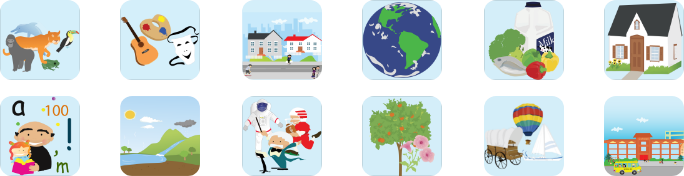
    Our new educational game app—WILD WORD LEARNER—is now available to play with 183 wordlists from the Wordsmyth Illustrated Learner’s Dictionary (WILD) spread over 12 great topics.

    Read the full description and download the free app for your young learners now!

    Natural Environment
    73 vocabulary words relating to items in settings such as the desert, forest, seashore, jungle, and ocean. Typical words include: sand, cactus, bobcat, shell, ocean, starfish, cave, vine, and frog.

    Plants
    42 vocabulary words relating to parts of plants, types of plants, parts of trees, flowers, and parts of a flower.  Typical words include: corn, rice, bamboo, fern, grass, cone, leaf, stamen, and moss.

    School
    54 vocabulary words related to school, including such items as: cafeteria, gym, classroom, playground, teacher, principal, blackboard, desk, whiteboard, map, globe, computer lab, tablet, and backpack.

    People and things
    112 words connected with parts of the body, ways people feel, people in jobs, holidays, and sports. Typical words include: ear, mouth, knee, glad, proud, scared, barber, chef, Halloween, and soccer.

    Animals
    110 animal words in categories such as Jumping, Leaping Animals; Creeping, Crawling Animals; Furry Animals; Sea Animals; Scary Animals; Pets; Bugs; Big Cats; and Beautiful Birds.

    Home
    72 vocabulary words relating to types of home, places in the home, and things found in the home. Typical words include:  porch, yard, kitchen, oven, closet, jacket, jeans, armchair, bathtub, and sink.

    Art and Music
    79 words relating to kinds of art, art materials, colors, shapes, musical instruments, and things found in a theater. Typical words include: easel, clay, painting, triangle, flute, drum, and costume.

    Busy World
    114 words relating to places of activity and the things and people found in each. Categories range from Places in a City to Things at a Restaurant, and from Things at a Campground to Things on a Farm.

    Transportation
    66 words relating to vehicles and ways of getting around.  Typical words include bus, train, airplane, walk, drive, skate, highway, sidewalk, path, engine, windshield, and tire.

    Food
    114 food words ranging from fruits, vegetables, meats, and seafood to baked goods, breakfast foods, and things on a sandwich. Typical words include: pear, broccoli, chicken, tuna, roll, and mustard.

    Earth and Space
    103 words including names of planets, types of land on Earth, types of weather, bodies of water, and names of Earth’s continents, oceans, seas, rivers, lakes, deserts, and mountains.

    Language and Numbers
    114 words in total. “Language” words include 58 action verbs, such as dig, climb, and fly, and 28 words that are prepositions, such as under, on, and through. “Numbers” includes 28 number words. 

  • Word Explorer: Explore the world of the words

    Word Explorer: Explore the world of the words

    Unique to our Children’s Dictionary Suite is the Word Explorer:  a word-finding and knowledge-exploration feature. It is an index of related words spread throughout the dictionaries that allows a child to find words connected with multiple topics and to explore whole networks of words and their meanings.  The dictionary entries also contain an integrated thesaurus of synonyms and antonyms. The addition of our Word Explorer creates a fun and uniquely valuable educational resource.

    The Word Explorer allows the child or teacher to navigate the dictionary using topics, their keywords, and words related to the keywords called “related words.” The Word Explorer is like a map built into the dictionary that allows the user to find and explore interesting paths through the dictionary. With the help of the Word Explorer, children can make many of these words part of their vocabulary and start to discover how words can help them make sense of the world.

    Approximately 200 of the entry words in this dictionary are Word Explorer keywords. These words are called “keywords” because they are links (or keys) to over 7,000 other dictionary entry words. Almost half the entry words in the Children’s Dictionary belong to the Word Explorer.

    Dictionary entries for keywords note their Word Explorer feature near the end of their entries. So, for example, under the Word Explorer Topic “Communication,” the keyword “art” is listed. Clicking on “art” under Communication (or looking up “art” in the regular search box) leads the child to discover words that describe types of art, people who make art, things used in art, places where art can be found, and many other categories of information relating to the notion of art. The Word Explorer can be particularly useful in helping students with writing, serving as inspiration and assisting them in finding the words they need. With the help of the Word Explorer, a child is aided in learning new concepts and making new connections among ideas.

  • The Wordsmyth Vocabulary Center

    The Wordsmyth Vocabulary Center

    Teachers, the Wordsmyth Vocabulary Center offers some of the best vocabulary-teaching tools you’ll find online and supports your curriculum’s vocabulary component for all subjects. In addition, it provides a remarkably easy way for your students to personalize their vocabulary learning on their own.

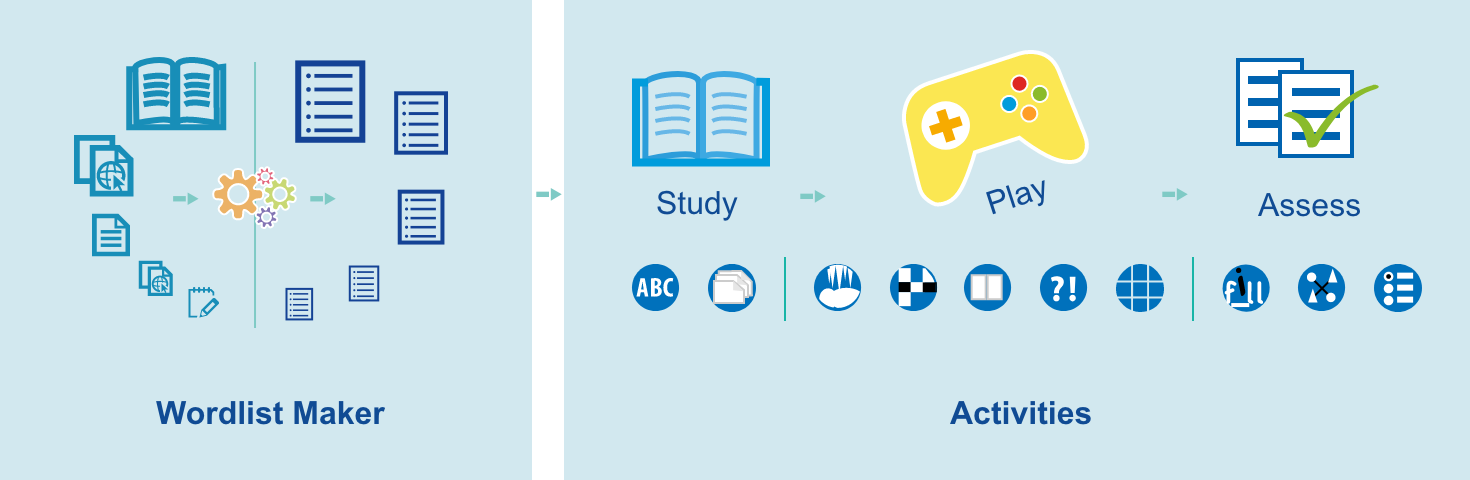
    Just pick a list and choose an activity. It’s simple!

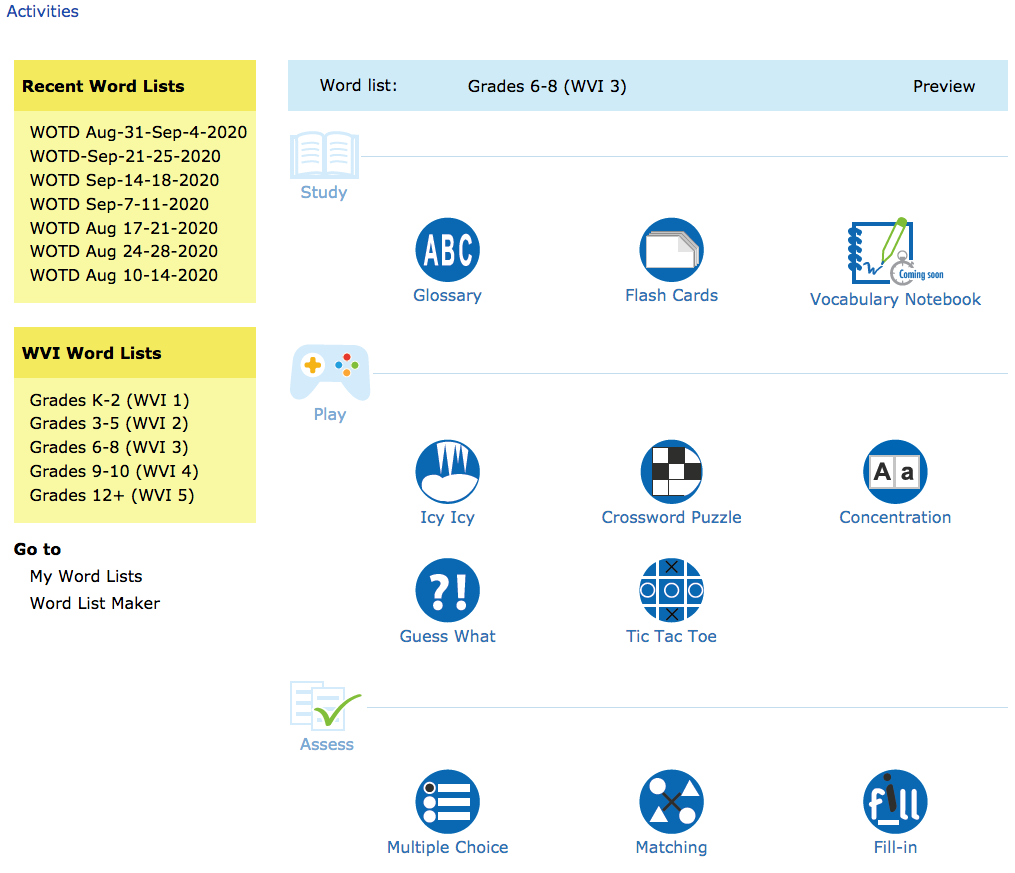
    On the Activities page of the Vocabulary Center, you can pick a word list from the yellow sidebar. If you haven’t created any lists of your own yet, you can always choose one from the Wordsmyth Vocabulary Inventory (WVI) lists according to your grade level. These are leveled and curated academic vocabulary lists. After you’ve selected your list, its name will appear in the blue banner above the activities.

    Now you can choose to have your students study the list of words with one of the study tools, or play a game using the words, or take a quiz to see how well they know them.

    For a customized learning experience, you can make your own word lists with ease

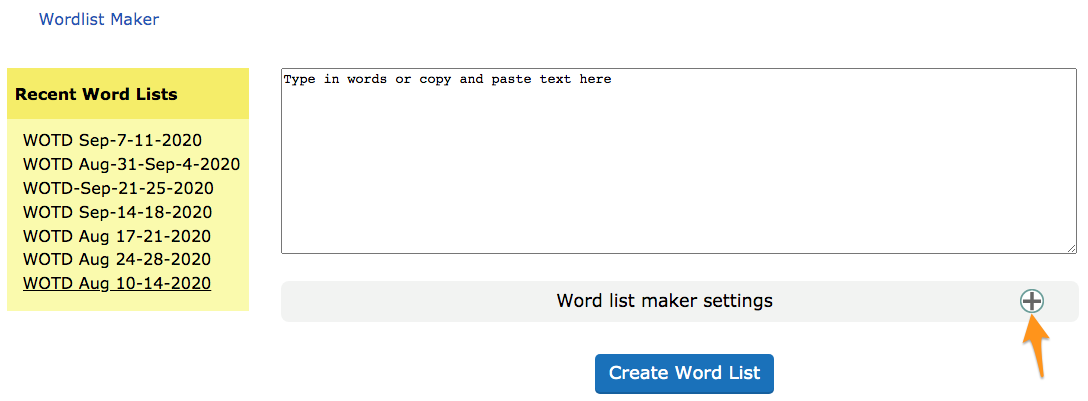
    If you have a list of words you want your students to learn, or that you want to learn yourself, go to the Word List Maker. You can type or copy and paste your list of words into the space provided. If you want to make a word list based on a reading, you can copy and paste your article into the space and the text analysis system will automatically extract the best vocabulary words and create a word list for you.

    By adjusting the Word list maker settings, you can decide what type of words you would like to have in your list.

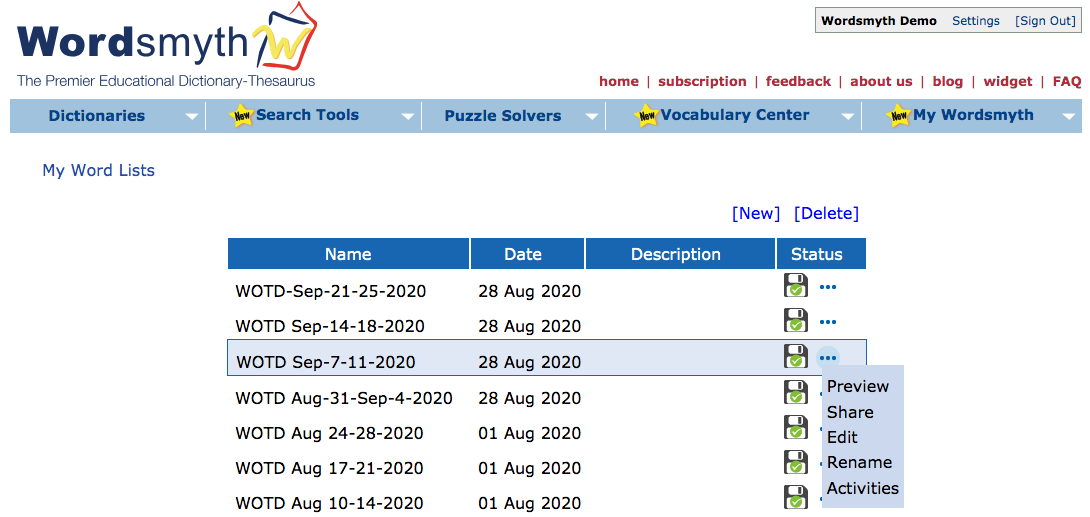
    All your word lists are saved in the My Word List section of the My Wordsmyth menu. There you can preview, edit, or rename your lists. You can use your lists anytime with any activities.

    To learn more about Wordlist Maker, please read Wordlist Maker User Guide.

    Share your lists with students

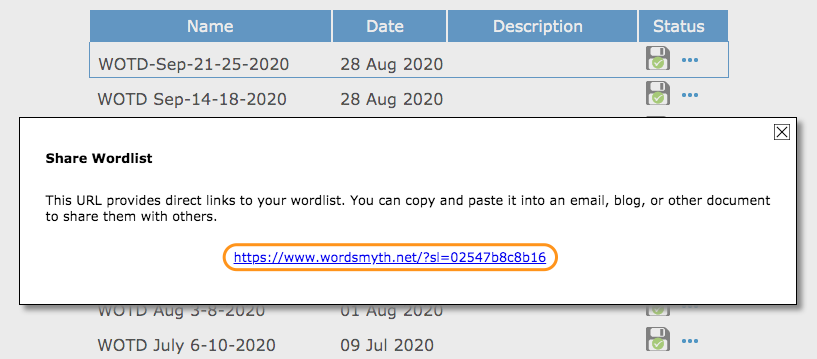
    As an educator, you can share your lists with your students. Anybody who has the URL of a particular word list can use the list with any of the Vocabulary Center activities.

    Subscribe to access full Wordsmyth dictionary features and vocabulary tools. Teacher Tools allow educators to manage classroom, create and send assignments to students, and get comprehensive reports on their vocabulary growth.

  • Wordsmyth Comprehensive Dictionary Suite

    Wordsmyth Comprehensive Dictionary Suite

    The Wordsmyth Comprehensive Dictionary Suite combines our Advanced Dictionary-Thesaurus with two additional Wordsmyth dictionaries, the Intermediate Dictionary-Thesaurus for upper elementary school students, and the Beginner’s Dictionary-Thesaurus for English language learners. Within the suite, users may easily move up or down between the levels to find simpler or more advanced definitions and example sentences for particular words.

    Using the buttons beneath the search box, users can select their default dictionary level (see screenshot) and get results from that dictionary with every search. Once in an entry, however, they can check for definitions and examples from other dictionaries for the same word if they desire.

    Advanced Dictionary

    The highest level of our dictionaries is called the “Advanced Dictionary.” The Advanced Dictionary is suited to the needs of adults and students from middle-school age and up. It currently contains 60,000 headwords, with example sentences for nearly 17,000 words, adding up to a total of nearly 50,000 examples.  Like all of our dictionaries, the Advanced Dictionary has both text and audio pronunciations for all words, as well as thousands of photographs and artist-created illustrations.

    It was for the Advanced Dictionary that the Wordsmyth team developed its integrated thesaurus, a source for synonyms, antonyms, and similar words.  We call it an “integrated”  thesaurus because thesaurus information is matched with individual senses (meanings) of words so that, for example, synonyms for the headword “hot” referring to temperature, “hot” referring to spiciness of food, and “hot” referring to popularity are matched with their appropriate definitions in the entry for “hot.”  The synonyms appear directly under each pertinent definition in the dictionary entry.  There is no need to click to go to a different page to access the thesaurus information.

    Intermediate Dictionary

    The next level down from the Advanced Dictionary is the “Intermediate Dictionary.”   As in the Advanced Dictionary, thesaurus information is built in and matched with particular senses of words.  The Intermediate Dictionary was written for children at the upper elementary level.  The definitions are written with simpler vocabulary and sentence structure than those written for the Advanced Dictionary.  The Intermediate Dictionary contains approximately 14,000 headwords and contains 23,000 full-sentence examples.   Additionally, all the headwords for the Intermediate Dictionary, as well as all the example sentences for headwords, have been translated into Spanish and Chinese.  (Note also that each sense of every headword is individually translated.) These translations are available to our subscribers and appear in the entries when the feature is selected by the user.   (Spanish and Chinese headword translations also appear in the other Wordsmyth dictionaries for these same words.)

    Beginner’s Dictionary

    The “Beginner’s Dictionary” is a dictionary that is geared toward adult literacy and adult ESL.  The Beginner’s Dictionary contains approximately 5000 headwords written in a concise but simple style.  The dictionary contains over 8,000 example sentences. 

    A feature developed specifically for the Beginner’s Dictionary is the Word Builder.  Word Builder displays words that are built on the headword that is looked up.  For example, with the headword “cool,” we list the words “cooler” (a type of refrigerator) and “coolant” in the Word Builder along with a short definition of each of these additional words.  While derivations of headwords (e.g., “coolly” and “coolness”) are listed for entries at all dictionary levels, the Word Builder, developed for the Beginner’s Dictionary, goes a step further, particularly in defining the additional words.

    Wordsmyth’s Comprehensive Dictionary has a companion app—Wordsmyth Student & ELL Dictionary—available for both Android and iOS devices.  The app provides for a better user experience on mobile devices and is accessible with or without the internet.  Access to three dictionary levels from one headword lookup supports students and English language learners of all ages and all levels. Check out the full app description.

  • Free Dictionary Widget! Get the Wordsmyth widget for online teaching and learning

    Free Dictionary Widget! Get the Wordsmyth widget for online teaching and learning

    To help with online study and learning during these difficult times, Wordsmyth would like to introduce you to its free dictionary widget that you and your students can use to look up words on any web page.

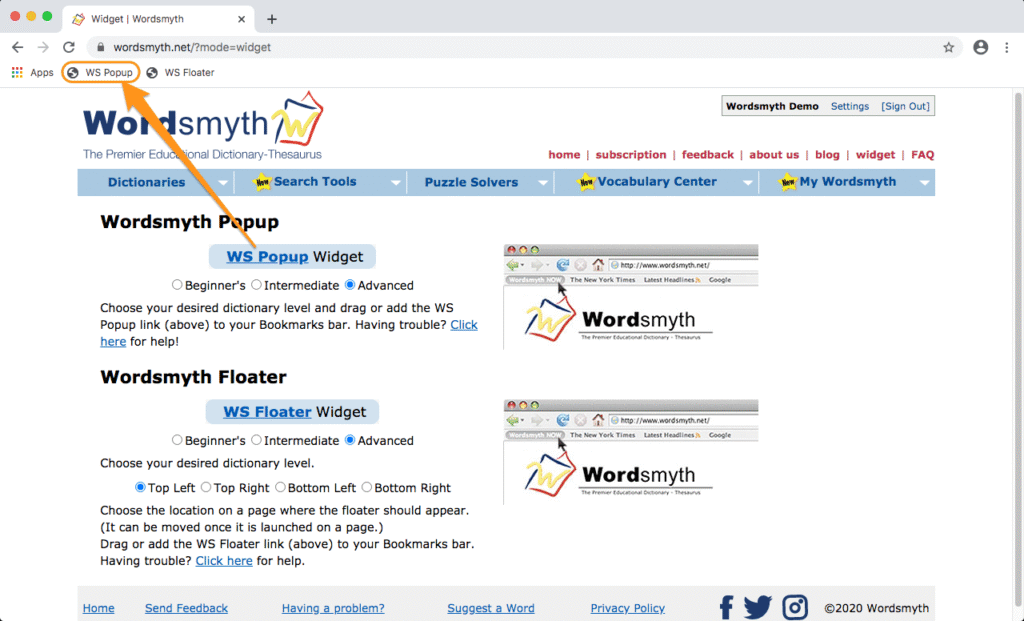
    Installing the widget is very easy. Simply go to Wordsmyth’s widget page and then “drag and drop” the widget onto your browser’s bookmark toolbar.

    Let’s say you are reading online and want to look up a word; select the word and click the widget link on your toolbar. After this first lookup, the widget is launched and you can simply double click any word and the widget will pop up automatically with the entry information you are looking for. If you want to look up a word that isn’t on the page, click the widget link and the widget search box will appear. You can then type in a word and click the “OK” button to retrieve the dictionary entry for the word you typed. (Please note that ad blockers may interfere with the functioning of the widget.)

    We invite you to read the Wordsmyth online teaching resources guide to learn more about Wordsmyth’s tools and resources that will support your online teaching and learning. Follow us on Facebook, Twitter, and Instagram for Word of the Day and updates on features that are coming soon.

  • Student & ELL Dictionary App

    Student & ELL Dictionary App

    Wordsmyth’s new app is available on App Store and Google Play and can
    be used with or without internet connection. If you want to purchase the app for your whole school, it is available with an educational discount through Apple School Manager or Managed Google Play.

    Three Dictionaries in One

    Wordsmyth’s Student & ELL Dictionary app contains Wordsmyth’s Advanced, Intermediate, and Beginner’s dictionaries.  The headwords in the three dictionaries are linked so that the user may easily move up or down between the levels to find simpler or more advanced definitions for the same looked-up word. The app display includes, among other features, audio pronunciations; easy-to-read definitions and example sentences; synonyms and antonyms; photographs; and colorful illustrations.  

    Advanced Dictionary

    • 60,000 headwords and over 100,000 definitions. Designed for adults and upper level students.
    • Accurate and clearly-written definitions along with carefully crafted example sentences that make meaning come alive while showing common and appropriate patterns of use.

    Intermediate Dictionary

    • Approximately 14,000 headwords and over 23,000 full-sentence examples.  Designed primarily for younger students and intermediate ESL.
    • Controlled vocabulary and sentence structure for easier comprehension.

    Beginner’s Dictionary

    • Approximately 5000 headwords and over 8,000 example sentences. Designed primarily for adult English Language Learners.
    • Concise and simple defining style.  Only the most frequent words of English used in definitions and example sentences.

    Customizable entry display

    Choose what information you want to see displayed on your dictionary page.  See only definitions or choose among the rich entry fields Wordsmyth provides.

    • Example sentences
      Carefully composed examples matched with definitions let you see how words are used and help you more deeply understand a word’s meaning through context.
    • Images and animations
      We’re proud of our definitions, but an image is still worth a thousand words.  Enjoy our animations as well! They both teach and entertain.
    • Word Explorer
      Enjoy our word-finding and knowledge-exploration feature that allows you to find words relating to multiple topics and to explore whole networks of related words and meanings.
    • Language notes
      Language notes offer you additional important information about how to  use words and which words to use. You can also discover interesting facts with Homophone Notes, Word Histories, and our Word Builder feature.

    Integrated Thesaurus

    Built into the dictionary is Wordmyth’s thesaurus, which includes synonyms, antonyms, and words that are somewhat similar in meaning to the headword. The thesaurus words are matched with individual senses of a word rather than with just the headword itself and they appear along with their corresponding definitions.  For example, synonyms for the headword “hot” referring to high temperature, “hot” referring to spiciness of food, and “hot” referring to an angry temper are matched with and appear along with their appropriate definitions in the entry for “hot.” 

    Another excellent feature of the thesaurus is that the words are linked with their own entries so that one click on a synonym, for example, will let the user view the meaning of that synonym in that word’s own entry.  Going back to the original entry is as simple as an additional click.

  • Using the Children’s Dictionary app during reading

    Using the Children’s Dictionary app during reading

    Our recent update allows the Wordsmyth Children’s Dictionary app to support multitasking functions on iPad and Android tablets. With this update, your students can use our dictionary while reading or writing on their mobile devices.

    If your haven’t tried the new feature yet, click here to learn how it works.

  • Wordsmyth Word Explorer Children’s Dictionary Suite

    The Wordsmyth Word Explorer Children’s Dictionary Suite is written for children in the upper elementary grades and in middle school.  It contains two levels:

    • The Elementary Children’s Dictionary, written specifically for children in grades 3 to 5, defines words in a simple, full-sentence style that explains word-meaning to kids.  It’s full of easy-to-understand definitions, child-friendly example sentences, illustrations, and photos.  
    • The Intermediate Children’s Dictionary is for grades 6 to 8. With over 14,000 entries, it covers even more of the most important words that children need to know, with support for a wide range of topics from science and social studies to emotions and everyday life. 

    You can choose either level as the default for your students.

    The Children’s Dictionary Suite also contains a hidden advanced level, which satisfies the needs of the most curious and advanced students. The Wordsmyth Advanced Dictionary includes 60,000 entries.  If a word is not found in either of the Children’s levels, the entry from the Advanced Dictionary will become available, regardless of the default level chosen for the Children’s Suite.  Inappropriate entries for children are blocked by the Parental Filter.

    A feature that was developed expressly for this dictionary is the Word Explorer.  The Word Explorer is a word-finding and knowledge-exploration feature that allows a child to find words that are associated with particular topics designated by “keywords,” so, for example, under the keyword “art,” the child can find words for types of art, people who make art, things used in art, places where art can be found, as well as many other types of categories.  Some other examples of keywords are “language,” “tool,” “exercise,” “water,” “transportation,” “religion,” “technology,” and “culture.”  Words chosen to be keywords are words that relate to general areas of knowledge and enter into numerous relations with other words.  The list of Word Explorer keywords can be found in the dropdown menu under “Word Exploration.”

    All headwords in the Intermediate Children’s Dictionary, as well as all the example sentences for headwords, have been translated into Spanish and Chinese.  (Note also that each sense of every headword is individually translated.) These translations are available to our subscribers and appear in the entries when the feature is selected by the user.  (Headword translations for Spanish and Chinese also appear in the other Wordsmyth dictionaries for these same words.)

    Also developed for the Children’s Dictionary Suite were the Word History feature and Language Notes feature.  These appear at the bottom of selected entries and give information about a word’s development over time or information that helps the user understand how the word is correctly used or how it may be different from other words that are similar.  Certain entries also contain Homophone Notes that alert the user to the fact that the word they looked up (e.g., “bore”) sounds the same but has a different meaning from another word (“boar”).

    Just as in our advanced level dictionary, the Wordsmyth Educational Dictionary-Thesaurus, the Word Explorer Children’s Dictionary contains a thesaurus that is built right into it.  That is, synonyms, antonyms, and similar words are matched with the appropriate senses of each headword rather than shown as a single pot of words attached to the headword itself.  Another great feature of the thesaurus is that the words are linked with their own entries so that one click on a synonym, for example, will let a child view the meaning of that synonym in that word’s own entry.  Going back to the original entry is as simple as an additional click.