Category: Online Teaching Resources

  • Why is Everything Different Now?

    Why is Everything Different Now?

    Why is everything different now

    Many young children are still having difficulty understanding why they are having to stay at home these days and why they are not going to school. Many children may be confused and anxious. To help caregivers and teachers answer questions relating to the current crisis, Wordsmyth has developed a story that not only explains, in a clear and simple manner, the basics concerning the virus but also helps children see that they are not alone in wondering why “everything is different now.”

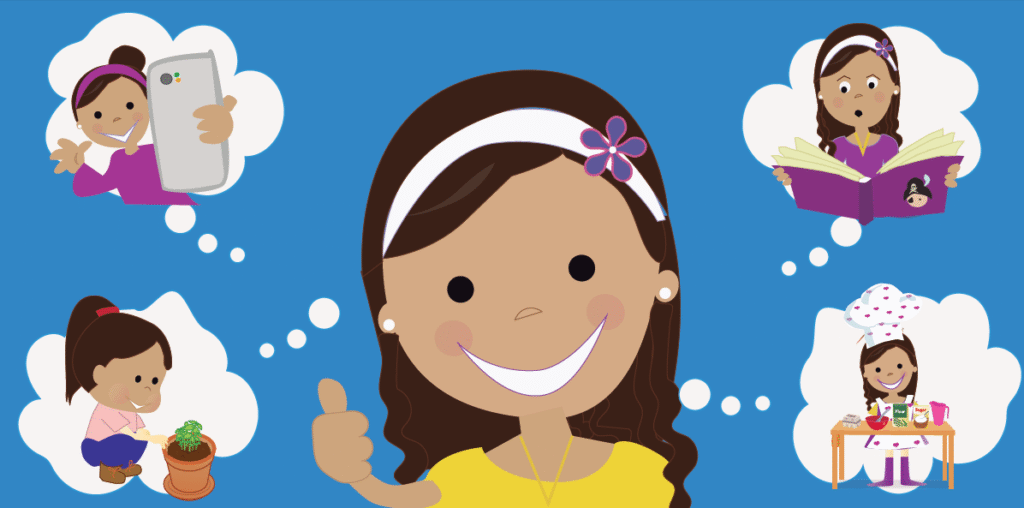
    Wordsmyth’s charmingly illustrated story about how one little girl is coping with staying at home is both realistic and heartening as she expresses both her anxiety and her positive attitude in connection with this very new and strange situation.

    We cordially invite you to download the Wordsmyth story Why is Everything Different Now? Print it out or use it online. Use it as a teaching tool or just for something both soothing and fun.

    If you’re a Wordsmyth subscriber, you can take advantage of the linking of key vocabulary words in the text with easy-to-read definitions and example sentences in WILD, our dictionary for K-2 readers (the Wordsmyth Illustrated Learner’s Dictionary). These entries can be used to create a glossary or to create other pre-teaching or post-reading activities for your students. Entries for all the other words of the story are also available in WILD.

  • Animated vocabulary instruction for kids!

    Animated vocabulary instruction for kids!

    Having trouble making basic, essential concepts clear to your young students? WILD animations can help!

    In addition to thousands of colorful static images created by our artists, the Wordsmyth Illustrated Learner’s Dictionary (WILD) offers animated illustrations for some of the most difficult words to explain and conceptualize.

    Check out our animated prepositions and verbs!

    WILD’s Language collection has animated illustrations for all of the most important English prepositions as well as for the most common action verbs. Each animation demonstrates the meaning of these types of words both clearly and entertainingly. Have fun taking a look!

  • WILD: the Book

    WILD: the Book

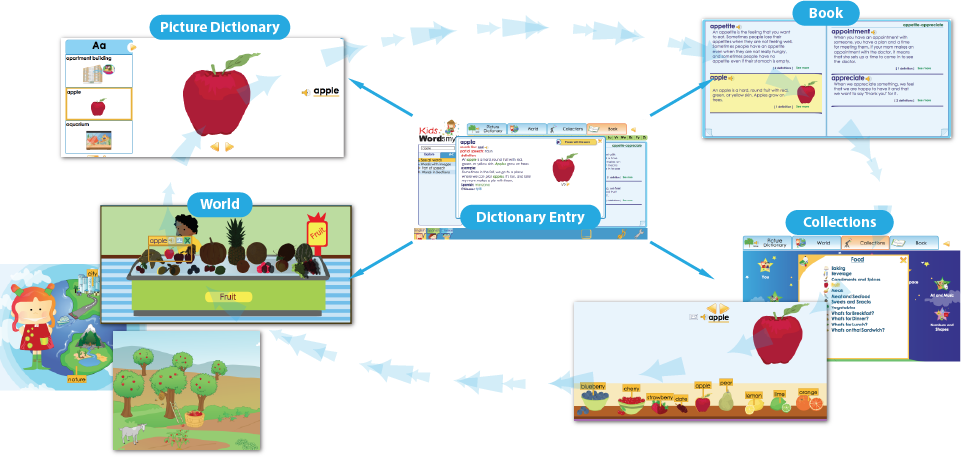
    The Book environment in WILD allows the child to access and explore dictionary entries in an interactive e-book format.  Concise versions of entries are displayed as if on pages of a print dictionary, and clicking on any word will open up its full expanded entry.   Unlike standard online dictionaries which present each entry in isolation, this format allows the child to browse entries alphabetically before and after the word they have looked up, and to treat the dictionary as a reading experience in and of itself. Features such as the thumb index and guide words at the top of the page can help introduce conventional dictionary skills that can be applied to print dictionaries a child may use in the classroom or at home.

    Every definition in the Book is written in a full-sentence, descriptive style.  Unlike the abstract definitions found in many dictionaries, these entries explain the meaning of words in terms of the everyday experiences of children while using a strictly controlled vocabulary and uncomplicated sentence structure. 

    In expanded Book entries, definitions combine with entertaining and often story-like example sentences, audio pronunciation of the entry word, additional meanings of the word, and Spanish and Chinese translations.  Altogether, the expanded entries in WILD contain over three thousand images—artists’ illustrations, photographs, and animations—to help illuminate the meaning of words and the ways they are used.

    WILD entry-climb

    These very readable, expanded dictionary entries serve another purpose as well. They provide seamless connections between the four visual environments that make up WILD.  In all four environments, the full Book entry for any word is just a click away. In addition, the entries themselves act as hubs between the four environments.  If a child exploring in the Picture Dictionary clicks to access a word’s definition in the Book, the dictionary entry will show them all the information there but will also allow them to go see this word where it appears in the Collections or in the settings of the World.  It’s as simple as clicking the links under “Places with this word” in the upper right-hand corner of the Book entry.

    The Book can, of course, be used simply to look up the meaning of a word by using the search box that appears in the sidebar. While children are more likely to use the Book by popping up entries while exploring in the various environments—wanting to read about or see more images for the word “jaguar” in the Mammals collection, for example—teachers may often wish to search for a particular item in the Book for direct teaching or to start a discussion.

    See other WILD visual environments:

  • Wordsmyth Word Explorer Children’s Dictionary Suite

    The Wordsmyth Word Explorer Children’s Dictionary Suite is written for children in the upper elementary grades and in middle school.  It contains two levels:

    • The Elementary Children’s Dictionary, written specifically for children in grades 3 to 5, defines words in a simple, full-sentence style that explains word-meaning to kids.  It’s full of easy-to-understand definitions, child-friendly example sentences, illustrations, and photos.  
    • The Intermediate Children’s Dictionary is for grades 6 to 8. With over 14,000 entries, it covers even more of the most important words that children need to know, with support for a wide range of topics from science and social studies to emotions and everyday life. 

    You can choose either level as the default for your students.

    The Children’s Dictionary Suite also contains a hidden advanced level, which satisfies the needs of the most curious and advanced students. The Wordsmyth Advanced Dictionary includes 60,000 entries.  If a word is not found in either of the Children’s levels, the entry from the Advanced Dictionary will become available, regardless of the default level chosen for the Children’s Suite.  Inappropriate entries for children are blocked by the Parental Filter.

    A feature that was developed expressly for this dictionary is the Word Explorer.  The Word Explorer is a word-finding and knowledge-exploration feature that allows a child to find words that are associated with particular topics designated by “keywords,” so, for example, under the keyword “art,” the child can find words for types of art, people who make art, things used in art, places where art can be found, as well as many other types of categories.  Some other examples of keywords are “language,” “tool,” “exercise,” “water,” “transportation,” “religion,” “technology,” and “culture.”  Words chosen to be keywords are words that relate to general areas of knowledge and enter into numerous relations with other words.  The list of Word Explorer keywords can be found in the dropdown menu under “Word Exploration.”

    All headwords in the Intermediate Children’s Dictionary, as well as all the example sentences for headwords, have been translated into Spanish and Chinese.  (Note also that each sense of every headword is individually translated.) These translations are available to our subscribers and appear in the entries when the feature is selected by the user.  (Headword translations for Spanish and Chinese also appear in the other Wordsmyth dictionaries for these same words.)

    Also developed for the Children’s Dictionary Suite were the Word History feature and Language Notes feature.  These appear at the bottom of selected entries and give information about a word’s development over time or information that helps the user understand how the word is correctly used or how it may be different from other words that are similar.  Certain entries also contain Homophone Notes that alert the user to the fact that the word they looked up (e.g., “bore”) sounds the same but has a different meaning from another word (“boar”).

    Just as in our advanced level dictionary, the Wordsmyth Educational Dictionary-Thesaurus, the Word Explorer Children’s Dictionary contains a thesaurus that is built right into it.  That is, synonyms, antonyms, and similar words are matched with the appropriate senses of each headword rather than shown as a single pot of words attached to the headword itself.  Another great feature of the thesaurus is that the words are linked with their own entries so that one click on a synonym, for example, will let a child view the meaning of that synonym in that word’s own entry.  Going back to the original entry is as simple as an additional click.

  • WILD: Collections

    WILD: Collections

    In WILD Collections, children view things arranged in categories. (Each individual item is linked with its dictionary entry in the Book so that more information and additional images can be popped up with one click.) In Collections, a child might view, for example, types of plants, types of weather, bodies of water, sea animals, birds, landforms, people in their jobs, things on a sandwich, ways people feel, kinds of art, things to read, and maps of the world. 

    Teachers will also find clusters of words sharing certain grammatical features, such as “Things Your Body Can Do” (action verbs), “Prepositions of Place,” or “Prepositions of Movement.” Collections also include other kinds of thematically grouped words and concepts, such as those connected with Transportation, Earth and Space, the Body, and Numbers and Shapes. An intuitive visual table of contents makes it fun and easy to browse through the various collections and discover the world of knowledge contained within them. With nearly a hundred different collections in WILD, there’s a lot to explore!

    See other WILD visual environments:

  • WILD: World

    WILD: World

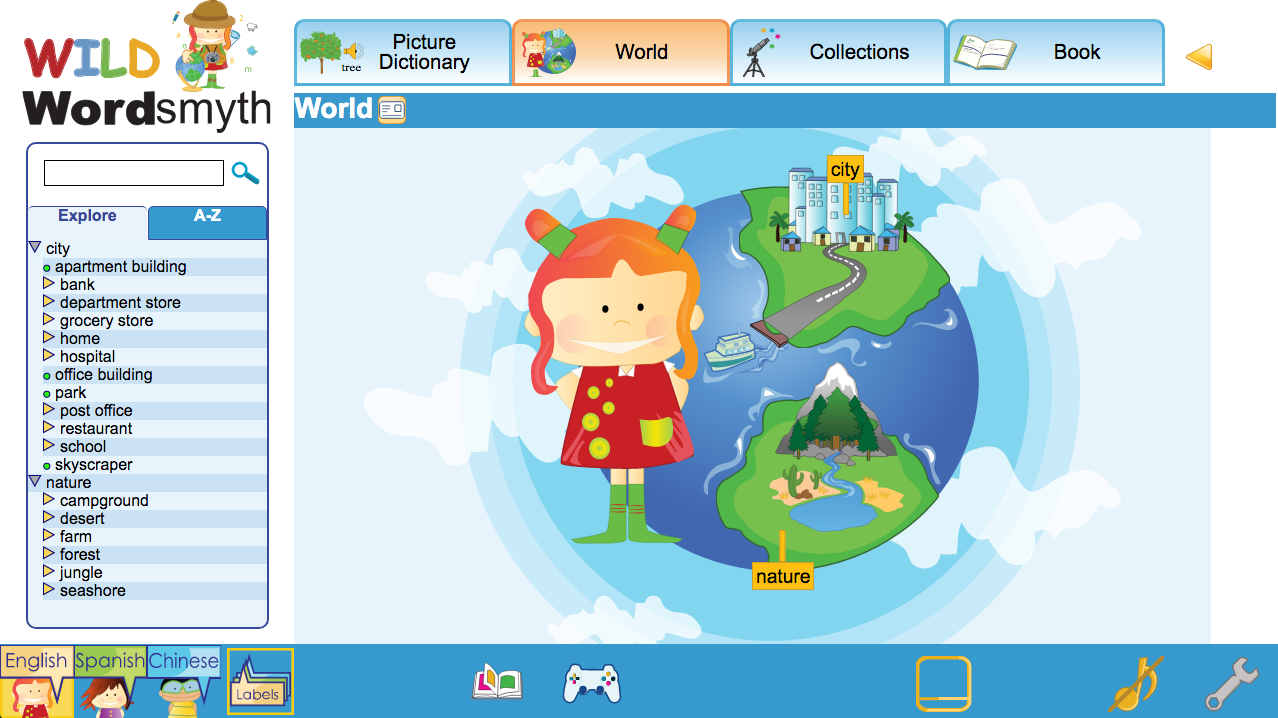
    The World environment in WILD is built upon the concept of a picture dictionary and provides a wide array of different settings with labeled items, but unlike picture dictionaries found in print, WILD allows the child to navigate deeper and deeper within the settings, and, at the same time, gives effortless access to greater information on any particular word of interest as the child explores.

    In the World, children can view items as they appear in either natural or urban environments.  A child may choose to explore in Nature, seeing what plants and animals exist in a variety of surroundings, such as the Desert, the Seashore, or the Forest; or he or she may explore in the City, looking at what objects and types of people can be found in different settings such as the School, the Restaurant, the Hospital, or the Grocery Store. 

    In any setting, there are opportunities to explore on different levels.  Once in the Seashore setting, for example, a child can navigate into the Tide Pool or into the Ocean and see what creatures and plants might exist there.  Or, once in the Farm setting, a child can zoom in to look at what’s growing or hopping about in the garden, or navigate into the barn and see what’s inside.

    English labels for items in World settings can be easily turned on or off. In addition, labels in other languages can be viewed or hidden. The English pronunciation of each item can be heard by clicking its audio icon, and child-friendly dictionary definitions, example sentences, photos, and other information about a word can be accessed by clicking on an item’s dictionary entry icon or by clicking on the item itself. (Audio and dictionary entry icons will appear when the child mouses over a picture in a setting.)

    The WILD World gives a child multiple ways to learn about words, make associations among words, and learn about things in the real world. But perhaps equally important—it’s so much fun to explore!

    See other WILD visual environments:

  • WILD: Picture Dictionary

    WILD: Picture Dictionary

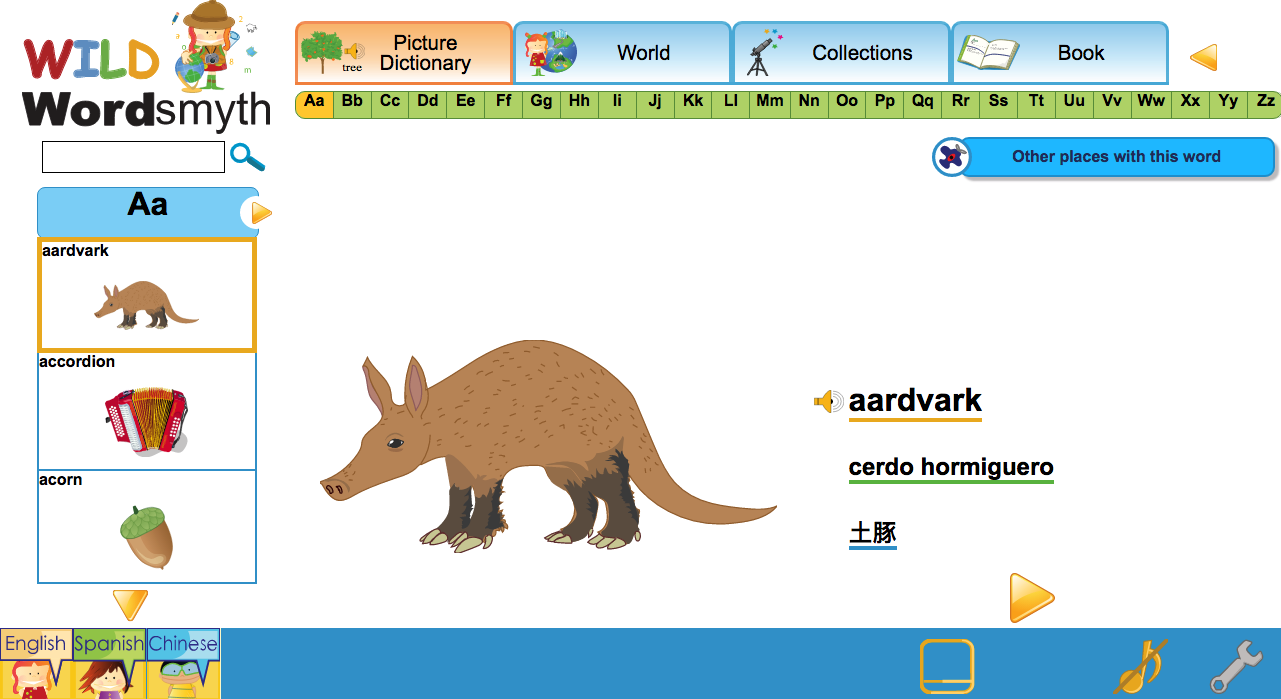
    The Picture Dictionary, designed with the youngest learners in mind, allows the exploration of a word visually and auditorily. Each selected word appears with a link to its audio pronunciation in English and is accompanied by an illustration or animation.

    By selecting one of the language options in the lower toolbar, the word will also appear written in that language—an indispensable feature for multilingual classrooms. In the bar on the far left, the Picture Dictionary shows the words and images that precede and follow the selected word. This is an engaging format for young learners that both reinforces concepts of alphabetization and encourages free exploration.

    Children can browse through the Picture Dictionary by clicking on the yellow navigational arrows in the main display or by using the scroll bar on the left. Children can also use the thumb index at the top of the page to go to words beginning with a certain letter. Of course, teachers can navigate directly to a particular word by using the search box.

    The Picture Dictionary defines words by picture only, but child-friendly definitions, example sentences, and additional images can be easily accessed through the word’s link with its dictionary entry in the Book. From there the child can navigate to that word anywhere else where the word appears in WILD. The aardvark, for example, can be found with other animals in the Mammals collection. The accordion can be seen in the school’s Music Room in the WILD World as well as in the Musical Instruments collection. The acorn can be found in the Trees and Tree Parts collection. By navigating to different parts of WILD, children can learn not just what a single word means as an individual item but how that word relates to other things in the actual world. This is how WILD integrates the learning of word meaning with the acquisition of real-world knowledge—in a way that is really fascinating and fun for kids!

    See other visual environments in WILD:

  • Teaching kids to be good digital citizens

    Teaching kids to be good digital citizens

    As schools have increasingly moved to internet instruction, teachers are now in greater need of excellent and reliable online resources than ever before. In WILD, the Wordsmyth Illustrated Learner’s Dictionary, they will find some of the best materials to help young children learn and explore in the online world. In addition, with the recognition that children are to an even greater extent using online resources by themselves, both teachers and caregivers will appreciate the guide provided in WILD that can assist them in teaching kids how to navigate the internet safely and respectfully so that they can become “Good Digital Citizens!”

    Go to WILD and click on the Passport in the toolbar to use the interactive infographic. Or click the link below to download the printable PDF version.

  • Coronavirus glossary:  a guide to the meaning of the most common terms

    Coronavirus glossary: a guide to the meaning of the most common terms

    The following is a small collection of terms that have been in the news in connection with the pandemic that is now affecting us all.  These terms can be confusing, and we hope this short glossary will help to clarify the meanings of these items and sort out the puzzling aspects.

    coronavirus

    A coronavirus is technically a type of virus.  The term does not refer specifically to the virus causing the current pandemic, although the term is being used in this way as a shorthand for the term “novel coronavirus,” the specific name of the virus we are dealing with now.  Viruses that have infected populations in the recent past such as SARS and MERS are also coronaviruses.  Coronaviruses are so-named because the outer perimeter of each round virus particle resembles a spiky crown similar in shape to the sun’s corona.  (“Corona” comes from a Latin word meaning “garland” or “crown.”)

    novel coronavirus

    The current virus that humans are grappling with is called the “novel coronavirus.”  The adjective “novel” differentiates this particular, NEW virus from previous coronaviruses.  Typical symptoms of the virus include fever, cough, shortness of breath, and loss of taste and smell.  The virus spreads very easily from person to person through droplets expelled into the air by a person who is infected.  If the droplets are breathed in by another person or taken into the nose, mouth, or eyes in some other way, this new person can become infected.  Currently there is no cure for the disease caused by the novel coronavirus and no vaccine to prevent people from becoming infected.  The majority of people who catch the virus may become ill but will recover on their own, similar to the way many people recover from the flu.  Hospital treatment for the disease focuses on helping patients with severe symptoms to survive while fighting the disease with their own immune systems.

    Covid-19

    The term Covid-19 (or “COVID-19”) refers to the disease caused by the novel coronavirus. “Co” in Covid stands for “corona,” “vi” stands for “virus,” and “d” stands for “disease.” The number 19 refers to the year 2019, the year in which the initial outbreak of the disease occurred. 

    respirator

    In the current crisis, the term “respirator” refers to a type of face mask used to both protect the wearer from breathing in droplets of the virus expelled by someone with Covid-19 and to protect other people from catching the virus if the wearer is infected.  However, the term is most often used in connection with protecting doctors, nurses, and other medical personnel from the possibility of catching the virus from infected patients.  The term “respirator mask” is also used.

    The word “respirator” has another meaning, which refers to a mechanical device.  This type of “respirator” is a machine that assists a patient with breathing.  In this sense, the word is similar to the word “ventilator.”  (See below.)  Currently, the term “respirator” seems to be used exclusively to refer to the protective face masks rather than breathing machines.  The term “ventilator” refers only to the mechanical device.

    ventilator

    A ventilator is a machine used in hospitals to help patients breathe.  Because the coronavirus can cause severe damage to the lungs, ventilators may be required to assist patients in breathing. 

    intubation

    “Intubation” refers to the process of inserting a tube through a patient’s mouth and into their upper respiratory tract so that they can be put on a ventilator.

    PPE

    PPE stands for “personal protective equipment.”  This is equipment that helps protect medical personnel from catching illnesses from patients.  Because the novel coronavirus spreads very easily from person to person, use of personal protective equipment is particularly critical at this time.  PPE typically includes face masks, gloves, goggles, and surgical gowns.  “Face shields” are also PPE.  These are clear plastic shields that extend from the forehead over the entire face.

    epidemic

    An epidemic is an outbreak of a disease wherein many individuals become infected over a wide area.

    pandemic

    A pandemic is a type of epidemic.  It is an epidemic that has spread to various parts of the world.  “Pan” is a word part that means “all.”  The term “Pan-American,” for example, refers to all the Americas—South America, North America, and Central America.  A “pantheon” is a temple dedicated to all the gods of a people.

    community spread

    During the early days of the coronavirus outbreak in the United States, the virus was being seen only in people who had visited other countries where there was an ongoing outbreak of the virus or in persons who had close contact with such people.  However, the virus quickly began to be seen in people who had not been overseas and who had not had close contact with such persons.  The original source of these new infections could not be discovered.  “Community spread” refers to the spread of a disease in a community where the source of the infection is not known.

    asymptomatic

    When a person is asymptomatic for Covid-19, they are carrying the coronavirus but they are not displaying any of the symptoms.  Although an asymptomatic person does not feel sick at all, they are capable of passing the disease on to other people.

  • Wordsmyth Children’s Dictionary Mobile App

    The Wordsmyth Children’s Dictionary-Thesaurus is a thoughtfully-written dictionary–a tool for exploration of words and meanings– designed for upper elementary and middle school students (grades 3 to 8).  The display includes, among other features, audio pronunciations, forms of the headword, definitions, example sentences, photos, and colorful illustrations.   The app can be used with or without an internet connection.

    Child-friendly definitions

    Definitions for the Children’s Dictionary-Thesaurus are written specifically for children, in a clear and uncomplicated style, for native speakers as well as ELLs.  Definitions use a controlled vocabulary and simple sentence structure.  In addition, thousands of easy-to-understand example sentences, photos, and illustrations enhance understanding of the meanings of words and make learning fun.

    Spanish and Chinese support for ELLs

    Wordsmyth Children’s Dictionary provides special support for English Language Learners whose native language is Spanish or Chinese.  All 14,000 headwords in each of their senses have been translated into Spanish and Chinese. In cases where a headword cannot be translated with equivalent words, a liberal translation is provided in addition to a literal one. In addition, every example sentence accompanying a definition has been translated. This gives a child a clear understanding of exactly which meaning the word has in his or her own language and also a strong sense of how it is used in the world and its importance for learning.

    Synonyms, Antonyms, and Similars:  Wordsmyth’s Integrated Thesaurus

    One unique feature of Wordsmyth Dictionaries is the integration of a thesaurus into the dictionary presentation.  Wordmyth’s thesaurus includes synonyms, antonyms, and words that are similar in meaning to the headword. The thesaurus words are matched with individual senses of a word rather than just presented as a “pot of words” under the headword.  In Wordsmyth, synonyms, antonyms, and similar words appear along with their corresponding definitions. For example, synonyms for the headword “hot” referring to high temperature, “hot” referring to spiciness of food, and “hot” referring to an angry temper are matched with and appear along with their appropriate definitions in the entry for “hot.” 

    Another great feature of the thesaurus is that the words are linked with their own entries so that one click on a synonym, for example, will let a child view the meaning of that synonym in that word’s own entry.  Going back to the original entry is as simple as an additional click.

    Word Explorer

    Unique to our Children’s Dictionary is the Word Explorer:  a word-finding and knowledge-exploration feature. It is an index of related words that allows a child to find words connected with multiple topics and to explore whole networks of words and their meanings.  So, for example, under the Topic “Communication,” the keyword “art” is listed. Clicking on “art” leads the child to discover words that describe types of art, people who make art, things used in art, places where art can be found, and many other categories of information relating to the topic. With the help of the Word Explorer, a child can learn new concepts and make new connections among ideas, make many new words part of his or her vocabulary, and start to discover how words are key to an understanding of the world.

    Vulgar words filter

    Our Children’s Dictionary includes words that are essential for children’s vocabulary development—fourteen thousand of them!  However, words that are used primarily to cause offense or are generally considered very offensive in our society are not included in this dictionary intended for children.  Vulgar words tend to be learned through natural exposure, and we feel it is within the province of caregivers and educators to decide when and how to help children shape their view of these words.  For our part, we are more concerned with giving children the necessary words and concepts to succeed in school and to become good readers and communicators.

    If you want to purchase the app for your whole school, it is available with an educational discount through Apple School Manager or Managed Google Play.