Category: Online Teaching Resources

  • ReadWorks vocabulary widget powered by Wordsmyth

    ReadWorks vocabulary widget powered by Wordsmyth

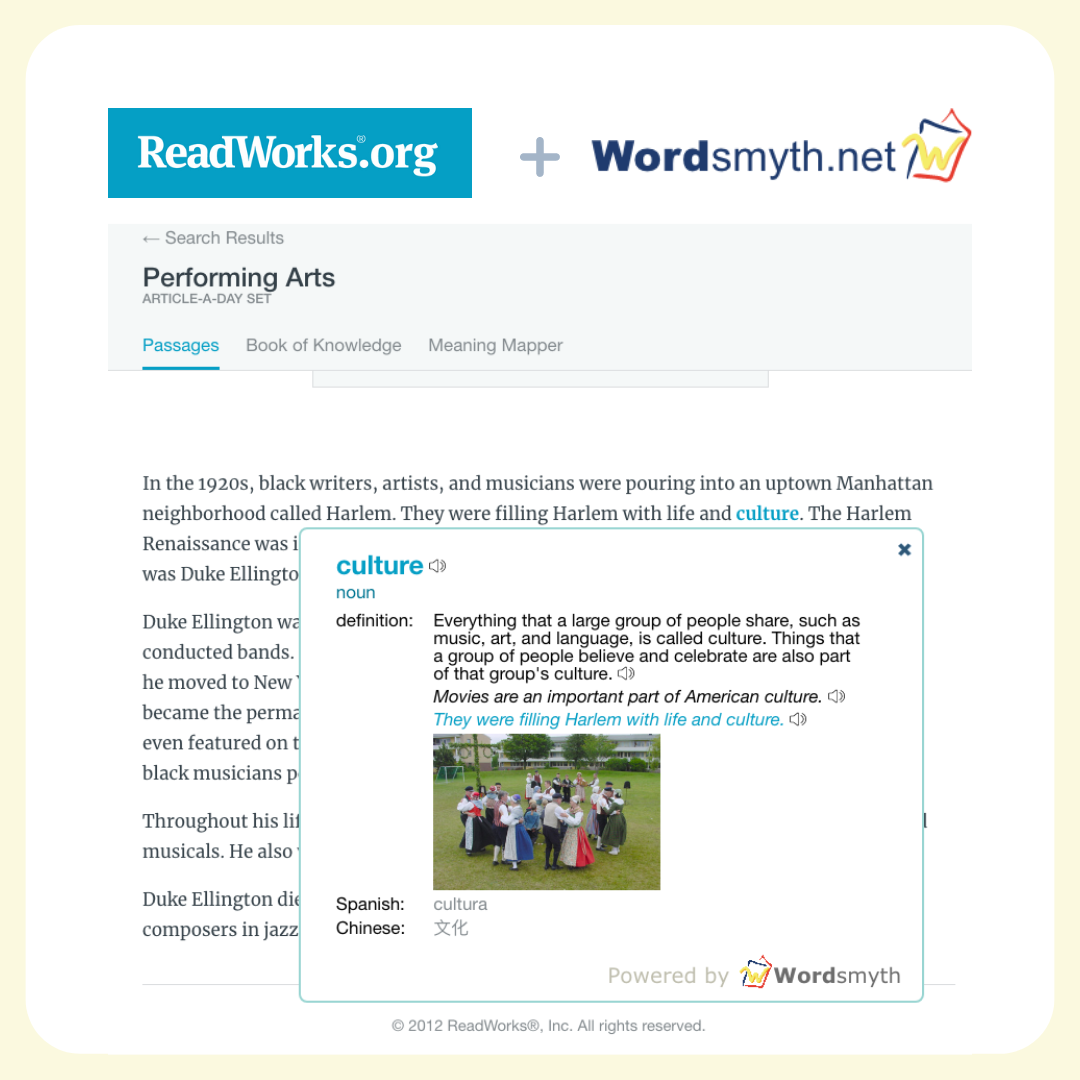
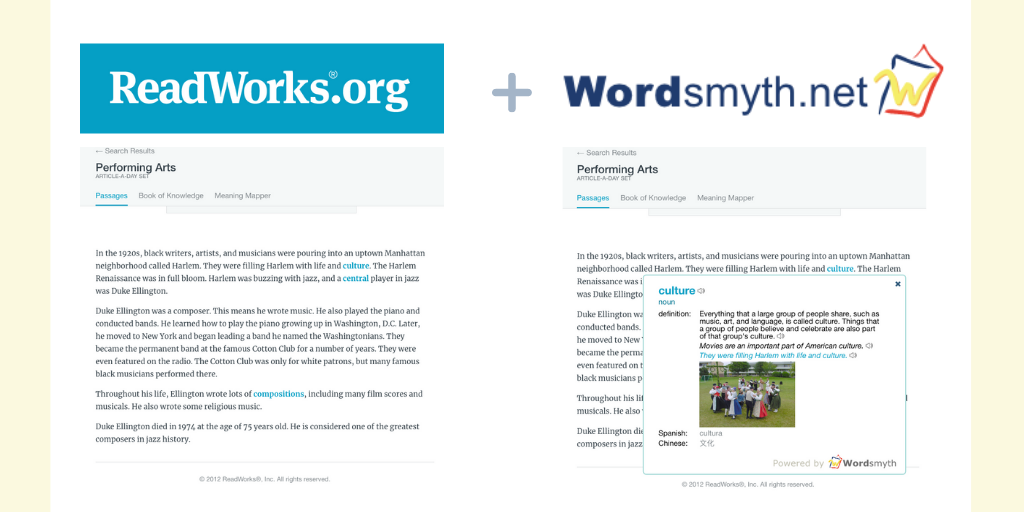
    Working in partnership with the acclaimed ReadWorks reading program, Wordsmyth is powering the new “ReadWorks Vocabulary Widget,” now live at www.readworks.org.

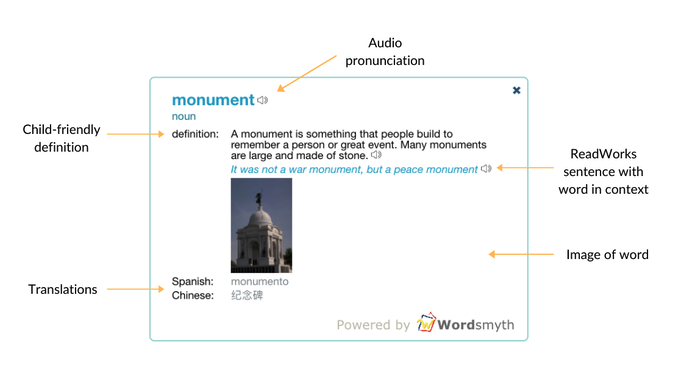
    The new vocabulary widget is automatically available for students to use during reading on the ReadWorks site. ReadWorks pre-selected vocabulary words appear in bold and in blue in their reading passages, and students can click on any of these vocabulary words to open the widget. From there, they can listen to a human-voiced audio pronunciation of the word, see images and varying word forms, and read a child-friendly Wordsmyth definition aligned to how the word is used in the reading passage. Translations of the word into Spanish and Mandarin Chinese are also provided.

    Learn more about the ReadWorks vocabulary widget powered by Wordsmyth on the ReadWorks help page.

    Using your own text in the Wordsmyth Vocabulary Center

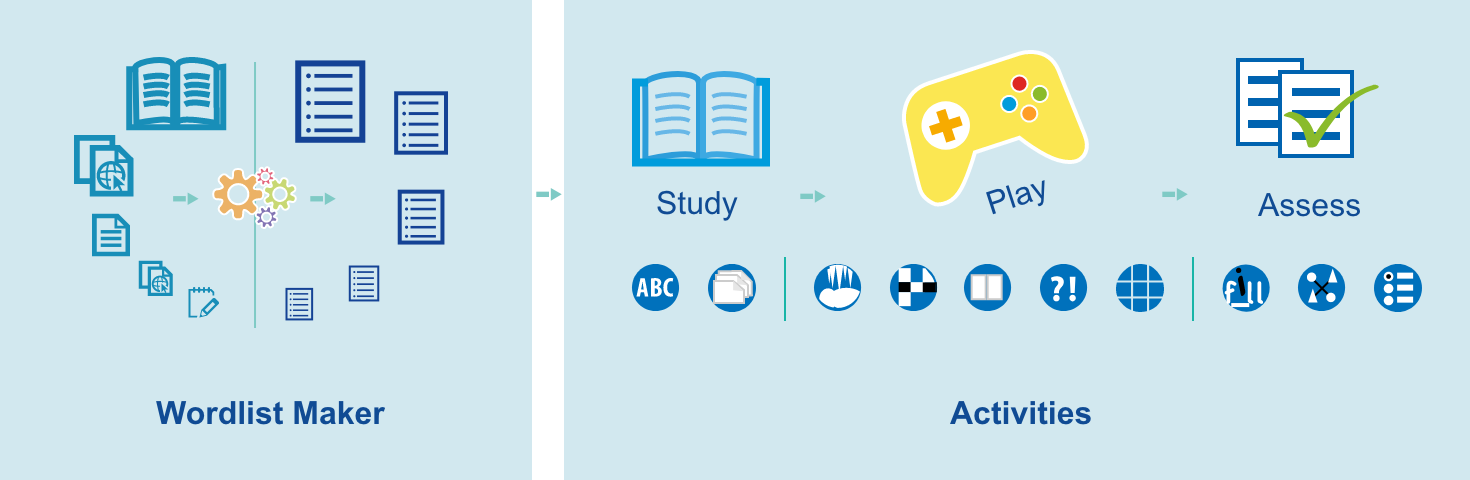
    If the idea of adding a vocabulary learning component to a text of your own choosing appeals to you, you can get good results by coming to the Wordsmyth Vocabulary center. Here, you can:

    • extract vocabulary automatically from any text to create vocabulary lists
    • use your vocabulary lists in Wordsmyth activities for practice and assessment
    • save and share your word lists with your students or learning partners

    If you have any questions, read more about Wordsmyth Vocabulary Center.

    The Wordsmyth widget travels anywhere

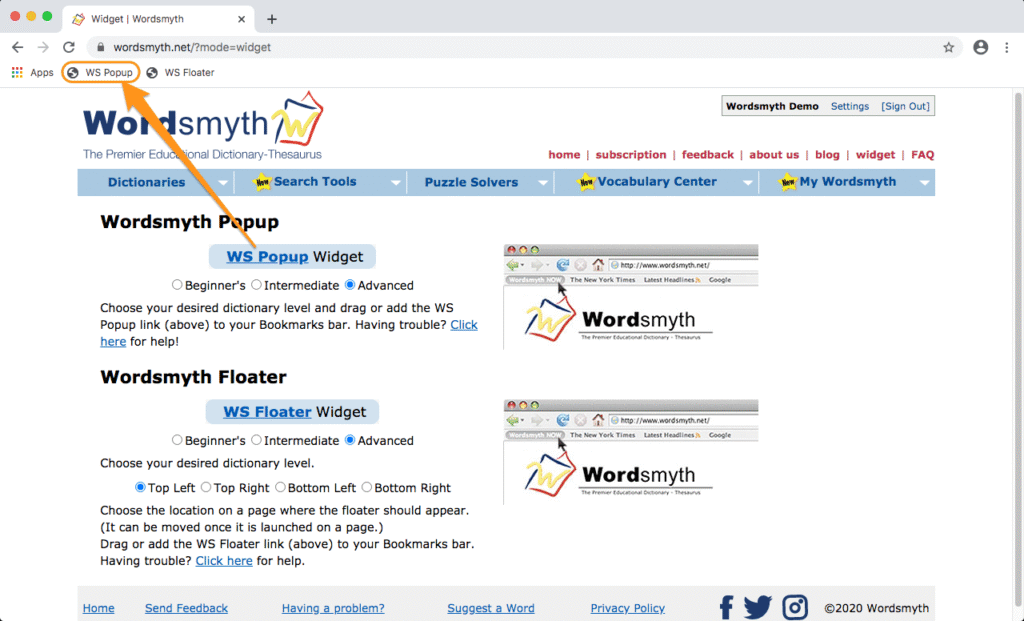
    Wordsmyth’s own vocabulary widget, available from its website, allows you or your students to look up words on any web page with any browser. If you are using ReadWorks, your students can use the Wordsmyth widget to look up words other than the ReadWorks pre-selected ones. (You can even compose or paste a text of your own in Google docs and have your students use it with our widget.) Simply drag and drop our widget icon to your browser toolbar from our widget page. Then click on words you want to look up while reading. It’s easy, and it’s free!

    If you have any questions, read more about Wordsmyth’s free widget.

  • Word Explorer: Explore the world of the words

    Word Explorer: Explore the world of the words

    Unique to our Children’s Dictionary Suite is the Word Explorer:  a word-finding and knowledge-exploration feature. It is an index of related words spread throughout the dictionaries that allows a child to find words connected with multiple topics and to explore whole networks of words and their meanings.  The dictionary entries also contain an integrated thesaurus of synonyms and antonyms. The addition of our Word Explorer creates a fun and uniquely valuable educational resource.

    The Word Explorer allows the child or teacher to navigate the dictionary using topics, their keywords, and words related to the keywords called “related words.” The Word Explorer is like a map built into the dictionary that allows the user to find and explore interesting paths through the dictionary. With the help of the Word Explorer, children can make many of these words part of their vocabulary and start to discover how words can help them make sense of the world.

    Approximately 200 of the entry words in this dictionary are Word Explorer keywords. These words are called “keywords” because they are links (or keys) to over 7,000 other dictionary entry words. Almost half the entry words in the Children’s Dictionary belong to the Word Explorer.

    Dictionary entries for keywords note their Word Explorer feature near the end of their entries. So, for example, under the Word Explorer Topic “Communication,” the keyword “art” is listed. Clicking on “art” under Communication (or looking up “art” in the regular search box) leads the child to discover words that describe types of art, people who make art, things used in art, places where art can be found, and many other categories of information relating to the notion of art. The Word Explorer can be particularly useful in helping students with writing, serving as inspiration and assisting them in finding the words they need. With the help of the Word Explorer, a child is aided in learning new concepts and making new connections among ideas.

  • The Wordsmyth Vocabulary Center

    The Wordsmyth Vocabulary Center

    Teachers, the Wordsmyth Vocabulary Center offers some of the best vocabulary-teaching tools you’ll find online and supports your curriculum’s vocabulary component for all subjects. In addition, it provides a remarkably easy way for your students to personalize their vocabulary learning on their own.

    Just pick a list and choose an activity. It’s simple!

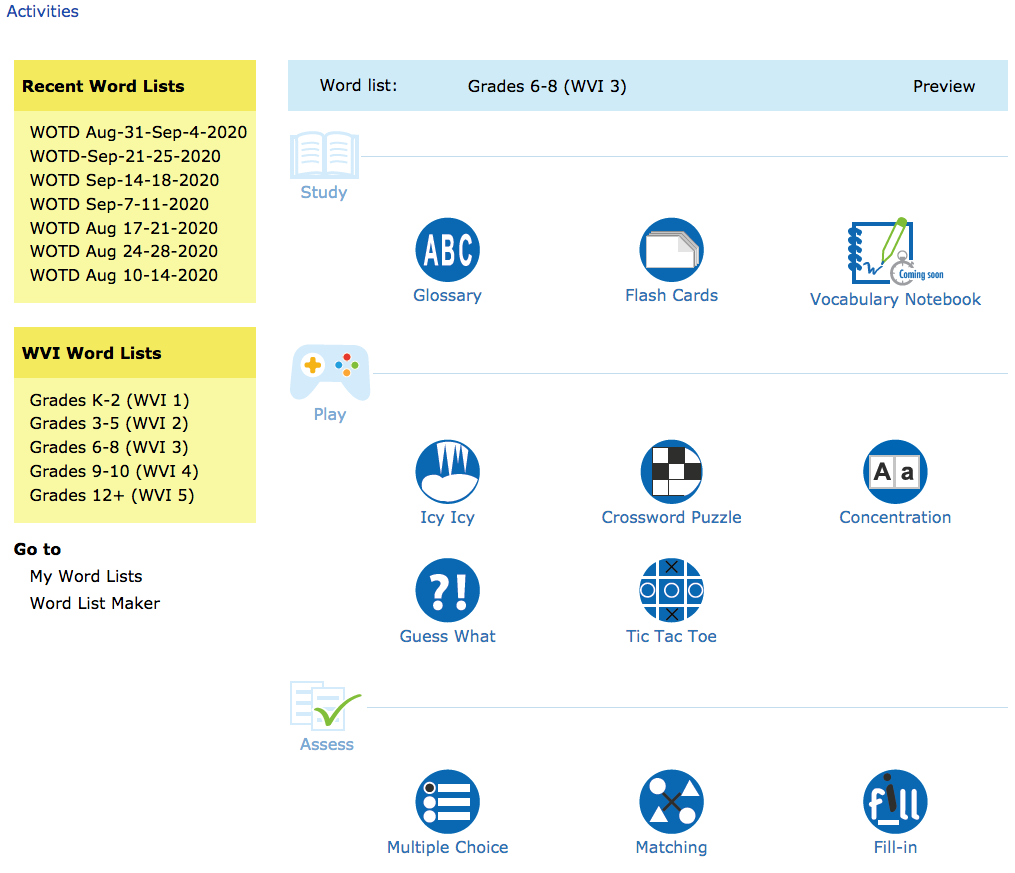
    On the Activities page of the Vocabulary Center, you can pick a word list from the yellow sidebar. If you haven’t created any lists of your own yet, you can always choose one from the Wordsmyth Vocabulary Inventory (WVI) lists according to your grade level. These are leveled and curated academic vocabulary lists. After you’ve selected your list, its name will appear in the blue banner above the activities.

    Now you can choose to have your students study the list of words with one of the study tools, or play a game using the words, or take a quiz to see how well they know them.

    For a customized learning experience, you can make your own word lists with ease

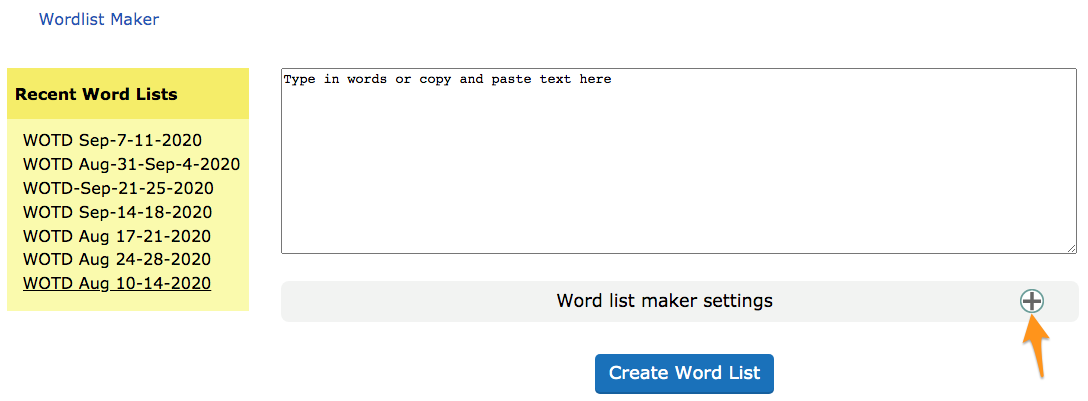
    If you have a list of words you want your students to learn, or that you want to learn yourself, go to the Word List Maker. You can type or copy and paste your list of words into the space provided. If you want to make a word list based on a reading, you can copy and paste your article into the space and the text analysis system will automatically extract the best vocabulary words and create a word list for you.

    By adjusting the Word list maker settings, you can decide what type of words you would like to have in your list.

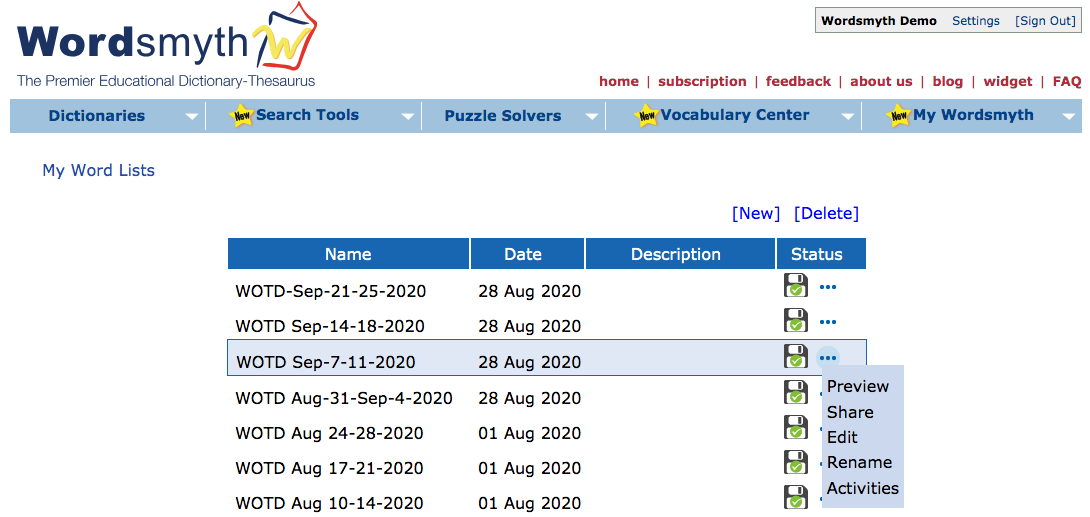
    All your word lists are saved in the My Word List section of the My Wordsmyth menu. There you can preview, edit, or rename your lists. You can use your lists anytime with any activities.

    To learn more about Wordlist Maker, please read Wordlist Maker User Guide.

    Share your lists with students

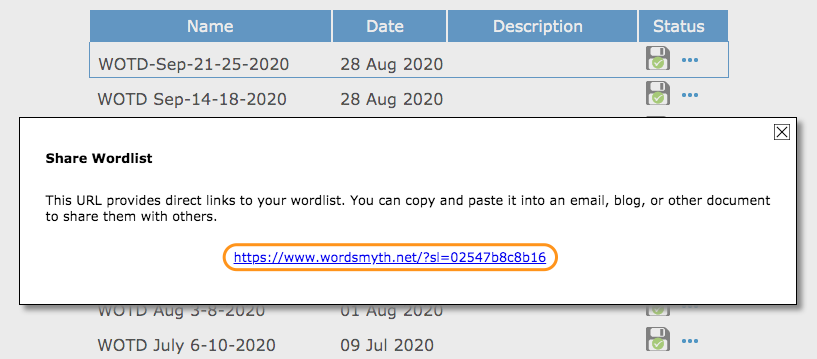
    As an educator, you can share your lists with your students. Anybody who has the URL of a particular word list can use the list with any of the Vocabulary Center activities.

    Subscribe to access full Wordsmyth dictionary features and vocabulary tools. Teacher Tools allow educators to manage classroom, create and send assignments to students, and get comprehensive reports on their vocabulary growth.

  • WILD’s Interactive World Maps

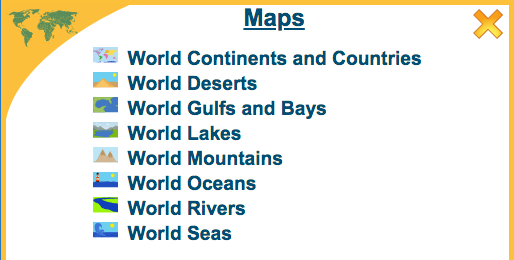
    The Wordsmyth Illustrated Learner’s Dictionary contains, as one of its numerous Collections, an exceptionally important collection called, very simply, “Maps.”

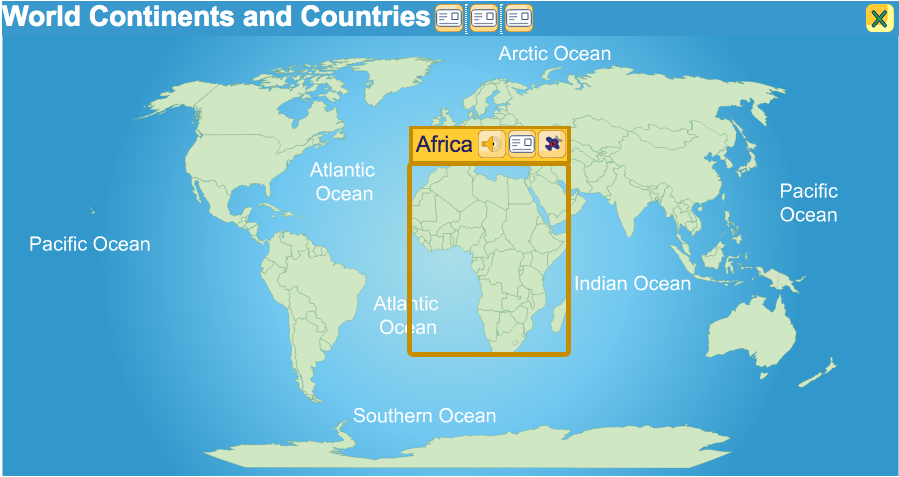
    First and foremost, the Maps Collection contains an interactive world map featuring all of the world’s oceans, continents, and countries. In addition, there are seven other world maps that display important geographical features of our planet, such as its major mountain ranges, deserts, rivers, lakes, and seas. All geographical place names in Maps—from Antarctica to Zimbabwe—are linked with informative definitions in the WILD dictionary Book.

    The top level of the “World Continents and Countries” map labels the oceans of the world and the continents according to the seven-continent model of the earth’s geography. Mousing over a continent will highlight that continent and bring up three icons: the audio icon, the Book entry icon, and a navigational icon that looks like an airplane. The audio icon links to the pronunciation of the continent’s name. The entry icon can be clicked on to see the continent’s entry in the Book, and clicking on the navigational icon opens the map of the continent and reveals the countries that make it up. (Clicking on the continent map itself also opens up the countries map.)

    Some continents, such as Asia, Africa, and Europe, break down into regions as well as countries—regions such as Southeast Asia, the Middle East, Central Africa, and Western Europe. Clicking on a regional map brings up the countries that make up that region. In addition, clicking on the country of Canada or the United States allows navigation down to the province or state level.

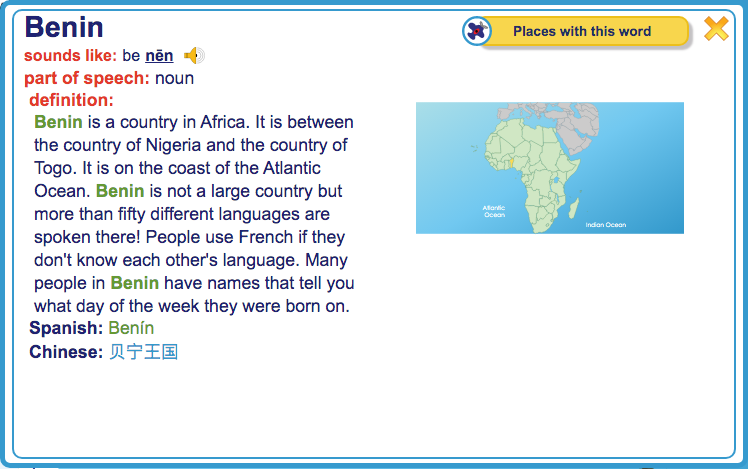
    When a child clicks on the map of an individual country, or on its entry icon, or on its listing in the sidebar, he or she is presented with the country’s entry in the WILD Book, that part of WILD that is most like a conventional dictionary. Here, the child can view a closer image of the country’s shape and location (by expanding the entry’s map image) and can access other information that will give him or her an impression of what the country is like.  Though our dictionary definitions are not intended to be encyclopedic in length or scope, they include such information as what type of climate or terrain characterizes the nation, what its neighboring countries are, what animals may live in the country, how people make their living there, or what languages are spoken. Any type of interesting fact about a nation may be included so that children will be encouraged to see every country of the world as unique and significant.

    Getting back to the Maps from a Book entry is as simple as clicking away from the entry or clicking the close box. Once back on the countries map, the child can click around to learn more about other countries and regions of the continent. Clicking the continent’s close box brings the child back to the top level of the world map and gives access to the maps of the other continents.

    The WILD interactive world maps and their connected dictionary entries in the WILD Book help children discover the world—help them discover and understand its geography, its nations, and its people. Our interactive maps make exploring and learning about the world easy and enjoyable.

  • Wordsmyth Comprehensive Dictionary Suite

    Wordsmyth Comprehensive Dictionary Suite

    The Wordsmyth Comprehensive Dictionary Suite combines our Advanced Dictionary-Thesaurus with two additional Wordsmyth dictionaries, the Intermediate Dictionary-Thesaurus for upper elementary school students, and the Beginner’s Dictionary-Thesaurus for English language learners. Within the suite, users may easily move up or down between the levels to find simpler or more advanced definitions and example sentences for particular words.

    Using the buttons beneath the search box, users can select their default dictionary level (see screenshot) and get results from that dictionary with every search. Once in an entry, however, they can check for definitions and examples from other dictionaries for the same word if they desire.

    Advanced Dictionary

    The highest level of our dictionaries is called the “Advanced Dictionary.” The Advanced Dictionary is suited to the needs of adults and students from middle-school age and up. It currently contains 60,000 headwords, with example sentences for nearly 17,000 words, adding up to a total of nearly 50,000 examples.  Like all of our dictionaries, the Advanced Dictionary has both text and audio pronunciations for all words, as well as thousands of photographs and artist-created illustrations.

    It was for the Advanced Dictionary that the Wordsmyth team developed its integrated thesaurus, a source for synonyms, antonyms, and similar words.  We call it an “integrated”  thesaurus because thesaurus information is matched with individual senses (meanings) of words so that, for example, synonyms for the headword “hot” referring to temperature, “hot” referring to spiciness of food, and “hot” referring to popularity are matched with their appropriate definitions in the entry for “hot.”  The synonyms appear directly under each pertinent definition in the dictionary entry.  There is no need to click to go to a different page to access the thesaurus information.

    Intermediate Dictionary

    The next level down from the Advanced Dictionary is the “Intermediate Dictionary.”   As in the Advanced Dictionary, thesaurus information is built in and matched with particular senses of words.  The Intermediate Dictionary was written for children at the upper elementary level.  The definitions are written with simpler vocabulary and sentence structure than those written for the Advanced Dictionary.  The Intermediate Dictionary contains approximately 14,000 headwords and contains 23,000 full-sentence examples.   Additionally, all the headwords for the Intermediate Dictionary, as well as all the example sentences for headwords, have been translated into Spanish and Chinese.  (Note also that each sense of every headword is individually translated.) These translations are available to our subscribers and appear in the entries when the feature is selected by the user.   (Spanish and Chinese headword translations also appear in the other Wordsmyth dictionaries for these same words.)

    Beginner’s Dictionary

    The “Beginner’s Dictionary” is a dictionary that is geared toward adult literacy and adult ESL.  The Beginner’s Dictionary contains approximately 5000 headwords written in a concise but simple style.  The dictionary contains over 8,000 example sentences. 

    A feature developed specifically for the Beginner’s Dictionary is the Word Builder.  Word Builder displays words that are built on the headword that is looked up.  For example, with the headword “cool,” we list the words “cooler” (a type of refrigerator) and “coolant” in the Word Builder along with a short definition of each of these additional words.  While derivations of headwords (e.g., “coolly” and “coolness”) are listed for entries at all dictionary levels, the Word Builder, developed for the Beginner’s Dictionary, goes a step further, particularly in defining the additional words.

    Wordsmyth’s Comprehensive Dictionary has a companion app—Wordsmyth Student & ELL Dictionary—available for both Android and iOS devices.  The app provides for a better user experience on mobile devices and is accessible with or without the internet.  Access to three dictionary levels from one headword lookup supports students and English language learners of all ages and all levels. Check out the full app description.
  • Free Dictionary Widget! Get the Wordsmyth widget for online teaching and learning

    Free Dictionary Widget! Get the Wordsmyth widget for online teaching and learning

    To help with online study and learning during these difficult times, Wordsmyth would like to introduce you to its free dictionary widget that you and your students can use to look up words on any web page.

    Installing the widget is very easy. Simply go to Wordsmyth’s widget page and then “drag and drop” the widget onto your browser’s bookmark toolbar.

    Let’s say you are reading online and want to look up a word; select the word and click the widget link on your toolbar. After this first lookup, the widget is launched and you can simply double click any word and the widget will pop up automatically with the entry information you are looking for. If you want to look up a word that isn’t on the page, click the widget link and the widget search box will appear. You can then type in a word and click the “OK” button to retrieve the dictionary entry for the word you typed. (Please note that ad blockers may interfere with the functioning of the widget.)

    We invite you to read the Wordsmyth online teaching resources guide to learn more about Wordsmyth’s tools and resources that will support your online teaching and learning. Follow us on Facebook, Twitter, and Instagram for Word of the Day and updates on features that are coming soon.

  • Wordsmyth dictionary app for students and ELL

    Wordsmyth dictionary app for students and ELL

    Wordsmyth’s Student & ELL Dictionary is now available on the App Store and Google Play. The app is designed for students (middle school-age and up) and English Language Learners at various stages of learning.

    • 3 Dictionaries in One: Beginners, Intermediate, and Advanced levels.
    • Integrated Thesaurus: Synonyms, Antonyms, and Similar Words.
    • Customizable entry display: Lets you select which information you want to see.

    This app provides the full set of features of our online leveled dictionary suite for better user experience on mobile phones or tablets. Once downloaded, it will always be available for you and your students even without internet.

    If you want to purchase the app for your whole school, it is available with an educational discount through Apple School Manager or Managed Google Play.

    Read the full description to find out more features of the app.

  • Student & ELL Dictionary App

    Student & ELL Dictionary App

    Wordsmyth’s new app is available on App Store and Google Play and can
    be used with or without internet connection. If you want to purchase the app for your whole school, it is available with an educational discount through Apple School Manager or Managed Google Play.

    Three Dictionaries in One

    Wordsmyth’s Student & ELL Dictionary app contains Wordsmyth’s Advanced, Intermediate, and Beginner’s dictionaries.  The headwords in the three dictionaries are linked so that the user may easily move up or down between the levels to find simpler or more advanced definitions for the same looked-up word. The app display includes, among other features, audio pronunciations; easy-to-read definitions and example sentences; synonyms and antonyms; photographs; and colorful illustrations.  

    Advanced Dictionary

    • 60,000 headwords and over 100,000 definitions. Designed for adults and upper level students.
    • Accurate and clearly-written definitions along with carefully crafted example sentences that make meaning come alive while showing common and appropriate patterns of use.

    Intermediate Dictionary

    • Approximately 14,000 headwords and over 23,000 full-sentence examples.  Designed primarily for younger students and intermediate ESL.
    • Controlled vocabulary and sentence structure for easier comprehension.

    Beginner’s Dictionary

    • Approximately 5000 headwords and over 8,000 example sentences. Designed primarily for adult English Language Learners.
    • Concise and simple defining style.  Only the most frequent words of English used in definitions and example sentences.

    Customizable entry display

    Choose what information you want to see displayed on your dictionary page.  See only definitions or choose among the rich entry fields Wordsmyth provides.

    • Example sentences
      Carefully composed examples matched with definitions let you see how words are used and help you more deeply understand a word’s meaning through context.
    • Images and animations
      We’re proud of our definitions, but an image is still worth a thousand words.  Enjoy our animations as well! They both teach and entertain.
    • Word Explorer
      Enjoy our word-finding and knowledge-exploration feature that allows you to find words relating to multiple topics and to explore whole networks of related words and meanings.
    • Language notes
      Language notes offer you additional important information about how to  use words and which words to use. You can also discover interesting facts with Homophone Notes, Word Histories, and our Word Builder feature.

    Integrated Thesaurus

    Built into the dictionary is Wordmyth’s thesaurus, which includes synonyms, antonyms, and words that are somewhat similar in meaning to the headword. The thesaurus words are matched with individual senses of a word rather than with just the headword itself and they appear along with their corresponding definitions.  For example, synonyms for the headword “hot” referring to high temperature, “hot” referring to spiciness of food, and “hot” referring to an angry temper are matched with and appear along with their appropriate definitions in the entry for “hot.” 

    Another excellent feature of the thesaurus is that the words are linked with their own entries so that one click on a synonym, for example, will let the user view the meaning of that synonym in that word’s own entry.  Going back to the original entry is as simple as an additional click.

  • Using the Children’s Dictionary app during reading

    Using the Children’s Dictionary app during reading

    Our recent update allows the Wordsmyth Children’s Dictionary app to support multitasking functions on iPad and Android tablets. With this update, your students can use our dictionary while reading or writing on their mobile devices.

    If your haven’t tried the new feature yet, click here to learn how it works.

  • WILD video overview: a summary of what you’ll find in the Wordsmyth Illustrated Learner’s Dictionary

    WILD video overview: a summary of what you’ll find in the Wordsmyth Illustrated Learner’s Dictionary

    If you’re new to WILD or want an easy way to introduce it to fellow teachers or friends, here is a video that covers the basics!

    Read more in detail: